

How it works

Your app redirects to a web page hosted by Authsignal (or displays it modally in an iframe). This is often the quickest way to integrate. You can configure your own custom domain and you can heavily customize the look and feel.
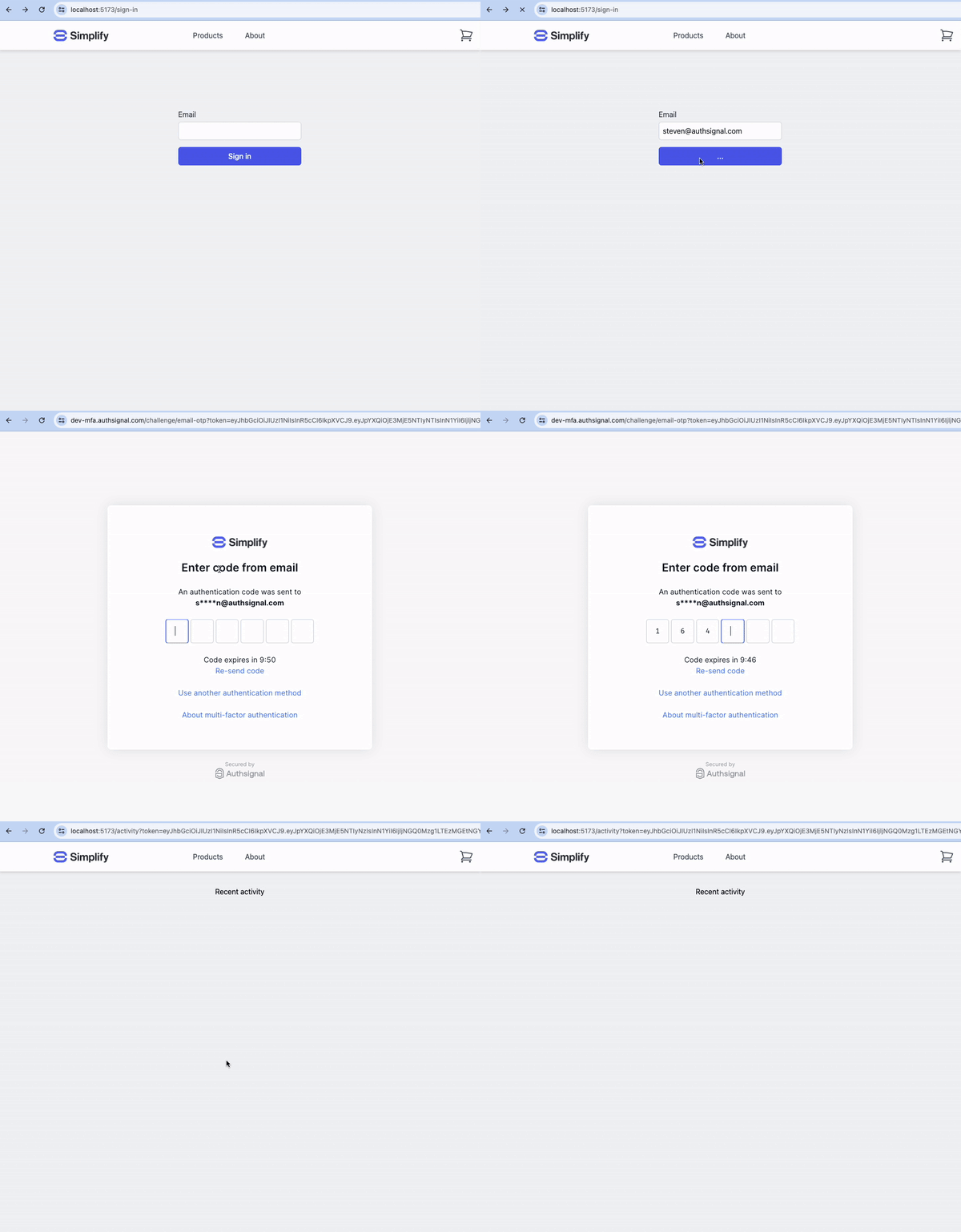
Integration steps

1. Backend - Track action

In your app’s backend, track an action which represents what your user is doing, e.g. signIn. You can do this using one of the Authsignal Server SDKs or you can call the Authsignal Server API for a REST integration.
const request = {
  userId: "dc58c6dc-a1fd-4a4f-8e2f-846636dd4833",
  action: "signIn",
  attributes: {
    redirectUrl: "https://yourapp.com/callback",
  },
};

const response = await authsignal.track(request);

const url = response.url;
var request = new TrackRequest(
    UserId: user.Id,
    Action: "signIn",
    Attributes: new TrackAttributes(
        RedirectUrl: "https://yourapp.com/callback"
    )
);

var response = await authsignal.Track(request);

var url = response.Url;
TrackRequest request = new TrackRequest();
request.userId = "dc58c6dc-a1fd-4a4f-8e2f-846636dd4833";
request.action = "signIn";
request.attributes = new TrackAttributes();
request.attributes.redirectUrl = "https://yourapp.com/callback";

TrackResponse response = authsignal.track(request).get();

String url = response.url;
response = Authsignal.track({
  user_id: "dc58c6dc-a1fd-4a4f-8e2f-846636dd4833",
  action: "signIn",
  attributes: {
    redirect_url: "https://yourapp.com/callback",
  }
})

url = response[:url]
response = authsignal.track(
    user_id="dc58c6dc-a1fd-4a4f-8e2f-846636dd4833",
    action="signIn",
    attributes={
        "redirectUrl": "https://yourapp.com/callback"
    }
)

url = response["url"]
$response = Authsignal::track([
    'userId' => "dc58c6dc-a1fd-4a4f-8e2f-846636dd4833",
    'action' => "signIn",
    'attributes' => [
        'redirectUrl' => "https://yourapp.com/callback"
    ]
]);

$url = $response["url"]
response, err := client.Track(
    TrackRequest{
        UserId: "dc58c6dc-a1fd-4a4f-8e2f-846636dd4833",
        Action: "signIn",
        Attributes: &TrackAttributes{
            RedirectUrl: "https://yourapp.com/callback",
        },
    },
)

url := response.Url

2. Frontend - Launch the pre-built UI

In your app’s frontend, pass the url from the track call to the Authsignal Web SDK to launch an enrollment or re-authentication flow.
authsignal.launch(url);

3. Backend - Validate challenge

Once the user has completed the challenge, Authsignal will send them back to the redirect URL you provided in step 1, appending a token as a query param which you can use to determine the result of the challenge server-side.
const request = {
  action: "signIn",
  token: "eyJhbGciOiJ...",
};

const response = await authsignal.validateChallenge(request);

if (response.state === "CHALLENGE_SUCCEEDED") {
  // The user completed the challenge successfully
  // Proceed with authenticated action
} else {
  // The user did not complete the challenge successfully
}
var request = new ValidateChallengeRequest(
    Action: "signIn,
    Token: "eyJhbGciOiJ..."
);

var response = await authsignal.ValidateChallenge(request);

if (response.State == UserActionState.CHALLENGE_SUCCEEDED) {
  // The user completed the challenge successfully
  // Proceed with authenticated action
} else {
  // The user did not complete the challenge successfully
}
ValidateChallengeRequest request = new ValidateChallengeRequest();
request.action = "signIn";
request.token = "eyJhbGciOiJ...";

ValidateChallengeResponse response = authsignal.validateChallenge(request).get();

if (response.state == UserActionState.CHALLENGE_SUCCEEDED) {
    // The user completed the challenge successfully
    // Proceed with authenticated action
} else {
    // The user did not complete the challenge successfully
}
response = Authsignal.validate_challenge(
    action: "signIn",
    token: "eyJhbGciOiJ..."
)

if response[:state] == "CHALLENGE_SUCCEEDED"
  # The user completed the challenge successfully
  # Proceed with authenticated action
else
  # The user did not complete the challenge successfully
end
response = authsignal.validate_challenge(
    attributes={
        "action": "signIn",
        "token": "eyJhbGciOiJ..."
    }
)

if response["state"] == "CHALLENGE_SUCCEEDED":
    # The user completed the challenge successfully
    # Proceed with authenticated action
else:
    # The user did not complete the challenge successfully
$response = Authsignal::validateChallenge([
    'action' => "signIn",
    'token' => "eyJhbGciOiJ...",
]);

if ($response["state"] === "CHALLENGE_SUCCEEDED") {
    # The user completed the challenge successfully
    # Proceed with authenticated action
} else {
    # The user did not complete the challenge successfully
}
response, err := client.ValidateChallenge(
    ValidateChallengeRequest{
        Action: "signIn",
        Token: "eyJhbGciOiJ...",
    },
)


if response.State == "CHALLENGE_SUCCEEDED" {
    // The user completed the challenge successfully
    // Proceed with authenticated action
} else {
    // The user did not complete the challenge successfully
}

Next steps