

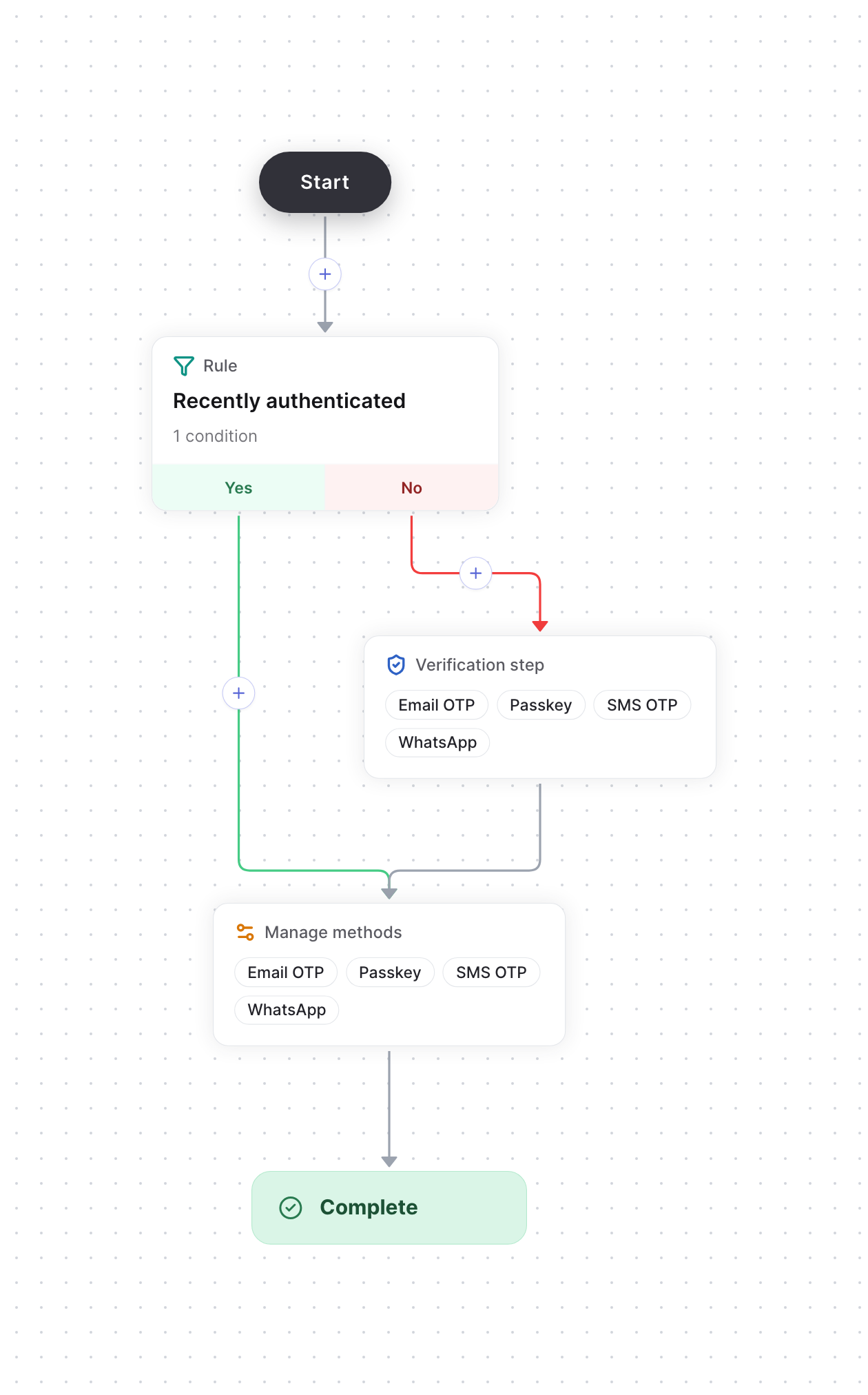
Users who signed in recently skip verification
Build the flow
1
Set up the methods
Set up the methods users can manage, such as email OTP, passkeys, SMS OTP and WhatsApp, on the Authenticators page.
2
Start from the Manage methods template
Create a Flows action, such as
manageMethods, and choose the Manage methods template. It gives you:- A Recently authenticated rule that checks whether the device last authenticated under an hour ago.
- On the No branch, a verification step that accepts every method you’ve set up. It then joins the Yes branch, so both branches share the next step.
- A Manage methods step, where you choose whether users can Read, Add, Update or Remove each method.
3
Adjust the flow (optional)
To change what counts as recently authenticated, edit the time window in the rule’s conditions.
4
Publish the flow
Select Publish. Then start and verify the flow from your backend when the user opens their security settings, as in the quickstart. Pass the user’s device ID in Start Flow’s
attributes, as deviceId, so the rule can check when the device last authenticated.