

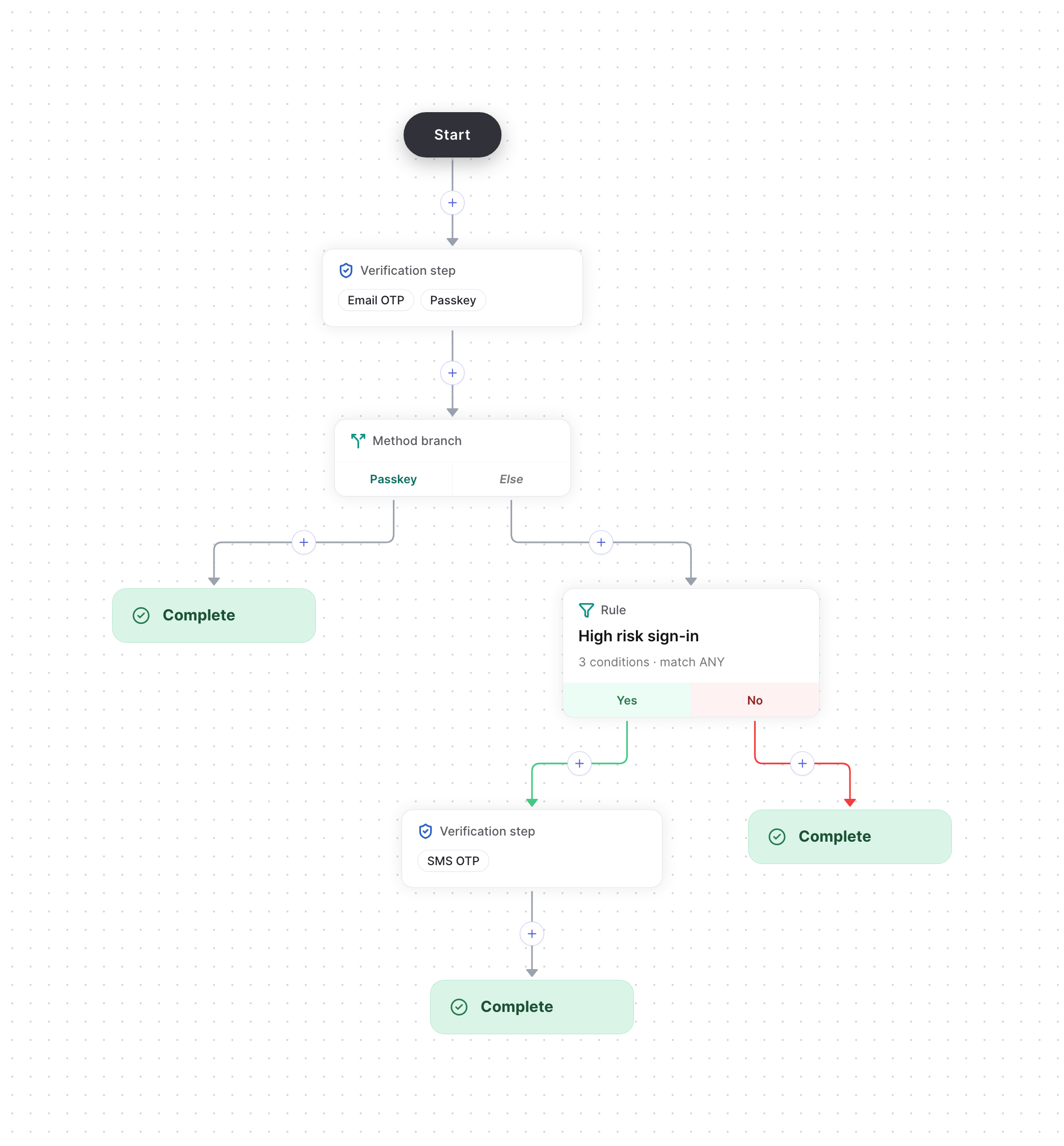
Only risky sign-ins get a second step
Build the flow
1
Set up the methods
Set up email OTP, passkeys and SMS OTP on the Authenticators page.
2
Start from the Risk-based authentication template
Create a Flows action, such as
signIn, and choose the Risk-based authentication template. It gives you:- A verification step that accepts Email OTP or Passkey.
- A method branch that sends passkey users to Complete.
- On the Else branch, a High risk sign-in rule. A rule sends users down Yes if it matches and No if it doesn’t. This one matches when any of these is true:
- IP is anonymous: the IP address belongs to a VPN, Tor or a proxy.
- Impossible travel: the user couldn’t have traveled from their last verified location in the time since.
- Device is new: the device hasn’t completed a verification yet.
- On the rule’s Yes branch, a verification step that accepts SMS OTP. The No branch goes to Complete.
3
Adjust the flow (optional)
To change what counts as high risk, edit the rule’s conditions.
4
Publish the flow
Select Publish. Then start and verify the flow from your backend, as in the quickstart. Pass the user’s IP address and device ID in Start Flow’s
attributes, as ipAddress and deviceId, so the rule can check them.