

Overview
Each environment has its own Authsignal tenant. You build and test configuration in the dev tenant using the portal. You then capture the changes as code in a shared module and apply that module to QA and then production.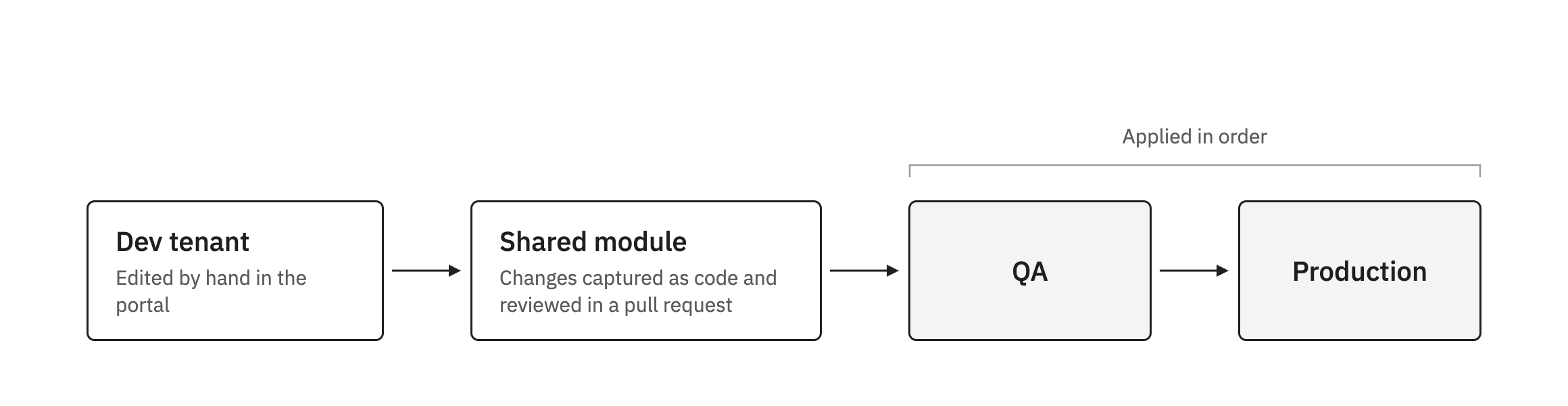
Changes start in dev and are applied to QA, then production
No changes means it does.
Terraform basics
Terraform reads code written in files ending in.tf and changes a system to match it. The Authsignal Terraform provider is the plugin that lets Terraform manage an Authsignal tenant through the Management API. A module is a folder of .tf files that other folders can reuse. Here, one module holds the Authsignal configuration and each environment’s folder uses it.
Terraform keeps a record of the resources it manages, called state. Each environment has its own state. Importing adds something that already exists in a tenant to state, without changing the tenant.
You run Terraform from inside an environment’s folder, mostly with three commands:
terraform initdownloads the provider and prepares the folder. Run it once in each folder, and again after changing the provider or where state is stored.terraform plancompares the code with the tenant and lists what it would change. It doesn’t change anything.terraform applymakes those changes.
What’s covered
The module holds whichever parts of the Authsignal configuration you choose to manage, such as authenticators, flows, rules, and branding. You can bring in new resources at any time. The resources the provider supports are listed on the Terraform Registry. A few values usually have to differ per tenant, such as web addresses and the tenant name shown to users. These are variables, which you set in each environment’sterraform.tfvars file. Everything else should be the same in every tenant.
Resources that should only exist in some environments, such as an action that only your automated tests use in dev and QA, sit behind a variable that you switch on per environment.
Repository layout
One shared module holds the Authsignal configuration. Each environment has a small folder that applies the module to one tenant, with its own state andterraform.tfvars file.
Prerequisites
- Terraform 1.11 or later. Install it, then check the version with
terraform version. - A git repository for the code.
- An Authsignal Portal account that can create tenants and Management API secret keys.
- Somewhere shared to keep state, such as an S3 bucket. See Where state is stored.
Setup
- Configure the dev tenant in the portal.
- Capture the dev configuration as code in the shared module. Terraform can generate a starting point from dev, or you can write the code by hand.
- Set up shared state storage, then import dev into Terraform state. The plan should show no changes to the tenant.
- Add QA and production one at a time. Terraform creates the configuration in each new tenant, importing anything the tenant already has.
Day to day
You still make changes to the dev tenant in the portal. You then update the module untilterraform plan in envs/dev reports No changes, then open a pull request. Once it merges, run the QA pipeline, then production.
If you change an existing resource in the QA or production tenant, Terraform reverts it the next time it’s applied there. Anything new you add in those tenants isn’t managed by Terraform, so it’s left alone. Dev should be the only tenant anyone edits by hand.