> ## Documentation Index
> Fetch the complete documentation index at: https://docs.authsignal.com/llms.txt
> Use this file to discover all available pages before exploring further.
# React
> Learn how to use the Authsignal React SDK.
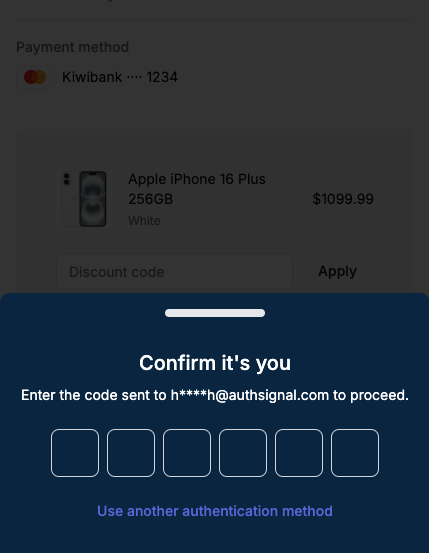
The Authsignal React SDK builds on top of the [Web SDK](/sdks/client/web/setup) by providing UI components which can be added to your React app.
The Authsignal React SDK currently only supports re-authentication flows.
## Installation
```bash npm theme={null}
npm install @authsignal/react
```
```bash yarn theme={null}
yarn add @authsignal/react
```
```bash pnpm theme={null}
pnpm add @authsignal/react
```
```bash bun theme={null}
bun add @authsignal/react
```
## AuthsignalProvider component
The `AuthsignalProvider` component allows you to use the [useAuthsignal hook](/sdks/client/react#useauthsignal-hook). Render the `AuthsignalProvider` component
at the root of your application so that it is available everywhere you need it.
```tsx theme={null}
import { AuthsignalProvider } from "@authsignal/react";
import { Checkout } from "./Checkout";
export function App() {
return (
);
}
```
The `AuthsignalProvider` component accepts the following props:
Your tenant ID. It can be found in the [API
keys](https://portal.authsignal.com/organisations/tenants/api) section.
Your tenant's API URL. It can be found in the [API
keys](https://portal.authsignal.com/organisations/tenants/api) section.
Customize the design of the UI components.
Set variables to customize the appearance of the UI components. Each variable accepts a valid
CSS value.
Your brand's primary color. Used for buttons.
The foreground color for the primary color. Used for text on buttons.
The color used for the background.
The foreground color for the background. Used for text.
The color used to indicate errors.
The color used for the focus ring.
The color used for input borders.
The base unit of spacing.
The border radius used for buttons and inputs.
## useAuthsignal hook
The `useAuthsignal` hook returns two functions, `startChallenge` and `startChallengeAsync`, that you can use to
trigger the authentication flow.
Both functions require a `token` to be passed as an argument. The `token` should be
returned by your server after [tracking an action](/api-reference/server-api/track-action).
### `startChallenge`
The `startChallenge` function triggers the authentication flow.
```tsx theme={null}
import { useAuthsignal } from "@authsignal/react";
export function Checkout() {
const { startChallenge } = useAuthsignal();
const handlePayment = async () => {
const response = await fetch("/api/payment", {
method: "POST",
headers: {
"Content-Type": "application/json",
},
});
const data = await response.json();
if (data.token) {
startChallenge({
token: data.token,
onChallengeSuccess: ({ token }) => {
// Challenge was successful
// Send the token to your server to validate the challenge
},
onCancel: () => {
// User cancelled the challenge
},
onTokenExpired: () => {
// Token expired
},
});
}
};
return (
);
}
```
As well as a `token`, the `startChallenge` function accepts the following callbacks:
A callback function that is called when the challenge is successful. It receives an object with a
`token` property. This `token` should be sent to your server to [validate the
challenge](/sdks/server/challenges#validate-challenge).
A callback function that is called when the user cancels the challenge.
A callback function that is called when the token expires.
### `startChallengeAsync`
Alternatively, you can use the `startChallengeAsync` function, which returns a `Promise` that resolves with a `token` when the challenge is successful.
It will throw a `ChallengeError` if the user cancels the challenge or the token expires.
```tsx theme={null}
import { useAuthsignal, ChallengeError } from "@authsignal/react";
export function Checkout() {
const { startChallengeAsync } = useAuthsignal();
const handlePayment = async () => {
const response = await fetch("/api/payment", {
method: "POST",
headers: {
"Content-Type": "application/json",
},
});
const data = await response.json();
if (data.token) {
try {
const { token } = await startChallengeAsync({
token: data.token,
});
// Challenge was successful
// Send the token to your server to validate the challenge
} catch (e) {
if (e instanceof ChallengeError) {
if (e.code === "USER_CANCELED") {
// User cancelled the challenge
} else if (e.code === "TOKEN_EXPIRED") {
// Token expired
}
}
}
}
};
return (
);
}
```
## Customizing the appearance
You can customize the appearance of the UI components by passing an `appearance` prop to the [AuthsignalProvider component](/sdks/client/react#authsignalprovider-component).
```tsx theme={null}
import { AuthsignalProvider } from "@authsignal/react";
import { Checkout } from "./Checkout";
export function App() {
return (
);
}
```