> ## Documentation Index
> Fetch the complete documentation index at: https://docs.authsignal.com/llms.txt
> Use this file to discover all available pages before exploring further.

# Rate limits for OTP codes and magic links

> How OTP and magic link rate limits work, their defaults, and how to change them.

export const RateLimitTimeline = ({start, end, startLabel, endLabel, events = [], blocked, window: windowSpan, lanes = [], caption}) => {
  const position = time => `${(time - start) / (end - start) * 100}%`;
  const length = (from, to) => `${(to - from) / (end - start) * 100}%`;
  const laneTop = index => `calc(8.25rem + ${index * 2.5}rem)`;
  return <figure className="rl-timeline">
      <div className="rl-timeline__scroll">
        <div className="rl-timeline__track" style={lanes.length ? {
    height: laneTop(lanes.length)
  } : undefined}>
          <div className="rl-timeline__axis" />
          {blocked && <div className="rl-timeline__blocked" style={{
    left: position(blocked.from),
    width: length(blocked.from, blocked.to)
  }}>
              {blocked.label && <span className="rl-timeline__blocked-label">{blocked.label}</span>}
            </div>}
          {events.map((event, index) => <div key={index} className={`rl-timeline__event rl-timeline__event--${event.side ?? (index % 2 === 0 ? "above" : "below")}`} style={{
    left: position(event.at)
  }}>
              <span className={`rl-timeline__dot rl-timeline__dot--${event.kind ?? "success"}`} />
              <span className="rl-timeline__label">
                <span className="rl-timeline__title">{event.title}</span>
                <span className="rl-timeline__time">{event.time}</span>
              </span>
            </div>)}
          <span className="rl-timeline__end rl-timeline__end--start">{startLabel}</span>
          <span className="rl-timeline__end rl-timeline__end--end">{endLabel}</span>
          {windowSpan && <div className="rl-timeline__window" style={{
    left: position(windowSpan.from),
    width: length(windowSpan.from, windowSpan.to)
  }}>
              <span className="rl-timeline__window-label">{windowSpan.label}</span>
            </div>}
          {lanes.map((lane, index) => <div key={`lane-${index}`} className="rl-timeline__lane" style={{
    top: laneTop(index)
  }}>
              <span className="rl-timeline__lane-label">{lane.label}</span>
              <div className="rl-timeline__lane-rail">
                {lane.blocked.map((band, bandIndex) => <div key={bandIndex} className="rl-timeline__lane-band" style={{
    left: position(band.from),
    width: length(band.from, band.to)
  }} />)}
              </div>
            </div>)}
        </div>
      </div>
      {caption && <figcaption className="rl-timeline__caption">{caption}</figcaption>}
    </figure>;
};

Rate limits control how often Authsignal sends an OTP code or magic link, and how many codes a user can submit. They help mitigate abuse such as SMS pumping, inbox flooding, and code guessing.

## How rate limits work

Each limit uses a sliding window. Authsignal counts the sends in the period leading up to each new request, not in fixed blocks of time.

There are five types of limit:

| Limit | What it counts | Authenticators |
| - | - | - |
| [Per recipient](#per-recipient) | Sends to one phone number or email address | SMS OTP, WhatsApp OTP, Email OTP, email magic link |
| [Cooldown](#cooldown) | Repeat sends to one phone number or email address | SMS OTP, WhatsApp OTP, Email OTP, email magic link |
| [Country](#country) | SMS sends to any number in a country | SMS OTP |
| [Number block](#number-block) | SMS sends to a group of consecutive numbers | SMS OTP |
| [Submission](#submission) | Codes a user submits | SMS OTP, WhatsApp OTP, Email OTP, authenticator app |

When you set more than one limit, Authsignal enforces all of them, so a request is blocked as soon as any one is exceeded.

<RateLimitTimeline
  start={0}
  end={840}
  startLabel="10:00"
  endLabel="10:14"
  events={[
{ at: 60, title: "Code 1 sent", time: "10:01:00" },
{ at: 240, title: "Code 2 sent", time: "10:04:00" },
{ at: 270, title: "Blocked by cooldown", time: "10:04:30", kind: "blocked" },
{ at: 420, title: "Code 3 sent", time: "10:07:00" },
{ at: 525, title: "Blocked by per recipient", time: "10:08:45", kind: "blocked" },
{ at: 660, title: "Code 4 sent", time: "10:11:00" },
]}
  lanes={[
{
  label: "Cooldown: 60 seconds",
  blocked: [
    { from: 60, to: 120 },
    { from: 240, to: 300 },
    { from: 420, to: 480 },
    { from: 660, to: 720 },
  ],
},
{
  label: "Per recipient: 3 codes every 10 minutes",
  blocked: [{ from: 420, to: 660 }],
},
]}
  caption="Example: a cooldown and a per recipient limit together. Shading shows when each limit blocks a send."
/>

## Rate limit details

### Per recipient

A per recipient limit caps how many codes or links Authsignal sends to one phone number or email address in a window.

**Default:** 6 every 10 minutes for SMS OTP and WhatsApp OTP. 12 every 10 minutes for Email OTP and email magic link.

**Portal setting:** open [Authenticators](https://portal.authsignal.com/organisations/tenants/authenticators), select the authenticator, and edit **Rate limits** under **Sending** in **Rate limit settings**. For SMS OTP, the setting is under **Per number**.

**Management API:** set `sendingRateLimitConfigurations` on an SMS OTP or Email OTP authenticator. For example, see [Update SMS OTP authenticator configuration](/api-reference/management-api/update-sms-otp-authenticator-configuration#body-sending-rate-limit-configurations-one-of-0).

<RateLimitTimeline
  start={0}
  end={720}
  startLabel="10:00"
  endLabel="10:12"
  events={[
{ at: 30, title: "Code 1 sent", time: "10:00:30" },
{ at: 120, title: "Code 2 sent", time: "10:02:00" },
{ at: 210, title: "Code 3 sent (limit)", time: "10:03:30" },
{ at: 300, title: "Code 4 blocked", time: "10:05:00", kind: "blocked" },
{ at: 630, title: "Code 4 sent", time: "10:10:30" },
]}
  blocked={{ from: 210, to: 630, label: "Blocked" }}
  window={{ from: 30, to: 630, label: "10-minute window from code 1" }}
  caption="Example: a limit of 3 codes every 10 minutes"
/>

**Use case:** limit how many messages a script or an impatient user can trigger to one inbox or phone, and help control your SMS costs for any single number.

<Note>
  To help limit slow, steady abuse as well as bursts, click **Add rate limit** to add a second, longer limit. For example, 6 every 10
  minutes and 20 every 24 hours.
</Note>

### Cooldown

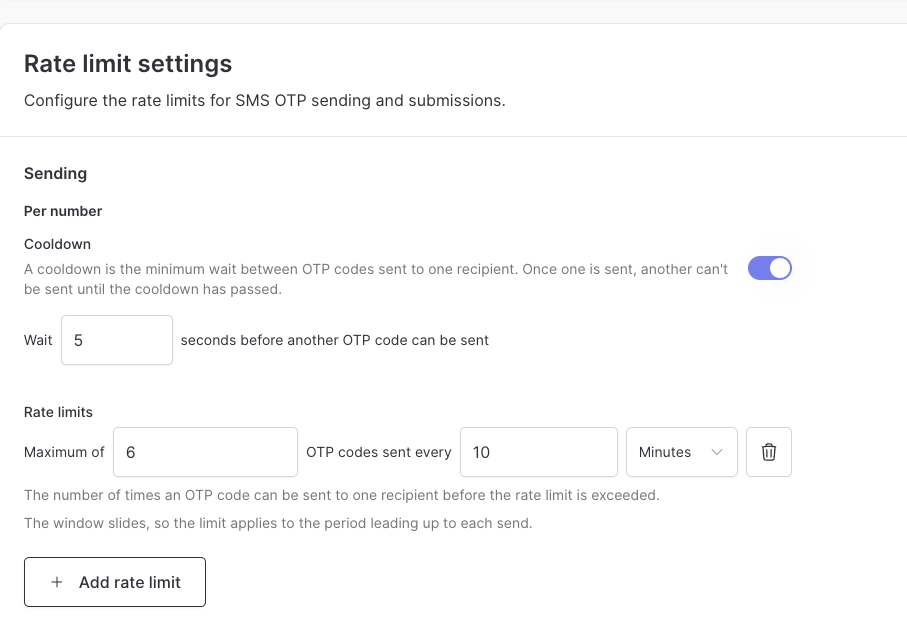
A cooldown is a resend rate limit. It sets the minimum wait between codes or links sent to one phone number or email address, such as 10 seconds. It is not the [code expiry](/knowledge-base/faqs#configuration-and-setup), which sets how long a code stays valid, and it is not how long a flow session stays open.

**Default:** 5 seconds for SMS OTP and WhatsApp OTP. 10 seconds for Email OTP and email magic link.

**Portal setting:** in **Rate limit settings**, under **Sending**, turn on **Cooldown** and enter how many seconds to wait, up to 60.

**Management API:** add a limit with a `rateLimit` of 1 to [`sendingRateLimitConfigurations`](/api-reference/management-api/update-sms-otp-authenticator-configuration#body-sending-rate-limit-configurations-one-of-0), and set `windowInMinutes` to the wait in minutes, such as `0.5` for 30 seconds.

<Frame caption="An SMS OTP cooldown of 5 seconds, above a rate limit of 6 codes every 10 minutes">
  <img src="https://mintcdn.com/authsignal-23/COFW-3J0LouCEVDH/images/docs/knowledge-base/operations/sms-otp-sending-rate-limits.png?fit=max&auto=format&n=COFW-3J0LouCEVDH&q=85&s=0bb5937669210ff47233dccc102b8de0" alt="SMS OTP rate limit settings with Cooldown turned on to wait 5 seconds before another OTP code can be sent, and a rate limit of 6 OTP codes every 10 minutes" width="907" height="630" data-path="images/docs/knowledge-base/operations/sms-otp-sending-rate-limits.png" />
</Frame>

<RateLimitTimeline
  start={0}
  end={15}
  startLabel="10:00:00"
  endLabel="10:00:15"
  events={[
{ at: 2, title: "Code sent", time: "10:00:02" },
{ at: 6, title: "Re-send blocked", time: "10:00:06", kind: "blocked" },
{ at: 13, title: "Code re-sent", time: "10:00:13" },
]}
  blocked={{ from: 2, to: 12, label: "Blocked" }}
  window={{ from: 2, to: 12, label: "10-second cooldown" }}
  caption="Example: a 10-second cooldown"
/>

**Use case:** reduce duplicate messages from double taps and repeated **Re-send code** clicks while the first message is still on its way. In the [pre-built UI](/implementation-options/prebuilt-ui/overview), the re-send link stays disabled until the cooldown ends.

### Country

A country limit caps how many SMS codes Authsignal sends to any number in a country.

**Default:** none. When you add one, the portal suggests 100 every 60 minutes.

**Portal setting:** open the **SMS OTP** authenticator. In **Rate limit settings**, click **Show advanced settings**, then click **Add country limit** under **Per country**. Set **Numbers covered** to **any number**, then choose the countries.

**Management API:** add an entry to [`prefixRateLimitConfigurations`](/api-reference/management-api/update-sms-otp-authenticator-configuration#body-prefix-rate-limit-configurations) on the SMS OTP authenticator. Set `blockSize` to `country`, `enabled` to `true`, and `countryCodes` to the countries it covers.

```mermaid theme={null}
flowchart LR
    A["+44 7700 900123"] --> UK
    B["+44 7700 900456"] --> UK
    C["+44 7700 900789"] --> UK
    D["+1 202 555 0123"] --> US
    UK["United Kingdom<br/>shares one count"]
    US["United States<br/>separate count"]
```

**Use case:** limit SMS pumping, where attackers trigger codes to high-cost numbers they profit from. Set a tight limit for countries you don't serve, and a looser one for your main markets. A limit for a specific country replaces an **All countries** limit for numbers in that country.

### Number block

A number block limit caps how many SMS codes Authsignal sends to a group of consecutive phone numbers. A group of 10,000 numbers covers every number that matches except for the last 4 digits. For example, +44 7700 900000 to +44 7700 909999.

**Default:** none.

**Portal setting:** add a country limit as above, then set **Numbers covered** to groups of 1,000, 10,000, or 100,000 numbers.

**Management API:** add an entry to [`prefixRateLimitConfigurations`](/api-reference/management-api/update-sms-otp-authenticator-configuration#body-prefix-rate-limit-configurations) with `blockSize` set to the group size, such as `10000`, and `enabled` set to `true`.

```mermaid theme={null}
flowchart LR
    A["+44 7700 900001"] --> B1
    B["+44 7700 900002"] --> B1
    C["+44 7700 909999"] --> B1
    D["+44 7700 910001"] --> B2
    B1["+44 7700 90xxxx<br/>shares one count"]
    B2["+44 7700 91xxxx<br/>separate count"]
```

<RateLimitTimeline
  start={0}
  end={70}
  startLabel="10:00"
  endLabel="11:10"
  events={[
{ at: 5, title: "+44 7700 900001", time: "Sent at 10:05" },
{ at: 15, title: "+44 7700 904512", time: "Sent at 10:15" },
{ at: 25, title: "+44 7700 909999", time: "Sent at 10:25 (limit)" },
{ at: 35, title: "+44 7700 900123", time: "Blocked at 10:35", kind: "blocked" },
{ at: 65, title: "+44 7700 900123", time: "Sent at 11:05" },
]}
  blocked={{ from: 25, to: 65, label: "Blocked" }}
  window={{ from: 5, to: 65, label: "60-minute window from the first code" }}
  caption="Example: a limit of 3 codes every 60 minutes for each group of 10,000 numbers"
/>

**Use case:** limit SMS pumping that cycles through a range of numbers. Each number can stay under its per recipient limit while the block as a whole reaches its limit. This limits sends to the affected range without limiting the rest of the country.

### Submission

A submission limit caps how many codes a user can submit in a window. It helps protect against attackers guessing codes.

**Default:** 10 every 5 minutes for SMS OTP, WhatsApp OTP, Email OTP, and authenticator app.

**Portal setting:** in **Rate limit settings**, edit **Submission**.

**Management API:** set [`submissionRateLimitConfiguration`](/api-reference/management-api/update-sms-otp-authenticator-configuration#body-submission-rate-limit-configuration-one-of-0) on an SMS OTP or Email OTP authenticator.

<RateLimitTimeline
  start={0}
  end={240}
  startLabel="10:00"
  endLabel="10:04"
  events={[
{ at: 30, title: "Wrong code 1", time: "10:00:30", kind: "error" },
{ at: 60, title: "Wrong code 2", time: "10:01:00", kind: "error" },
{ at: 100, title: "Wrong code 3 (limit)", time: "10:01:40", kind: "error" },
{ at: 120, title: "Correct code blocked", time: "10:02:00", kind: "blocked" },
{ at: 210, title: "Correct code accepted", time: "10:03:30" },
]}
  blocked={{ from: 100, to: 210, label: "Blocked" }}
  window={{ from: 30, to: 210, label: "3-minute window from wrong code 1" }}
  caption="Example: a limit of 3 submissions every 3 minutes"
/>

**Use case:** a 6-digit code has a million possible values. A submission limit reduces the chance that an attacker guesses one before it expires.

## Default limits

| Authenticator | Per recipient | Cooldown | Submission |
| - | - | - | - |
| SMS OTP | 6 every 10 minutes | 5 seconds | 10 every 5 minutes |
| WhatsApp OTP | 6 every 10 minutes | 5 seconds | 10 every 5 minutes |
| Email OTP | 12 every 10 minutes | 10 seconds | 10 every 5 minutes |
| Email magic link | 12 every 10 minutes | 10 seconds | Not applicable |
| Authenticator app | Not applicable | Not applicable | 10 every 5 minutes |

## Sandbox codes

Rate limits also apply in [sandbox mode](/knowledge-base/testing/static-otp-codes). Sends count toward the sending limits, and each sandbox code you submit counts toward the submission limit. If your automated tests submit many codes for one test user, spread them across several test users or raise the submission limit on your test tenant.

## Try it: add a cooldown

1. In the Authsignal Portal, open [Authenticators](https://portal.authsignal.com/organisations/tenants/authenticators) and select **Email OTP**.
2. In **Rate limit settings**, under **Sending**, turn on **Cooldown** if it's off.
3. Set the wait to 30 seconds, then click **Save changes**.
4. Start an action that shows the pre-built UI, and choose Email OTP.
5. After the code arrives, the **Re-send code** link stays disabled for 30 seconds.


This documentation is built and hosted on [Mintlify](https://mintlify.com), a developer documentation platform.