> ## Documentation Index
> Fetch the complete documentation index at: https://docs.authsignal.com/llms.txt
> Use this file to discover all available pages before exploring further.
# Adding adaptive MFA to Auth0
> Learn how to add adaptive MFA to your Auth0 login flow using Authsignal.
## Controlling the frequency of MFA challenges based on device
By default a user will be required to complete an MFA challenge every time they sign in.
This behavior can be fine-tuned by configuring a rule for your Auth0 login action - for example, you could let users skip MFA if you know they have previously authenticated within the last 24 hours on the same device.
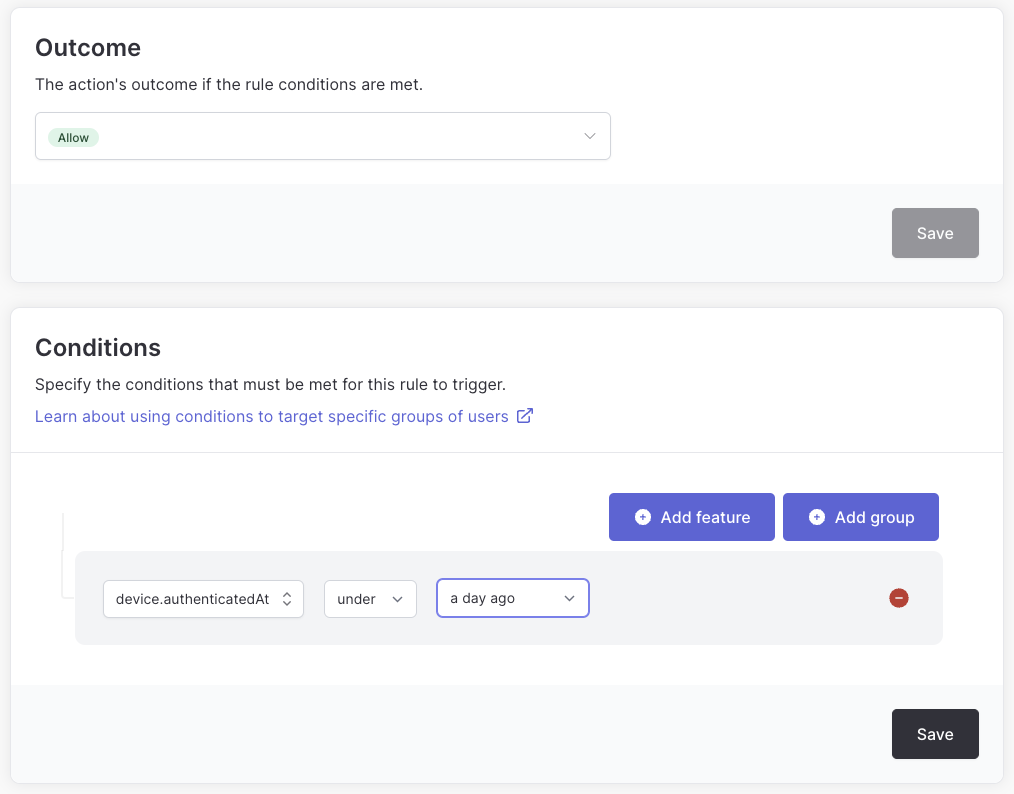 To enable this rule you must send a **device ID** to Authsignal.
This can be achieved by adding `device_id` as an [authorization param](https://auth0.github.io/auth0-spa-js/interfaces/AuthorizationParams.html) in your Auth0 integration code.
If you are already tracking device ID in your own app you can pass this value - or use the [Authsignal Web SDK](/sdks/client/web/device-tracking) to pass a persistent device ID which is stored in a cookie.
For example if using the [auth0-spa-js](https://auth0.github.io/auth0-spa-js/interfaces/AuthorizationParams.html) library:
```javascript theme={null}
await loginWithRedirect({
authorizationParams: { device_id: authsignal.anonymousId },
});
```
Or if using the [auth0-react](https://auth0.github.io/auth0-react/interfaces/Auth0ProviderOptions.html) library:
```jsx theme={null}
```
Or if using the [nextjs-auth0](https://auth0.github.io/nextjs-auth0/interfaces/types.AuthorizationParameters.html) library:
```javascript theme={null}
await handleLogin(req, res, {
authorizationParams: { device_id: authsignal.anonymousId },
});
```
## Opting out for social or federated logins
You may want to let users opt out of MFA if they are using an external social login provider, for example Google or Facebook.
This can easily be achieved by checking the connection on the `event` object.
```javascript theme={null}
const { handleAuth0ExecutePostLogin, handleAuth0ContinuePostLogin } = require("@authsignal/node");
/**
* @param {Event} event
* @param {PostLoginAPI} api
*/
exports.onExecutePostLogin = async (event, api) => {
// Only redirect for auth0 database connections, not social or federated
if (event.connection.strategy === "auth0") {
await handleAuth0ExecutePostLogin(event, api);
}
};
exports.onContinuePostLogin = handleAuth0ContinuePostLogin;
```
## Using the Server SDK directly for more customization and control
To allow for more customization and control you can also use the [Authsignal Server SDK](/sdks/server/overview) directly from within your Auth0 custom action.
```javascript theme={null}
const { Authsignal, UserActionState } = require("@authsignal/node");
/**
* @param {Event} event
* @param {PostLoginAPI} api
*/
exports.onExecutePostLogin = async (event, api) => {
// Redirects are not possible for refresh token exchange
// https://auth0.com/docs/customize/actions/flows-and-triggers/login-flow/redirect-with-actions#refresh-tokens
if (event.transaction?.protocol === "oauth2-refresh-token") {
return;
}
const secret = event.secrets.AUTHSIGNAL_SECRET;
const userId = event.user.user_id;
const redirectUrl = `https://${event.request.hostname}/continue`;
const authsignal = new Authsignal({ secret });
const { state, url, isEnrolled } = await authsignal.track({
action: "auth0-login",
userId,
redirectUrl,
// optional
email: event.user.email,
ipAddress: event.request.ip,
userAgent: event.request.user_agent,
deviceId: event.request.query?.["device_id"],
});
// Redirect to the Challenge UI if a challenge is required
// Also redirect users not yet enrolled so they can enroll
if (state === UserActionState.CHALLENGE_REQUIRED || !isEnrolled) {
api.redirect.sendUserTo(url);
}
};
/**
* @param {Event} event
* @param {PostLoginAPI} api
*/
exports.onContinuePostLogin = async (event, api) => {
const secret = event.secrets.AUTHSIGNAL_SECRET;
const userId = event.user.user_id;
const authsignal = new Authsignal({ secret });
const result = await authsignal.validateChallenge({
token: event.request.query?.["token"],
userId,
});
if (result && result.state !== "CHALLENGE_SUCCEEDED") {
api.access.deny("Access denied");
}
};
```
## Next steps
* [Using an internal user ID](/integrations/auth0-internal-user-id)
* [Using rules to implement risk-based authentication](/actions-rules/rules/getting-started#creating-a-rule-to-challenge-high-risk-users)
* [Using business-specific data points in rules](/actions-rules/rules/custom-data-points)
* [Restricting authenticators with actions](/actions-rules/actions/restricting-authenticators)
To enable this rule you must send a **device ID** to Authsignal.
This can be achieved by adding `device_id` as an [authorization param](https://auth0.github.io/auth0-spa-js/interfaces/AuthorizationParams.html) in your Auth0 integration code.
If you are already tracking device ID in your own app you can pass this value - or use the [Authsignal Web SDK](/sdks/client/web/device-tracking) to pass a persistent device ID which is stored in a cookie.
For example if using the [auth0-spa-js](https://auth0.github.io/auth0-spa-js/interfaces/AuthorizationParams.html) library:
```javascript theme={null}
await loginWithRedirect({
authorizationParams: { device_id: authsignal.anonymousId },
});
```
Or if using the [auth0-react](https://auth0.github.io/auth0-react/interfaces/Auth0ProviderOptions.html) library:
```jsx theme={null}
```
Or if using the [nextjs-auth0](https://auth0.github.io/nextjs-auth0/interfaces/types.AuthorizationParameters.html) library:
```javascript theme={null}
await handleLogin(req, res, {
authorizationParams: { device_id: authsignal.anonymousId },
});
```
## Opting out for social or federated logins
You may want to let users opt out of MFA if they are using an external social login provider, for example Google or Facebook.
This can easily be achieved by checking the connection on the `event` object.
```javascript theme={null}
const { handleAuth0ExecutePostLogin, handleAuth0ContinuePostLogin } = require("@authsignal/node");
/**
* @param {Event} event
* @param {PostLoginAPI} api
*/
exports.onExecutePostLogin = async (event, api) => {
// Only redirect for auth0 database connections, not social or federated
if (event.connection.strategy === "auth0") {
await handleAuth0ExecutePostLogin(event, api);
}
};
exports.onContinuePostLogin = handleAuth0ContinuePostLogin;
```
## Using the Server SDK directly for more customization and control
To allow for more customization and control you can also use the [Authsignal Server SDK](/sdks/server/overview) directly from within your Auth0 custom action.
```javascript theme={null}
const { Authsignal, UserActionState } = require("@authsignal/node");
/**
* @param {Event} event
* @param {PostLoginAPI} api
*/
exports.onExecutePostLogin = async (event, api) => {
// Redirects are not possible for refresh token exchange
// https://auth0.com/docs/customize/actions/flows-and-triggers/login-flow/redirect-with-actions#refresh-tokens
if (event.transaction?.protocol === "oauth2-refresh-token") {
return;
}
const secret = event.secrets.AUTHSIGNAL_SECRET;
const userId = event.user.user_id;
const redirectUrl = `https://${event.request.hostname}/continue`;
const authsignal = new Authsignal({ secret });
const { state, url, isEnrolled } = await authsignal.track({
action: "auth0-login",
userId,
redirectUrl,
// optional
email: event.user.email,
ipAddress: event.request.ip,
userAgent: event.request.user_agent,
deviceId: event.request.query?.["device_id"],
});
// Redirect to the Challenge UI if a challenge is required
// Also redirect users not yet enrolled so they can enroll
if (state === UserActionState.CHALLENGE_REQUIRED || !isEnrolled) {
api.redirect.sendUserTo(url);
}
};
/**
* @param {Event} event
* @param {PostLoginAPI} api
*/
exports.onContinuePostLogin = async (event, api) => {
const secret = event.secrets.AUTHSIGNAL_SECRET;
const userId = event.user.user_id;
const authsignal = new Authsignal({ secret });
const result = await authsignal.validateChallenge({
token: event.request.query?.["token"],
userId,
});
if (result && result.state !== "CHALLENGE_SUCCEEDED") {
api.access.deny("Access denied");
}
};
```
## Next steps
* [Using an internal user ID](/integrations/auth0-internal-user-id)
* [Using rules to implement risk-based authentication](/actions-rules/rules/getting-started#creating-a-rule-to-challenge-high-risk-users)
* [Using business-specific data points in rules](/actions-rules/rules/custom-data-points)
* [Restricting authenticators with actions](/actions-rules/actions/restricting-authenticators)