> ## Documentation Index
> Fetch the complete documentation index at: https://docs.authsignal.com/llms.txt
> Use this file to discover all available pages before exploring further.
# Removing authenticators
> Let users remove their authenticators via Authsignal's pre-built UI
Users may want to remove authentication methods for various reasons:
* Switching to a new device or authenticator app
* No longer having access to an email or phone number
* Simplifying their authentication setup
The Authsignal pre-built UI provides a secure, user-friendly way for users to remove authenticators.
## Implementation steps
**1. Backend: Track action with settings redirect**
Passing `redirectToSettings: true` in the track request will mean that after completing a challenge with an existing authentication method, users will be redirected to a settings menu where they can remove authentication methods.
```ts Node.js {6} theme={null}
const request = {
userId: "dc58c6dc-a1fd-4a4f-8e2f-846636dd4833",
action: "manageAuthenticators",
attributes: {
redirectUrl: "https://yourapp.com/callback"
redirectToSettings: true,
},
};
const response = await authsignal.track(request);
const url = response.url;
```
```csharp C# {6} theme={null}
var request = new TrackRequest(
UserId: "dc58c6dc-a1fd-4a4f-8e2f-846636dd4833",
Action: "manageAuthenticators",
Attributes: new TrackAttributes(
RedirectUrl: "https://yourapp.com/callback",
RedirectToSettings: true
)
);
var response = await authsignal.Track(request);
var url = response.Url;
```
```java Java {6} theme={null}
TrackRequest request = new TrackRequest();
request.userId = "dc58c6dc-a1fd-4a4f-8e2f-846636dd4833";
request.action = "manageAuthenticators";
request.attributes = new TrackAttributes();
request.attributes.redirectUrl = https://yourapp.com/callback";
request.attributes.redirectToSettings = true;
TrackResponse response = authsignal.track(request).get();
String url = response.url;
```
```ruby Ruby {6} theme={null}
response = Authsignal.track({
user_id: "dc58c6dc-a1fd-4a4f-8e2f-846636dd4833",
action: "manageAuthenticators",
attributes: {
redirect_url: "https://yourapp.com/callback",
redirect_to_settings: true
}
})
url = response[:url]
```
```python Python {6} theme={null}
response = authsignal.track(
user_id="dc58c6dc-a1fd-4a4f-8e2f-846636dd4833",
action="manageAuthenticators",
attributes={
"redirectUrl": "https://yourapp.com/callback",
"redirectToSettings": True
}
)
url = response["url"]
```
```php PHP {6} theme={null}
$response = Authsignal::track([
'userId' => "dc58c6dc-a1fd-4a4f-8e2f-846636dd4833",
'action' => "manageAuthenticators",
'attributes' => [
'redirectUrl' => "https://yourapp.com/callback",
'redirectToSettings' => true
]
]);
$url = $response["url"]
```
```go Go {1, 8} theme={null}
redirectToSettings := true
response, err := client.Track(
TrackRequest{
UserId: "dc58c6dc-a1fd-4a4f-8e2f-846636dd4833",
Action: "manageAuthenticators",
Attributes: &TrackAttributes{
RedirectUrl: "https://yourapp.com/callback",
RedirectToSettings: &redirectToSettings,
},
},
)
url := response.Url
```
**2. Frontend: Launch settings flow**
```javascript theme={null}
// Launch the pre-built UI for authenticator management
authsignal.launch(url);
```
**3. User experience**
Users will:
1. Complete a challenge with one of their existing authenticators
2. Access the settings menu where they can view all their enrolled methods
3. Remove unwanted authenticators
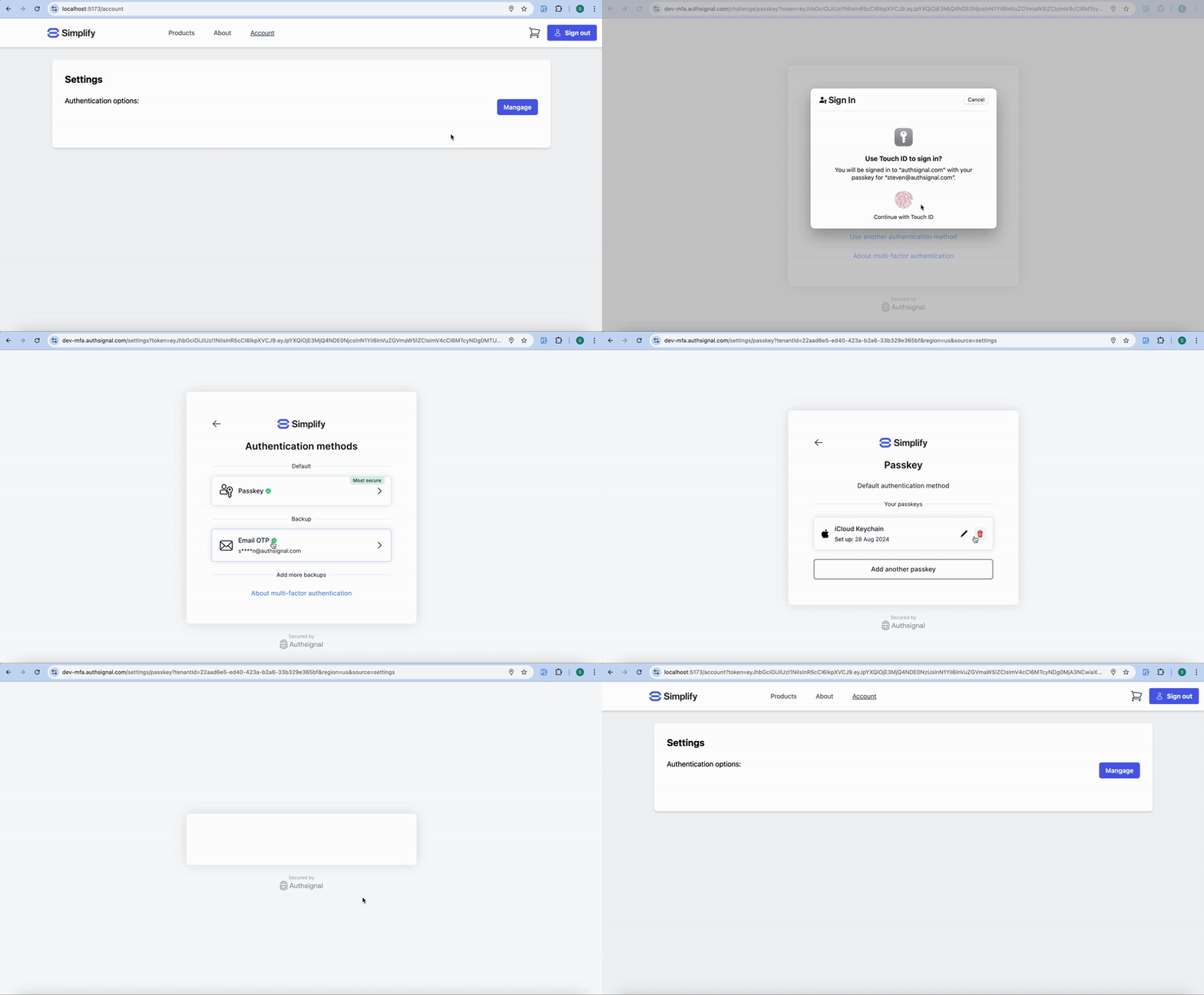 The pre-built UI automatically enforces security by requiring authentication before allowing
removal. Users cannot remove their last remaining authenticator to prevent account lockout.
## Administrative removal
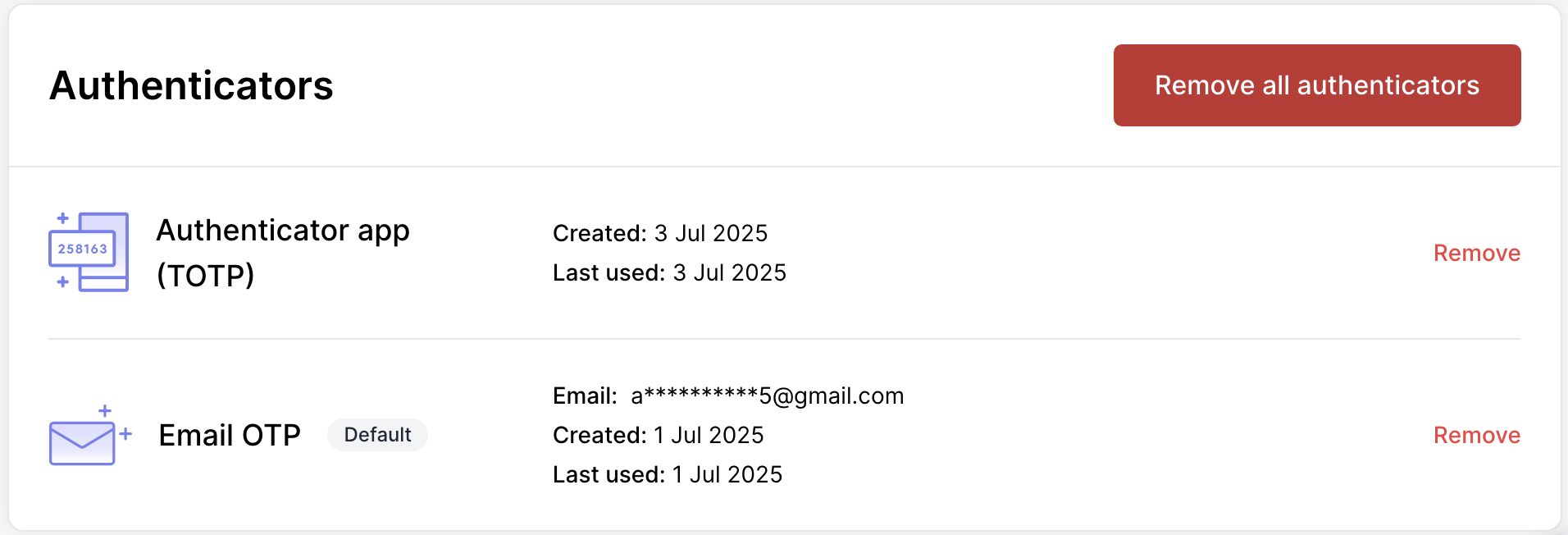
Admins can remove authenticators for users through the [Authsignal Portal](https://portal.authsignal.com/users):
1. Navigate to the Users section
2. Search for and select the user
3. Scroll down to see the enrolled authenticators
4. Remove specific methods as needed
The pre-built UI automatically enforces security by requiring authentication before allowing
removal. Users cannot remove their last remaining authenticator to prevent account lockout.
## Administrative removal
Admins can remove authenticators for users through the [Authsignal Portal](https://portal.authsignal.com/users):
1. Navigate to the Users section
2. Search for and select the user
3. Scroll down to see the enrolled authenticators
4. Remove specific methods as needed
 ## Next steps
* [Programmatic authenticator removal](/advanced-usage/programmatic-authenticator-management)
## Next steps
* [Programmatic authenticator removal](/advanced-usage/programmatic-authenticator-management)