> ## Documentation Index
> Fetch the complete documentation index at: https://docs.authsignal.com/llms.txt
> Use this file to discover all available pages before exploring further.
# Pre-built UI
> Rapidly implement web-based authentication flows using Authsignal's pre-built UI.
## How it works
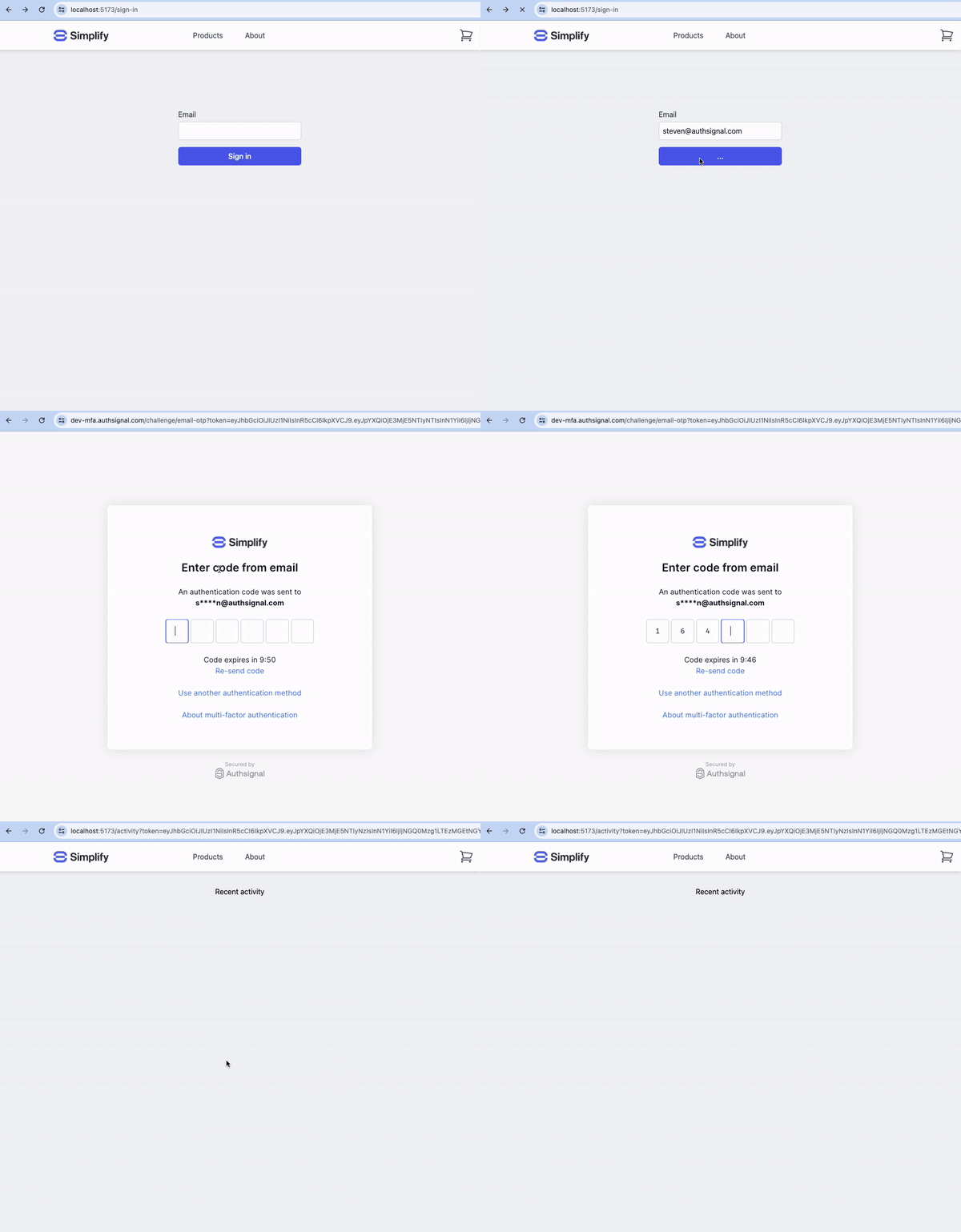
Your app redirects to a web page hosted by Authsignal (or displays it modally in an iframe).
This is often the quickest way to integrate.
You can configure your own [custom domain](/implementation-options/prebuilt-ui/custom-domains) and you can [heavily customize](/implementation-options/prebuilt-ui/custom-branding) the look and feel.
 ## Integration steps
```mermaid theme={null}
sequenceDiagram
participant F as Your frontend
participant B as Your backend
participant A as Authsignal
B->>A: (1) Track action
A->>B: Pre-built UI URL
B->>F: Pre-built UI URL
Note left of F: (2) Present challenge via pre-built UI
F->>B: Check result
B->>A: (3) Validate challenge
A->>B: Challenge result
```
### 1. Backend - Track action
In your app's backend, track an action which represents what your user is doing, e.g. `signIn`.
You can do this using one of the [Authsignal Server SDKs](/sdks/server) or you can call the [Authsignal Server API](/api-reference/server-api) for a REST integration.
```ts Node.js theme={null}
const request = {
userId: "dc58c6dc-a1fd-4a4f-8e2f-846636dd4833",
action: "signIn",
attributes: {
redirectUrl: "https://yourapp.com/callback",
},
};
const response = await authsignal.track(request);
const url = response.url;
```
```csharp C# theme={null}
var request = new TrackRequest(
UserId: user.Id,
Action: "signIn",
Attributes: new TrackAttributes(
RedirectUrl: "https://yourapp.com/callback"
)
);
var response = await authsignal.Track(request);
var url = response.Url;
```
```java Java theme={null}
TrackRequest request = new TrackRequest();
request.userId = "dc58c6dc-a1fd-4a4f-8e2f-846636dd4833";
request.action = "signIn";
request.attributes = new TrackAttributes();
request.attributes.redirectUrl = "https://yourapp.com/callback";
TrackResponse response = authsignal.track(request).get();
String url = response.url;
```
```ruby Ruby theme={null}
response = Authsignal.track({
user_id: "dc58c6dc-a1fd-4a4f-8e2f-846636dd4833",
action: "signIn",
attributes: {
redirect_url: "https://yourapp.com/callback",
}
})
url = response[:url]
```
```python Python theme={null}
response = authsignal.track(
user_id="dc58c6dc-a1fd-4a4f-8e2f-846636dd4833",
action="signIn",
attributes={
"redirectUrl": "https://yourapp.com/callback"
}
)
url = response["url"]
```
```php PHP theme={null}
$response = Authsignal::track([
'userId' => "dc58c6dc-a1fd-4a4f-8e2f-846636dd4833",
'action' => "signIn",
'attributes' => [
'redirectUrl' => "https://yourapp.com/callback"
]
]);
$url = $response["url"]
```
```go Go theme={null}
response, err := client.Track(
TrackRequest{
UserId: "dc58c6dc-a1fd-4a4f-8e2f-846636dd4833",
Action: "signIn",
Attributes: &TrackAttributes{
RedirectUrl: "https://yourapp.com/callback",
},
},
)
url := response.Url
```
### 2. Frontend - Launch the pre-built UI
In your app's frontend, pass the url from the `track` call to the [Authsignal Web SDK](/sdks/client/web/setup) to launch an enrollment or re-authentication flow.
```javascript theme={null}
authsignal.launch(url);
```
### 3. Backend - Validate challenge
Once the user has completed the challenge, Authsignal will send them back to the redirect URL you provided in step 1, appending a `token` as a query param which you can use to determine the result of the challenge server-side.
```ts Node.js theme={null}
const request = {
action: "signIn",
token: "eyJhbGciOiJ...",
};
const response = await authsignal.validateChallenge(request);
if (response.state === "CHALLENGE_SUCCEEDED") {
// The user completed the challenge successfully
// Proceed with authenticated action
} else {
// The user did not complete the challenge successfully
}
```
```csharp C# theme={null}
var request = new ValidateChallengeRequest(
Action: "signIn,
Token: "eyJhbGciOiJ..."
);
var response = await authsignal.ValidateChallenge(request);
if (response.State == UserActionState.CHALLENGE_SUCCEEDED) {
// The user completed the challenge successfully
// Proceed with authenticated action
} else {
// The user did not complete the challenge successfully
}
```
```java Java theme={null}
ValidateChallengeRequest request = new ValidateChallengeRequest();
request.action = "signIn";
request.token = "eyJhbGciOiJ...";
ValidateChallengeResponse response = authsignal.validateChallenge(request).get();
if (response.state == UserActionState.CHALLENGE_SUCCEEDED) {
// The user completed the challenge successfully
// Proceed with authenticated action
} else {
// The user did not complete the challenge successfully
}
```
```ruby Ruby theme={null}
response = Authsignal.validate_challenge(
action: "signIn",
token: "eyJhbGciOiJ..."
)
if response[:state] == "CHALLENGE_SUCCEEDED"
# The user completed the challenge successfully
# Proceed with authenticated action
else
# The user did not complete the challenge successfully
end
```
```python Python theme={null}
response = authsignal.validate_challenge(
attributes={
"action": "signIn",
"token": "eyJhbGciOiJ..."
}
)
if response["state"] == "CHALLENGE_SUCCEEDED":
# The user completed the challenge successfully
# Proceed with authenticated action
else:
# The user did not complete the challenge successfully
```
```php PHP theme={null}
$response = Authsignal::validateChallenge([
'action' => "signIn",
'token' => "eyJhbGciOiJ...",
]);
if ($response["state"] === "CHALLENGE_SUCCEEDED") {
# The user completed the challenge successfully
# Proceed with authenticated action
} else {
# The user did not complete the challenge successfully
}
```
```go Go theme={null}
response, err := client.ValidateChallenge(
ValidateChallengeRequest{
Action: "signIn",
Token: "eyJhbGciOiJ...",
},
)
if response.State == "CHALLENGE_SUCCEEDED" {
// The user completed the challenge successfully
// Proceed with authenticated action
} else {
// The user did not complete the challenge successfully
}
```
## Next steps
* [Launching the pre-built UI](/implementation-options/prebuilt-ui/presentation-modes)
## Integration steps
```mermaid theme={null}
sequenceDiagram
participant F as Your frontend
participant B as Your backend
participant A as Authsignal
B->>A: (1) Track action
A->>B: Pre-built UI URL
B->>F: Pre-built UI URL
Note left of F: (2) Present challenge via pre-built UI
F->>B: Check result
B->>A: (3) Validate challenge
A->>B: Challenge result
```
### 1. Backend - Track action
In your app's backend, track an action which represents what your user is doing, e.g. `signIn`.
You can do this using one of the [Authsignal Server SDKs](/sdks/server) or you can call the [Authsignal Server API](/api-reference/server-api) for a REST integration.
```ts Node.js theme={null}
const request = {
userId: "dc58c6dc-a1fd-4a4f-8e2f-846636dd4833",
action: "signIn",
attributes: {
redirectUrl: "https://yourapp.com/callback",
},
};
const response = await authsignal.track(request);
const url = response.url;
```
```csharp C# theme={null}
var request = new TrackRequest(
UserId: user.Id,
Action: "signIn",
Attributes: new TrackAttributes(
RedirectUrl: "https://yourapp.com/callback"
)
);
var response = await authsignal.Track(request);
var url = response.Url;
```
```java Java theme={null}
TrackRequest request = new TrackRequest();
request.userId = "dc58c6dc-a1fd-4a4f-8e2f-846636dd4833";
request.action = "signIn";
request.attributes = new TrackAttributes();
request.attributes.redirectUrl = "https://yourapp.com/callback";
TrackResponse response = authsignal.track(request).get();
String url = response.url;
```
```ruby Ruby theme={null}
response = Authsignal.track({
user_id: "dc58c6dc-a1fd-4a4f-8e2f-846636dd4833",
action: "signIn",
attributes: {
redirect_url: "https://yourapp.com/callback",
}
})
url = response[:url]
```
```python Python theme={null}
response = authsignal.track(
user_id="dc58c6dc-a1fd-4a4f-8e2f-846636dd4833",
action="signIn",
attributes={
"redirectUrl": "https://yourapp.com/callback"
}
)
url = response["url"]
```
```php PHP theme={null}
$response = Authsignal::track([
'userId' => "dc58c6dc-a1fd-4a4f-8e2f-846636dd4833",
'action' => "signIn",
'attributes' => [
'redirectUrl' => "https://yourapp.com/callback"
]
]);
$url = $response["url"]
```
```go Go theme={null}
response, err := client.Track(
TrackRequest{
UserId: "dc58c6dc-a1fd-4a4f-8e2f-846636dd4833",
Action: "signIn",
Attributes: &TrackAttributes{
RedirectUrl: "https://yourapp.com/callback",
},
},
)
url := response.Url
```
### 2. Frontend - Launch the pre-built UI
In your app's frontend, pass the url from the `track` call to the [Authsignal Web SDK](/sdks/client/web/setup) to launch an enrollment or re-authentication flow.
```javascript theme={null}
authsignal.launch(url);
```
### 3. Backend - Validate challenge
Once the user has completed the challenge, Authsignal will send them back to the redirect URL you provided in step 1, appending a `token` as a query param which you can use to determine the result of the challenge server-side.
```ts Node.js theme={null}
const request = {
action: "signIn",
token: "eyJhbGciOiJ...",
};
const response = await authsignal.validateChallenge(request);
if (response.state === "CHALLENGE_SUCCEEDED") {
// The user completed the challenge successfully
// Proceed with authenticated action
} else {
// The user did not complete the challenge successfully
}
```
```csharp C# theme={null}
var request = new ValidateChallengeRequest(
Action: "signIn,
Token: "eyJhbGciOiJ..."
);
var response = await authsignal.ValidateChallenge(request);
if (response.State == UserActionState.CHALLENGE_SUCCEEDED) {
// The user completed the challenge successfully
// Proceed with authenticated action
} else {
// The user did not complete the challenge successfully
}
```
```java Java theme={null}
ValidateChallengeRequest request = new ValidateChallengeRequest();
request.action = "signIn";
request.token = "eyJhbGciOiJ...";
ValidateChallengeResponse response = authsignal.validateChallenge(request).get();
if (response.state == UserActionState.CHALLENGE_SUCCEEDED) {
// The user completed the challenge successfully
// Proceed with authenticated action
} else {
// The user did not complete the challenge successfully
}
```
```ruby Ruby theme={null}
response = Authsignal.validate_challenge(
action: "signIn",
token: "eyJhbGciOiJ..."
)
if response[:state] == "CHALLENGE_SUCCEEDED"
# The user completed the challenge successfully
# Proceed with authenticated action
else
# The user did not complete the challenge successfully
end
```
```python Python theme={null}
response = authsignal.validate_challenge(
attributes={
"action": "signIn",
"token": "eyJhbGciOiJ..."
}
)
if response["state"] == "CHALLENGE_SUCCEEDED":
# The user completed the challenge successfully
# Proceed with authenticated action
else:
# The user did not complete the challenge successfully
```
```php PHP theme={null}
$response = Authsignal::validateChallenge([
'action' => "signIn",
'token' => "eyJhbGciOiJ...",
]);
if ($response["state"] === "CHALLENGE_SUCCEEDED") {
# The user completed the challenge successfully
# Proceed with authenticated action
} else {
# The user did not complete the challenge successfully
}
```
```go Go theme={null}
response, err := client.ValidateChallenge(
ValidateChallengeRequest{
Action: "signIn",
Token: "eyJhbGciOiJ...",
},
)
if response.State == "CHALLENGE_SUCCEEDED" {
// The user completed the challenge successfully
// Proceed with authenticated action
} else {
// The user did not complete the challenge successfully
}
```
## Next steps
* [Launching the pre-built UI](/implementation-options/prebuilt-ui/presentation-modes)