> ## Documentation Index
> Fetch the complete documentation index at: https://docs.authsignal.com/llms.txt
> Use this file to discover all available pages before exploring further.
# Opt-in consent checkbox
> Require users to check a consent checkbox before receiving an SMS during enrollment.
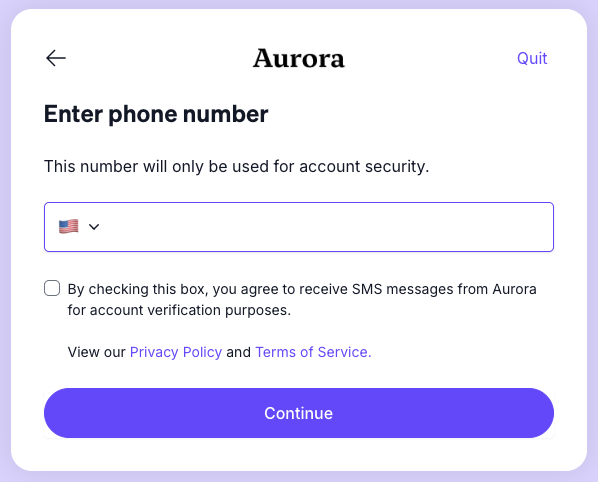
The opt-in consent checkbox allows you to collect explicit user consent before sending an SMS. This is useful for complying with regulations such as 10DLC, TCPA, or other messaging consent requirements.
When enabled, users must check a consent checkbox on the phone number entry screen in the [pre-built UI](/implementation-options/prebuilt-ui/overview) before they can proceed with SMS enrollment.
 ## Configuration
To enable the opt-in consent checkbox:
1. Navigate to [Authenticators](https://portal.authsignal.com/organisations/tenants/authenticators) in the Authsignal Portal
2. Select **SMS OTP**
3. Scroll to **Pre-built UI settings**
4. Enable **Show opt-in checkbox**
Once enabled, a rich text editor will appear where you can configure the consent message displayed alongside the checkbox.
## Localization
The consent message can be configured per language. Select a language tab in the editor to provide a translated version of your consent message.
If no message is configured for the user's locale, the first available configured language will be used as a fallback.
## Configuration
To enable the opt-in consent checkbox:
1. Navigate to [Authenticators](https://portal.authsignal.com/organisations/tenants/authenticators) in the Authsignal Portal
2. Select **SMS OTP**
3. Scroll to **Pre-built UI settings**
4. Enable **Show opt-in checkbox**
Once enabled, a rich text editor will appear where you can configure the consent message displayed alongside the checkbox.
## Localization
The consent message can be configured per language. Select a language tab in the editor to provide a translated version of your consent message.
If no message is configured for the user's locale, the first available configured language will be used as a fallback.