> ## Documentation Index
> Fetch the complete documentation index at: https://docs.authsignal.com/llms.txt
> Use this file to discover all available pages before exploring further.
# Enrolling authenticators
> Learn how your users can enroll new authenticators using Authsignal's pre-built UI.
The Authsignal pre-built UI provides a complete enrollment experience with minimal integration effort.
## First-time enrollment
When users have no existing authenticators, they can enroll their first method directly.
**Backend: Generate enrollment URL**
```ts Node.js theme={null}
const request = {
userId: "dc58c6dc-a1fd-4a4f-8e2f-846636dd4833",
action: "enroll",
attributes: {
redirectUrl: "https://yourapp.com/callback",
},
};
const response = await authsignal.track(request);
const url = response.url;
```
```csharp C# theme={null}
var request = new TrackRequest(
UserId: "dc58c6dc-a1fd-4a4f-8e2f-846636dd4833",
Action: "enroll",
Attributes: new TrackAttributes(
RedirectUrl: "https://yourapp.com/callback",
)
);
var response = await authsignal.Track(request);
var url = response.Url;
```
```java Java theme={null}
TrackRequest request = new TrackRequest();
request.userId = "dc58c6dc-a1fd-4a4f-8e2f-846636dd4833";
request.action = "enroll";
request.attributes = new TrackAttributes();
request.attributes.redirectUrl = https://yourapp.com/callback";
TrackResponse response = authsignal.track(request).get();
String url = response.url;
```
```ruby Ruby theme={null}
response = Authsignal.track({
user_id: "dc58c6dc-a1fd-4a4f-8e2f-846636dd4833",
action: "enroll",
attributes: {
redirect_url: "https://yourapp.com/callback",
}
})
url = response[:url]
```
```python Python theme={null}
response = authsignal.track(
user_id="dc58c6dc-a1fd-4a4f-8e2f-846636dd4833",
action="enroll",
attributes={
"redirectUrl": "https://yourapp.com/callback",
}
)
url = response["url"]
```
```php PHP theme={null}
$response = Authsignal::track([
'userId' => "dc58c6dc-a1fd-4a4f-8e2f-846636dd4833",
'action' => "enroll",
'attributes' => [
'redirectUrl' => "https://yourapp.com/callback",
]
]);
$url = $response["url"]
```
```go Go theme={null}
response, err := client.Track(
TrackRequest{
UserId: "dc58c6dc-a1fd-4a4f-8e2f-846636dd4833",
Action: "enroll",
Attributes: &TrackAttributes{
RedirectUrl: "https://yourapp.com/callback",
},
},
)
url := response.Url
```
**Frontend: Launch enrollment flow**
```javascript theme={null}
authsignal.launch(url);
```
Check enrollment status using [Get User](/sdks/server/users#get-user) or [Get
Authenticators](/sdks/server/authenticators#get-authenticators) to customize your UI based on
whether users are enrolled.
## Adding additional authenticators
Users can enroll additional methods through the pre-built UI by first completing a challenge with one of their existing methods.
We can add the `redirectToSettings` attribute to the track request to land the user on a screen after their challenge which will let them enroll more methods.
```ts Node.js {6} theme={null}
const request = {
userId: "dc58c6dc-a1fd-4a4f-8e2f-846636dd4833",
action: "manageAuthenticators",
attributes: {
redirectUrl: "https://yourapp.com/callback"
redirectToSettings: true,
},
};
const response = await authsignal.track(request);
const url = response.url;
```
```csharp C# {6} theme={null}
var request = new TrackRequest(
UserId: "dc58c6dc-a1fd-4a4f-8e2f-846636dd4833",
Action: "manageAuthenticators",
Attributes: new TrackAttributes(
RedirectUrl: "https://yourapp.com/callback",
RedirectToSettings: true
)
);
var response = await authsignal.Track(request);
var url = response.Url;
```
```java Java {6} theme={null}
TrackRequest request = new TrackRequest();
request.userId = "dc58c6dc-a1fd-4a4f-8e2f-846636dd4833";
request.action = "manageAuthenticators";
request.attributes = new TrackAttributes();
request.attributes.redirectUrl = https://yourapp.com/callback";
request.attributes.redirectToSettings = true;
TrackResponse response = authsignal.track(request).get();
String url = response.url;
```
```ruby Ruby {6} theme={null}
response = Authsignal.track({
user_id: "dc58c6dc-a1fd-4a4f-8e2f-846636dd4833",
action: "manageAuthenticators",
attributes: {
redirect_url: "https://yourapp.com/callback",
redirect_to_settings: true
}
})
url = response[:url]
```
```python Python {6} theme={null}
response = authsignal.track(
user_id="dc58c6dc-a1fd-4a4f-8e2f-846636dd4833",
action="manageAuthenticators",
attributes={
"redirectUrl": "https://yourapp.com/callback",
"redirectToSettings": True
}
)
url = response["url"]
```
```php PHP {6} theme={null}
$response = Authsignal::track([
'userId' => "dc58c6dc-a1fd-4a4f-8e2f-846636dd4833",
'action' => "manageAuthenticators",
'attributes' => [
'redirectUrl' => "https://yourapp.com/callback",
'redirectToSettings' => true
]
]);
$url = $response["url"]
```
```go Go {1, 8} theme={null}
redirectToSettings := true
response, err := client.Track(
TrackRequest{
UserId: "dc58c6dc-a1fd-4a4f-8e2f-846636dd4833",
Action: "manageAuthenticators",
Attributes: &TrackAttributes{
RedirectUrl: "https://yourapp.com/callback",
RedirectToSettings: &redirectToSettings,
},
},
)
url := response.Url
```
If a user has previously enrolled email OTP, for example, then they can complete an email OTP challenge in order to enroll passkey as another authentication option.
This security requirement ensures [strong binding](/advanced-usage/authenticator-binding) between
authenticators, preventing attackers from adding new methods if they compromise a single factor.
## Enrolling email and SMS authenticators
By default Authsignal's pre-built UI requires users to enter their email address or phone number when enrolling an email or SMS-based authenticator.
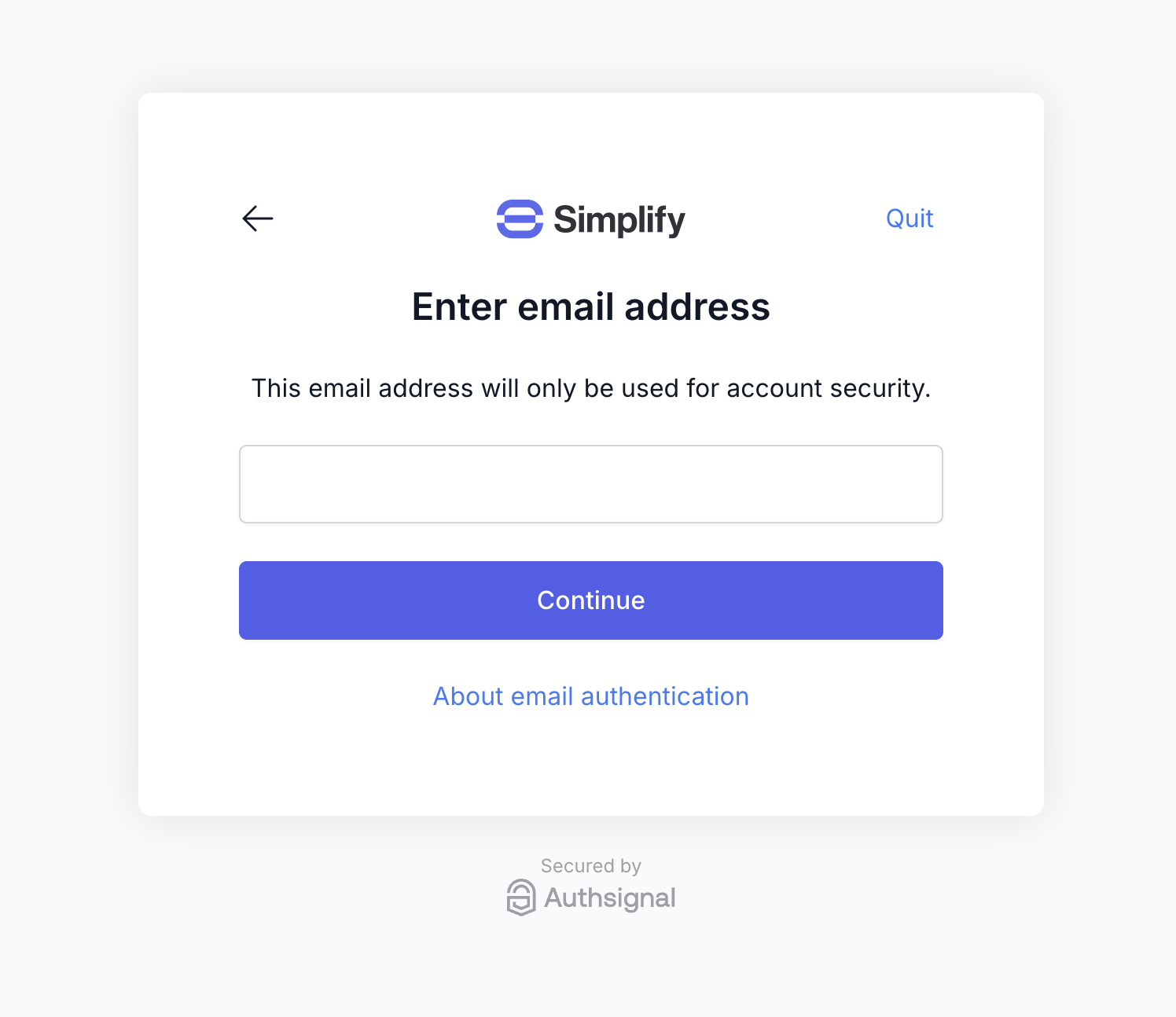 If you've already captured the user's email in your own system, however, then you can skip this step by passing the user's email or phone number in the track request.
```ts Node.js {6} theme={null}
const request = {
userId: "dc58c6dc-a1fd-4a4f-8e2f-846636dd4833",
action: "enroll",
attributes: {
redirectUrl: "https://yourapp.com/callback",
email: "jane.smith@authsignal.com",
},
};
const response = await authsignal.track(request);
```
```csharp C# {6} theme={null}
var request = new TrackRequest(
UserId: "dc58c6dc-a1fd-4a4f-8e2f-846636dd4833",
Action: "enroll",
Attributes: new TrackAttributes(
RedirectUrl: "https://yourapp.com/callback",
Email: "jane.smith@authsignal.com",
)
);
var response = await authsignal.Track(request);
```
```java Java {6} theme={null}
TrackRequest request = new TrackRequest();
request.userId = "dc58c6dc-a1fd-4a4f-8e2f-846636dd4833";
request.action = "enroll";
request.attributes = new TrackAttributes();
request.attributes.redirectUrl = "https://yourapp.com/callback";
request.attributes.email = "jane@authsignal.co";
TrackResponse response = authsignal.track(request).get();
```
```ruby Ruby {6} theme={null}
response = Authsignal.track({
user_id: "dc58c6dc-a1fd-4a4f-8e2f-846636dd4833",
action: "enroll",
attributes: {
redirect_url: "https://yourapp.com/callback",
email: "jane.smith@authsignal.com",
}
})
```
```python Python {6} theme={null}
response = authsignal.track(
user_id="dc58c6dc-a1fd-4a4f-8e2f-846636dd4833",
action="enroll",
attributes={
"redirectUrl": "https://yourapp.com/callback",
"email": "jane.smith@authsignal.com",
}
)
```
```php PHP {6} theme={null}
$response = Authsignal::track([
'userId' => "dc58c6dc-a1fd-4a4f-8e2f-846636dd4833",
'action' => "enroll",
'attributes' => [
'redirectUrl' => "https://yourapp.com/callback",
'email' => "jane.smith@authsignal.com",
]
]);
```
```go Go {7} theme={null}
response, err := client.Track(
TrackRequest{
UserId: "dc58c6dc-a1fd-4a4f-8e2f-846636dd4833",
Action: "enroll",
Attributes: &TrackAttributes{
RedirectUrl: "https://yourapp.com/callback",
Email: "jane.smith@authsignal.com",
},
},
)
```
This will skip the email or phone number input step during enrollment, but still allow the user to edit the value later.
If you wish to prevent the user from editing the value, this can be configured in the [Authsignal Portal](https://portal.authsignal.com/organisations/tenants/authenticators) by disabling the **self-service management** setting on the relevant authenticator configuration.
Additionally, if you're already verified the user's email in your own system then you can [programmatically enroll them with an email or SMS authenticator](/advanced-usage/programmatic-authenticator-management) at an appropriate point in your app (e.g. during a registration flow).
If you've already captured the user's email in your own system, however, then you can skip this step by passing the user's email or phone number in the track request.
```ts Node.js {6} theme={null}
const request = {
userId: "dc58c6dc-a1fd-4a4f-8e2f-846636dd4833",
action: "enroll",
attributes: {
redirectUrl: "https://yourapp.com/callback",
email: "jane.smith@authsignal.com",
},
};
const response = await authsignal.track(request);
```
```csharp C# {6} theme={null}
var request = new TrackRequest(
UserId: "dc58c6dc-a1fd-4a4f-8e2f-846636dd4833",
Action: "enroll",
Attributes: new TrackAttributes(
RedirectUrl: "https://yourapp.com/callback",
Email: "jane.smith@authsignal.com",
)
);
var response = await authsignal.Track(request);
```
```java Java {6} theme={null}
TrackRequest request = new TrackRequest();
request.userId = "dc58c6dc-a1fd-4a4f-8e2f-846636dd4833";
request.action = "enroll";
request.attributes = new TrackAttributes();
request.attributes.redirectUrl = "https://yourapp.com/callback";
request.attributes.email = "jane@authsignal.co";
TrackResponse response = authsignal.track(request).get();
```
```ruby Ruby {6} theme={null}
response = Authsignal.track({
user_id: "dc58c6dc-a1fd-4a4f-8e2f-846636dd4833",
action: "enroll",
attributes: {
redirect_url: "https://yourapp.com/callback",
email: "jane.smith@authsignal.com",
}
})
```
```python Python {6} theme={null}
response = authsignal.track(
user_id="dc58c6dc-a1fd-4a4f-8e2f-846636dd4833",
action="enroll",
attributes={
"redirectUrl": "https://yourapp.com/callback",
"email": "jane.smith@authsignal.com",
}
)
```
```php PHP {6} theme={null}
$response = Authsignal::track([
'userId' => "dc58c6dc-a1fd-4a4f-8e2f-846636dd4833",
'action' => "enroll",
'attributes' => [
'redirectUrl' => "https://yourapp.com/callback",
'email' => "jane.smith@authsignal.com",
]
]);
```
```go Go {7} theme={null}
response, err := client.Track(
TrackRequest{
UserId: "dc58c6dc-a1fd-4a4f-8e2f-846636dd4833",
Action: "enroll",
Attributes: &TrackAttributes{
RedirectUrl: "https://yourapp.com/callback",
Email: "jane.smith@authsignal.com",
},
},
)
```
This will skip the email or phone number input step during enrollment, but still allow the user to edit the value later.
If you wish to prevent the user from editing the value, this can be configured in the [Authsignal Portal](https://portal.authsignal.com/organisations/tenants/authenticators) by disabling the **self-service management** setting on the relevant authenticator configuration.
Additionally, if you're already verified the user's email in your own system then you can [programmatically enroll them with an email or SMS authenticator](/advanced-usage/programmatic-authenticator-management) at an appropriate point in your app (e.g. during a registration flow).