> ## Documentation Index
> Fetch the complete documentation index at: https://docs.authsignal.com/llms.txt
> Use this file to discover all available pages before exploring further.
# Custom domains
> Use your own custom domain with Authsignal's pre-built UI.
If you're using Authsignal's pre-built UI for your authentication flows you
can add your own custom domain.
## Add your custom domain to the Authsignal Portal
Decide on the subdomain you want to use.
For example, if your app is hosted on `example.com`, you might want to use `auth.example.com` as
your custom domain.
Now, head to the [custom domains](https://portal.authsignal.com/organisations/tenants/custom_domains)
page in the Authsignal Portal.
Enter your desired subdomain and click **Add**.
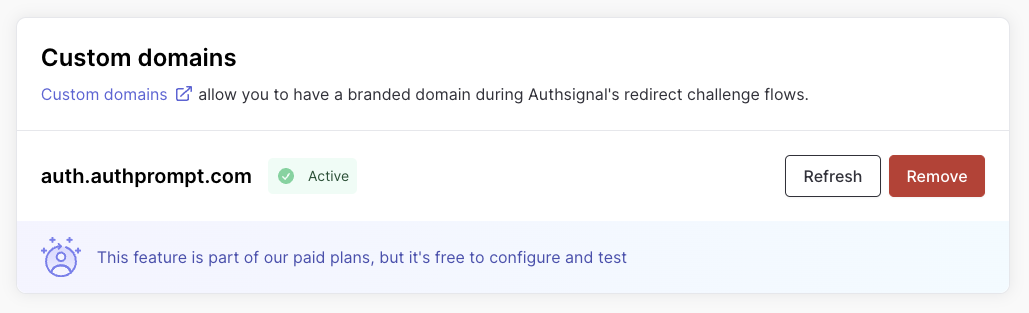
You will be prompted to add a CNAME record to your DNS provider. Once Authsignal detects that the CNAME record has been added, you will
see a **Valid configuration** message.
Click **Activate custom domain** to get the pre-built UI to use your custom domain.
You must activate your custom domain before it will take effect.
 ## Multiple custom domains
Multiple custom domains is an enterprise feature. [Contact us](mailto:support@authsignal.com) to enable this for your account.
If you have multiple applications or brands, you can configure additional custom domains. Each domain can be used independently with Authsignal's pre-built UI.
### Use cases
Multiple custom domains offers flexibility for organizations managing diverse branding, regional requirements, or partner integrations—all from a single Authsignal tenant.
* **Multiple brands, single tenant** — Organizations owning several brands can maintain separate branded authentication experiences (e.g., `auth.brand1.com` and `auth.brand2.com`) while sharing a centralized Authsignal configuration.
* **Regional domains** — Businesses requiring different domains for regional operations can serve users across jurisdictions (e.g., `auth.example.com`, `auth.example.co.uk`, `auth.example.com.au`).
* **White-labeled B2B SaaS** — SaaS providers offering white-labeled solutions can give each customer their own branded authentication domain (e.g., `auth.client-a.com`, `auth.client-b.com`) while maintaining a single tenant.
### Adding additional domains
Once the multiple custom domains feature is enabled for your account, you'll see an **Add another custom domain** option on the custom domains page. Follow the same setup process as your first domain:
1. Enter the subdomain (e.g., `mfa.anotherbrand.com`)
2. Add the CNAME record to your DNS provider
3. Wait for verification
4. Click **Activate custom domain**
### Default domain
One of your custom domains is designated as the **default**. This is the domain used when you don't explicitly specify which domain to use in your integration.
To change the default domain, click **Set as default** on any active domain.
### Using a specific domain
To redirect a user to a specific domain, you can include a `customDomain` attribute in your track action request.
```ts Node.js {6} theme={null}
const request = {
userId: "dc58c6dc-a1fd-4a4f-8e2f-846636dd4833",
action: "signIn",
attributes: {
redirectUrl: "https://yourapp.com/callback",
customDomain: "https://auth.example.com"
},
};
const response = await authsignal.track(request);
const url = response.url;
```
```csharp C# {6} theme={null}
var request = new TrackRequest(
UserId: user.Id,
Action: "signIn",
Attributes: new TrackAttributes(
RedirectUrl: "https://yourapp.com/callback",
CustomDomain: "https://auth.example.com"
)
);
var response = await authsignal.Track(request);
var url = response.Url;
```
```java Java {6} theme={null}
TrackRequest request = new TrackRequest();
request.userId = "dc58c6dc-a1fd-4a4f-8e2f-846636dd4833";
request.action = "signIn";
request.attributes = new TrackAttributes();
request.attributes.redirectUrl = "https://yourapp.com/callback";
request.attributes.customDomain = "https://auth.example.com";
TrackResponse response = authsignal.track(request).get();
String url = response.url;
```
```ruby Ruby {6} theme={null}
response = Authsignal.track({
user_id: "dc58c6dc-a1fd-4a4f-8e2f-846636dd4833",
action: "signIn",
attributes: {
redirect_url: "https://yourapp.com/callback",
custom_domain: "https://auth.example.com"
}
})
url = response[:url]
```
```python Python {6} theme={null}
response = authsignal.track(
user_id="dc58c6dc-a1fd-4a4f-8e2f-846636dd4833",
action="signIn",
attributes={
"redirectUrl": "https://yourapp.com/callback",
"customDomain": "https://auth.example.com"
}
)
url = response["url"]
```
```php PHP {6} theme={null}
$response = Authsignal::track([
'userId' => "dc58c6dc-a1fd-4a4f-8e2f-846636dd4833",
'action' => "signIn",
'attributes' => [
'redirectUrl' => "https://yourapp.com/callback",
'customDomain' => "https://auth.example.com"
]
]);
$url = $response["url"]
```
```go Go {7} theme={null}
response, err := client.Track(
TrackRequest{
UserId: "dc58c6dc-a1fd-4a4f-8e2f-846636dd4833",
Action: "signIn",
Attributes: &TrackAttributes{
RedirectUrl: "https://yourapp.com/callback",
CustomDomain: "https://auth.example.com",
},
},
)
url := response.Url
```
The `customDomain` attribute must be the full URL of the domain you want to use, including the protocol (e.g. `https://auth.example.com`).
If no `customDomain` is specified or the domain is not active, the default domain will be used.
## Multiple custom domains
Multiple custom domains is an enterprise feature. [Contact us](mailto:support@authsignal.com) to enable this for your account.
If you have multiple applications or brands, you can configure additional custom domains. Each domain can be used independently with Authsignal's pre-built UI.
### Use cases
Multiple custom domains offers flexibility for organizations managing diverse branding, regional requirements, or partner integrations—all from a single Authsignal tenant.
* **Multiple brands, single tenant** — Organizations owning several brands can maintain separate branded authentication experiences (e.g., `auth.brand1.com` and `auth.brand2.com`) while sharing a centralized Authsignal configuration.
* **Regional domains** — Businesses requiring different domains for regional operations can serve users across jurisdictions (e.g., `auth.example.com`, `auth.example.co.uk`, `auth.example.com.au`).
* **White-labeled B2B SaaS** — SaaS providers offering white-labeled solutions can give each customer their own branded authentication domain (e.g., `auth.client-a.com`, `auth.client-b.com`) while maintaining a single tenant.
### Adding additional domains
Once the multiple custom domains feature is enabled for your account, you'll see an **Add another custom domain** option on the custom domains page. Follow the same setup process as your first domain:
1. Enter the subdomain (e.g., `mfa.anotherbrand.com`)
2. Add the CNAME record to your DNS provider
3. Wait for verification
4. Click **Activate custom domain**
### Default domain
One of your custom domains is designated as the **default**. This is the domain used when you don't explicitly specify which domain to use in your integration.
To change the default domain, click **Set as default** on any active domain.
### Using a specific domain
To redirect a user to a specific domain, you can include a `customDomain` attribute in your track action request.
```ts Node.js {6} theme={null}
const request = {
userId: "dc58c6dc-a1fd-4a4f-8e2f-846636dd4833",
action: "signIn",
attributes: {
redirectUrl: "https://yourapp.com/callback",
customDomain: "https://auth.example.com"
},
};
const response = await authsignal.track(request);
const url = response.url;
```
```csharp C# {6} theme={null}
var request = new TrackRequest(
UserId: user.Id,
Action: "signIn",
Attributes: new TrackAttributes(
RedirectUrl: "https://yourapp.com/callback",
CustomDomain: "https://auth.example.com"
)
);
var response = await authsignal.Track(request);
var url = response.Url;
```
```java Java {6} theme={null}
TrackRequest request = new TrackRequest();
request.userId = "dc58c6dc-a1fd-4a4f-8e2f-846636dd4833";
request.action = "signIn";
request.attributes = new TrackAttributes();
request.attributes.redirectUrl = "https://yourapp.com/callback";
request.attributes.customDomain = "https://auth.example.com";
TrackResponse response = authsignal.track(request).get();
String url = response.url;
```
```ruby Ruby {6} theme={null}
response = Authsignal.track({
user_id: "dc58c6dc-a1fd-4a4f-8e2f-846636dd4833",
action: "signIn",
attributes: {
redirect_url: "https://yourapp.com/callback",
custom_domain: "https://auth.example.com"
}
})
url = response[:url]
```
```python Python {6} theme={null}
response = authsignal.track(
user_id="dc58c6dc-a1fd-4a4f-8e2f-846636dd4833",
action="signIn",
attributes={
"redirectUrl": "https://yourapp.com/callback",
"customDomain": "https://auth.example.com"
}
)
url = response["url"]
```
```php PHP {6} theme={null}
$response = Authsignal::track([
'userId' => "dc58c6dc-a1fd-4a4f-8e2f-846636dd4833",
'action' => "signIn",
'attributes' => [
'redirectUrl' => "https://yourapp.com/callback",
'customDomain' => "https://auth.example.com"
]
]);
$url = $response["url"]
```
```go Go {7} theme={null}
response, err := client.Track(
TrackRequest{
UserId: "dc58c6dc-a1fd-4a4f-8e2f-846636dd4833",
Action: "signIn",
Attributes: &TrackAttributes{
RedirectUrl: "https://yourapp.com/callback",
CustomDomain: "https://auth.example.com",
},
},
)
url := response.Url
```
The `customDomain` attribute must be the full URL of the domain you want to use, including the protocol (e.g. `https://auth.example.com`).
If no `customDomain` is specified or the domain is not active, the default domain will be used.