> ## Documentation Index
> Fetch the complete documentation index at: https://docs.authsignal.com/llms.txt
> Use this file to discover all available pages before exploring further.
# SMS OTP
> Send one-time verification codes via SMS for authentication and for verifying users' phone numbers.
Authsignal SDKs can be used to implement SMS OTP challenges in two scenarios.
1. [Sign-in](#sign-in). Use our Server SDKs to authenticate users with SMS as the 1st factor. This integration only requires a phone number to initiate.
2. [Adaptive MFA](#adaptive-mfa). Use Server SDKs together with Client SDKs to authenticate users with SMS as a secondary factor. This integration requires a user ID to initiate and assumes the user has already been authenticated with a primary factor.
## SMS provider setup
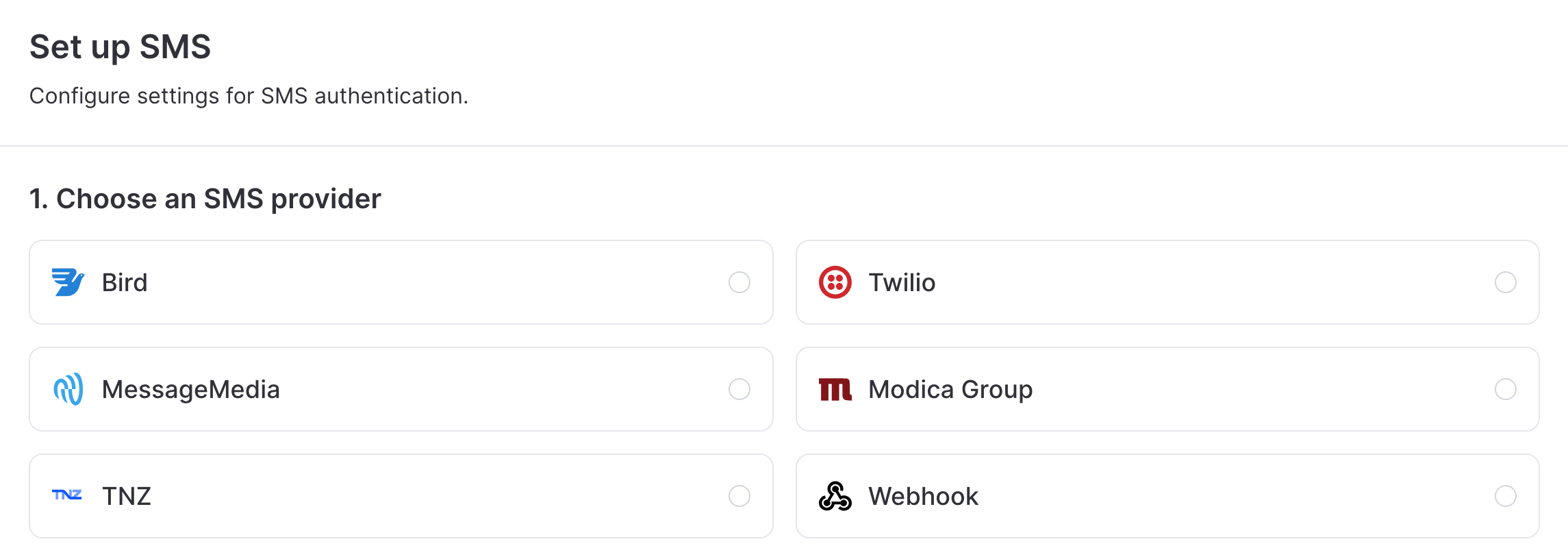
Navigate to [Authenticators](https://portal.authsignal.com/organisations/tenants/authenticators) in the Authsignal Portal, click on **SMS OTP**, and choose an SMS provider.
 1. Log in to your [Bird account](https://bird.com/)
2. Get your **Access key** from your Bird account settings
3. Note your **Workspace ID** from your workspace settings
4. Create or locate an SMS channel and note the **Channel ID**
5. In the Authsignal Portal, select **Bird** as your SMS provider
6. Enter your Bird access key, workspace ID, and channel ID
1. Log in to your [Twilio Console](https://console.twilio.com/)
2. Ensure you have at least one active phone number or messaging service in your Twilio account
3. From your dashboard, locate and copy your **Account SID** and **Auth Token**
4. In the Authsignal Portal, select **Twilio** as your SMS provider
5. Enter your **Account SID** and **Auth Token**
1. Log in to your [MessageMedia account](https://hub.messagemedia.com/)
2. Navigate to **Settings > API settings**
3. Click **Create API Key** to generate a new key
4. Copy your **API Key** and **API Secret**
5. Optionally, note a **Source number/Sender ID** if you want to specify one
6. In the Authsignal Portal, select **MessageMedia** as your SMS provider
7. Enter your **API Key**, **API Secret**, and optionally your **Source number/Sender ID**
1. Log in to your [TNZ Dashboard](https://www.tnz.co.nz/)
2. Navigate to the **Users** section
3. Create a new user or select an existing user
4. Click on the **API** tab within the user profile
5. Enable API access and copy the **Auth Token** (or **API Key**)
6. In the Authsignal Portal, select **TNZ** as your SMS provider
7. Enter your **API Key**
1. Contact [Modica Group](https://modica.group/) to set up your SMS account
2. Log in to your [Modica Omni dashboard](https://omni.modicagroup.com/)
3. Navigate to **Integrations > API Configuration**
4. Click on the **REST** tab
5. In the **Authentication** section, note your **Application Name** and generate or reset your **Password**
6. In the Authsignal Portal, select **Modica Group** as your SMS provider
7. Enter your **Application Name** and **Password**
For detailed instructions on setting up a webhook for SMS delivery, see the [webhooks documentation](/advanced-usage/webhooks/introduction).
## SDK setup
### Server SDK
Initialize the SDK using your secret key from the [API keys page](https://portal.authsignal.com/organisations/tenants/api) and the [API URL](/sdks/server/setup#regions) for your region.
```ts Node.js theme={null}
import { Authsignal } from "@authsignal/node";
const authsignal = new Authsignal({
apiSecretKey: "YOUR_SECRET_KEY",
apiUrl: "YOUR_API_URL",
});
```
```csharp C# theme={null}
using Authsignal;
var authsignal = new AuthsignalClient(
apiSecretKey: "YOUR_SECRET_KEY",
apiUrl: "YOUR_API_URL"
);
```
```java Java theme={null}
import com.authsignal.AuthsignalClient;
AuthsignalClient authsignal = new AuthsignalClient(
"YOUR_SECRET_KEY",
"YOUR_API_URL"
);
```
```ruby Ruby theme={null}
require 'authsignal'
Authsignal.setup do |config|
config.api_secret_key = ENV["YOUR_SECRET_KEY"]
config.api_url = "YOUR_API_URL"
end
```
```python Python theme={null}
from authsignal.client import AuthsignalClient
authsignal = AuthsignalClient(
api_secret_key="YOUR_SECRET_KEY",
api_url="YOUR_API_URL"
)
```
```php PHP theme={null}
Authsignal::setApiSecretKey("YOUR_SECRET_KEY");
Authsignal::setApiUrl("YOUR_API_URL");
```
```go Go theme={null}
import "github.com/authsignal/authsignalgo/v2/client"
client := NewAuthsignalClient(
"YOUR_SECRET_KEY",
"YOUR_API_URL",
)
```
### Client SDK
Initialize the [Web SDK](/sdks/client/web/setup) or [Mobile SDK](/sdks/client/mobile/setup) using your tenant ID from the [API keys page](https://portal.authsignal.com/organisations/tenants/api) and your [API URL](/sdks/server/setup#regions).
```ts Web theme={null}
import { Authsignal } from "@authsignal/browser";
const authsignal = new Authsignal({
tenantId: "YOUR_TENANT_ID",
baseUrl: "YOUR_API_URL",
});
```
```swift iOS theme={null}
import Authsignal
let authsignal = Authsignal(
tenantID: "YOUR_TENANT_ID",
baseURL: "YOUR_API_URL"
)
```
```kotlin Android theme={null}
import com.authsignal.Authsignal
val authsignal = Authsignal(
tenantID = "YOUR_TENANT_ID",
baseURL = "YOUR_API_URL",
)
```
```ts React Native theme={null}
import { Authsignal } from "react-native-authsignal";
const authsignal = new Authsignal({
tenantID: "YOUR_TENANT_ID",
baseURL: "YOUR_API_URL",
});
```
```dart Flutter theme={null}
import 'package:authsignal_flutter/authsignal_flutter.dart';
final authsignal = Authsignal(
"YOUR_TENANT_ID",
baseURL: "YOUR_API_URL"
);
```
## Sign-in
**Scenario** - Let users sign-in with SMS OTP as the **1st factor**.
Our [Server SDKs](/sdks/server) include methods to initiate and verify an OTP challenge for a given phone number.
These methods are well-suited for passwordless sign-in scenarios where you need to authenticate a user based on their phone number.
### 1. Initiate challenge
Call [Initiate Challenge](/sdks/server/challenges#initiate-challenge) to send an OTP to a phone number.
```ts Node.js theme={null}
const request = {
verificationMethod: "SMS",
action: "signInWithSms",
phoneNumber: "+64270000000",
};
const response = await authsignal.challenge(request);
const challengeId = response.challengeId;
```
```csharp C# theme={null}
var request = new ChallengeRequest(
VerificationMethod: VerificationMethod.SMS,
Action: "signInWithSms",
PhoneNumber: "+64270000000"
);
var response = await authsignal.challenge(request);
var challengeId = response.ChallengeId;
```
```java Java theme={null}
ChallengeRequest request = new ChallengeRequest();
request.verificationMethod = VerificationMethodType.SMS;
request.action = "signInWithSms";
request.phoneNumber = "+64270000000";
ChallengeResponse response = authsignal.challenge(request).get();
String challengeId = response.challengeId;
```
```ruby Ruby theme={null}
response = Authsignal.challenge(
verification_method: "SMS",
action: "signInWithSms",
phone_number: "+64270000000",
)
challenge_id = response[:challenge_id]
```
```go Go theme={null}
response, err := client.Challenge(
ChallengeRequest{
VerificationMethod: "SMS",
Action: "signInWithSms",
PhoneNumber: "+64270000000",
},
)
challengeId := response.challengeId
```
You can choose a value for the [action](/actions-rules/actions/getting-started) here which best describes what the user is doing in your app (e.g. signing in with SMS).
It will be used to track user activity in the Authsignal Portal.
### 2. Verify challenge
Once the user inputs the OTP code, call [Verify Challenge](/sdks/server/challenges#verify-challenge) to verify it.
```ts Node.js theme={null}
const request = {
challengeId: "3a991a14-690c-492b-a5e5-02b9056a4b7d",
verificationCode: "123456",
};
const response = await authsignal.verify(request);
const isVerified = response.isVerified;
```
```csharp C# theme={null}
var request = new VerifyRequest(
ChallengeId: "3a991a14-690c-492b-a5e5-02b9056a4b7d",
VerificationCode: "123456"
);
var response = await authsignal.Verify(request);
var isVerified = response.IsVerified;
```
```java Java theme={null}
VerifyRequest request = new VerifyRequest();
request.challengeId = "3a991a14-690c-492b-a5e5-02b9056a4b7d";
request.verificationCode = "123456";
VerifyResponse response = authsignal.verify(request).get();
boolean isVerified = response.isVerified;
```
```ruby Ruby theme={null}
response = Authsignal.verify(
challenge_id: "3a991a14-690c-492b-a5e5-02b9056a4b7d",
verification_code: "123456",
)
is_verified = response[:is_verified]
```
```go Go theme={null}
response, err := client.Verify(
VerifyRequest{
ChallengeId: "3a991a14-690c-492b-a5e5-02b9056a4b7d",
VerificationCode: "123456",
},
)
isVerified := response.IsVerified
```
### 3. Claim challenge
Now that the challenge has been verified, you can lookup the user in your IdP or DB based on their phone number.
For passwordless flows with a combined sign-up and sign-in UX, you may need to create the user at this point if no account exists.
Then claim the challenge once you know the primary user ID associated with the phone number.
```ts Node.js theme={null}
const request = {
challengeId: "3a991a14-690c-492b-a5e5-02b9056a4b7d",
userId: "dc58c6dc-a1fd-4a4f-8e2f-846636dd4833",
};
const response = await authsignal.claimChallenge(request);
```
```csharp C# theme={null}
var request = new ClaimChallengeRequest(
ChallengeId: "3a991a14-690c-492b-a5e5-02b9056a4b7d",
UserId: "dc58c6dc-a1fd-4a4f-8e2f-846636dd4833"
);
var response = await authsignal.ClaimChallenge(request);
```
```java Java theme={null}
ClaimChallengeRequest request = new ClaimChallengeRequest();
request.challengeId = "3a991a14-690c-492b-a5e5-02b9056a4b7d";
request.userId = "dc58c6dc-a1fd-4a4f-8e2f-846636dd4833";
ClaimChallengeResponse response = authsignal.claimChallenge(request).get();
```
```ruby Ruby theme={null}
response = Authsignal.claim_challenge(
challenge_id: "3a991a14-690c-492b-a5e5-02b9056a4b7d",
user_id: "dc58c6dc-a1fd-4a4f-8e2f-846636dd4833",
)
```
```go Go theme={null}
response, err := client.ClaimChallenge(
ClaimChallengeRequest{
ChallengeId: "3a991a14-690c-492b-a5e5-02b9056a4b7d",
UserId: "dc58c6dc-a1fd-4a4f-8e2f-846636dd4833",
},
)
```
This final step is important because it **attributes activity to the correct user and ensures observability in the Authsignal Portal**.
## Adaptive MFA
**Scenario** - Challenge users with SMS OTP as a **2nd factor** and use rules to decide when and
where in your app to trigger the challenge.
The following steps demonstrate how to implement **adaptive MFA** with SMS OTP - either at sign-in or as step-up authentication when the user performs a sensitive action in your app (e.g. making a payment).
### 1. Track action
Use a [Server SDK](/sdks/server) to track an action in your backend.
This step can apply [rules](/actions-rules/rules/getting-started) to determine if a challenge is required.
```ts Node.js theme={null}
const request = {
userId: "dc58c6dc-a1fd-4a4f-8e2f-846636dd4833",
action: "signIn",
attributes: {
phoneNumber: "+64270000000",
},
};
const response = await authsignal.track(request);
if (response.state === "CHALLENGE_REQUIRED") {
// Obtain token to present challenge
const token = response.token;
}
```
```csharp C# theme={null}
var request = new TrackRequest(
UserId: "dc58c6dc-a1fd-4a4f-8e2f-846636dd4833",
Action: "signIn",
Attributes: new TrackAttributes(
PhoneNumber: "+64270000000"
)
);
var response = await authsignal.Track(request);
if (response.State == UserActionState.CHALLENGE_REQUIRED)
{
// Obtain token to present challenge
var token = response.Token;
}
```
```java Java theme={null}
TrackRequest request = new TrackRequest();
request.userId = "dc58c6dc-a1fd-4a4f-8e2f-846636dd4833";
request.action = "signIn";
request.attributes = new TrackAttributes();
request.attributes.phoneNumber = "+64270000000";
TrackResponse response = authsignal.track(request).get();
if (response.state.equals(UserActionState.CHALLENGE_REQUIRED)) {
// Obtain token to present challenge
String token = response.token;
}
```
```ruby Ruby theme={null}
response = Authsignal.track({
user_id: 'dc58c6dc-a1fd-4a4f-8e2f-846636dd4833',
action: 'signIn',
attributes: {
phone_number: '+64270000000'
}
})
case response[:state]
when "CHALLENGE_REQUIRED"
# Obtain token to present challenge
token = response[:token]
end
```
```python Python theme={null}
response = authsignal.track(
user_id="dc58c6dc-a1fd-4a4f-8e2f-846636dd4833",
action="signIn",
attributes={
"phoneNumber": "+64270000000"
}
)
if response["state"] == "CHALLENGE_REQUIRED":
# Obtain token to present challenge
token = response["token"]
```
```php PHP theme={null}
$response = $authsignal->track([
'userId' => 'dc58c6dc-a1fd-4a4f-8e2f-846636dd4833',
'action' => 'signIn',
'attributes' => [
'phoneNumber' => '+64270000000'
]
]);
switch ($response['state']) {
case 'CHALLENGE_REQUIRED':
// Obtain token to present challenge
$token = $response['token'];
}
```
```go Go theme={null}
response, err := client.Track(
TrackRequest{
UserId: "dc58c6dc-a1fd-4a4f-8e2f-846636dd4833",
Action: "signIn",
Attributes: &TrackAttributes{
PhoneNumber: "+64270000000",
},
},
)
switch response.State {
case "CHALLENGE_REQUIRED":
// Obtain token to present challenge
token := response.Token
}
```
You can choose a value for the [action](/actions-rules/actions/getting-started) here which best describes what the user is doing in your app (e.g. `signIn` or `createPayment`).
Each action can have its own set of rules.
To learn more about using rules and handling different action states refer to our documentation on [actions](/actions-rules/actions/getting-started) and [rules](/actions-rules/rules/getting-started).
### 2. Present challenge
If the action state is `CHALLENGE_REQUIRED` then you can present an SMS OTP challenge using the [Web SDK](/sdks/client/web/setup) or [Mobile SDK](/sdks/client/mobile/setup).
```ts Web theme={null}
// Set token from the track response
authsignal.setToken("eyJhbGciOiJ...");
// Send the user an SMS OTP code
// You can call this multiple times via a 'resend' button
await authsignal.sms.challenge();
// Verify the inputted code matches the original code
const response = await authsignal.sms.verify({ code: "123456" });
// Obtain a new token
const token = response.token;
```
```swift iOS theme={null}
// Set token from the track response
authsignal.setToken("eyJhbGciOiJ...")
// Send the user an SMS OTP code
// You can call this multiple times via a 'resend' button
await authsignal.sms.challenge()
// Verify the inputted code matches the original code
let response = await authsignal.sms.verify(code: "123456")
// Obtain a new token
let token = response.token
```
```kotlin Android theme={null}
// Set token from the track response
authsignal.setToken("eyJhbGciOiJ...")
// Send the user an SMS OTP code
// You can call this multiple times via a 'resend' button
authsignal.sms.challenge()
// Verify the inputted code matches the original code
val response = authsignal.sms.verify(code = "123456")
// Obtain a new token
val token = response.token
```
```ts React Native theme={null}
// Set token from the track response
await authsignal.setToken("eyJhbGciOiJ...");
// Send the user an SMS OTP code
// You can call this multiple times via a 'resend' button
await authsignal.sms.challenge();
// Verify the inputted code matches the original code
const response = await authsignal.sms.verify({ code: "123456" });
// Obtain a new token
const token = response.token;
```
```dart Flutter theme={null}
// Set token from the track response
await authsignal.setToken("eyJhbGciOiJ...");
// Send the user an SMS OTP code
// You can call this multiple times via a 'resend' button
await authsignal.sms.challenge();
// Verify the inputted code matches the original code
final response = await authsignal.sms.verify(code: "123456");
// Obtain a new token
final token = response.token;
```
```js theme={null}
// Launch the pre-built UI with the URL from the track response
const result = await authsignal.launch(url);
// Obtain a token to validate in the next step
if (result.token) {
const token = result.token;
}
```
### 3. Validate action
Use the new token obtained from the client SDK to validate the action on your backend.
```ts Node.js theme={null}
const response = await authsignal.validateChallenge({
action: "signIn",
token: "eyJhbGciOiJIUzI....",
});
if (response.state === "CHALLENGE_SUCCEEDED") {
// User completed challenge successfully
}
```
```csharp C# theme={null}
var request = new ValidateChallengeRequest(
Action: "signIn",
Token: "eyJhbGciOiJIUzI...."
);
var response = await authsignal.ValidateChallenge(request);
if (response.State == UserActionState.CHALLENGE_SUCCEEDED) {
// User completed challenge successfully
}
```
```java Java theme={null}
ValidateChallengeRequest request = new ValidateChallengeRequest();
request.action = "signIn";
request.token = "eyJhbGciOiJIUzI....";
ValidateChallengeResponse response = authsignal.validateChallenge(request).get();
if (response.state == UserActionState.CHALLENGE_SUCCEEDED) {
// User completed challenge successfully
}
```
```ruby Ruby theme={null}
response = Authsignal.validate_challenge(action: "signIn", token: "eyJhbGciOiJIUzI....")
if response[:state] == "CHALLENGE_SUCCEEDED"
# User completed challenge successfully
end
```
```python Python theme={null}
response = authsignal.validate_challenge(action="signIn", token="eyJhbGciOiJIUzI....")
if response["state"] == "CHALLENGE_SUCCEEDED":
# User completed challenge successfully
```
```php PHP theme={null}
$response = Authsignal::validateChallenge(action: "signIn", token: "eyJhbGciOiJIUzI....");
if ($response["state"] === "CHALLENGE_SUCCEEDED") {
# User completed challenge successfully
}
```
```go Go theme={null}
response, err := client.ValidateChallenge(
ValidateChallengeRequest{
Action: "signIn",
Token: "eyJhbGciOiJ...",
},
)
if response.State == "CHALLENGE_SUCCEEDED" {
// User completed challenge successfully
}
```
If the action state shows that the SMS OTP challenge was completed successfully, you can let the user proceed with the action.
## Enrollment
**Scenario** - Enroll users in SMS OTP while they’re authenticated so it can be used later as a
method for adaptive MFA.
To use SMS OTP for adaptive MFA, users must be **enrolled** with SMS OTP as an authentication method.
This means their phone number has previously been verified and can be trusted.
The following steps demonstrate how to implement an enrollment flow using a [Server SDK](/sdks/server/overview).
### 1. Initiate challenge
Call [Initiate Challenge](/sdks/server/challenges#initiate-challenge) to send an OTP to a phone number.
```ts Node.js theme={null}
const request = {
verificationMethod: "SMS",
action: "enrollSms",
phoneNumber: "+64270000000",
userId: "dc58c6dc-a1fd-4a4f-8e2f-846636dd4833",
scope: "add:authenticators",
};
const response = await authsignal.challenge(request);
const challengeId = response.challengeId;
```
```csharp C# theme={null}
var request = new ChallengeRequest(
VerificationMethod: VerificationMethod.SMS,
Action: "enrollSms",
PhoneNumber: "+64270000000",
UserId: "dc58c6dc-a1fd-4a4f-8e2f-846636dd4833",
Scope: "add:authenticators",
);
var response = await authsignal.challenge(request);
var challengeId = response.ChallengeId;
```
```java Java theme={null}
ChallengeRequest request = new ChallengeRequest();
request.verificationMethod = VerificationMethodType.SMS;
request.action = "enrollSms";
request.phoneNumber = "+64270000000";
request.userId = "dc58c6dc-a1fd-4a4f-8e2f-846636dd4833";
request.scope = "add:authenticators";
ChallengeResponse response = authsignal.challenge(request).get();
String challengeId = response.challengeId;
```
```ruby Ruby theme={null}
response = Authsignal.challenge(
verification_method: "SMS",
action: "enrollSms",
phone_number: "+64270000000",
user_id: "dc58c6dc-a1fd-4a4f-8e2f-846636dd4833",
scope: "add:authenticators",
)
challenge_id = response[:challenge_id]
```
```go Go theme={null}
response, err := client.Challenge(
ChallengeRequest{
VerificationMethod: "SMS",
Action: "enrollSms",
PhoneNumber: "+64270000000",
UserId: "dc58c6dc-a1fd-4a4f-8e2f-846636dd4833",
Scope: "add:authenticators",
},
)
challengeId := response.challengeId
```
The **add:authenticators** scope is required to enroll a new SMS authenticator for an existing user.
This scope should only be used **when the user is in an already authenticated state**.
For more information on using scopes safely refer to our documentation on [authenticator binding](/advanced-usage/authenticator-binding).
### 2. Verify challenge
Once the user inputs the OTP code, call [Verify Challenge](/sdks/server/challenges#verify-challenge) to verify it.
```ts Node.js theme={null}
const request = {
challengeId: "3a991a14-690c-492b-a5e5-02b9056a4b7d",
verificationCode: "123456",
};
const response = await authsignal.verify(request);
const isVerified = response.isVerified;
```
```csharp C# theme={null}
var request = new VerifyRequest(
ChallengeId: "3a991a14-690c-492b-a5e5-02b9056a4b7d",
VerificationCode: "123456"
);
var response = await authsignal.Verify(request);
var isVerified = response.IsVerified;
```
```java Java theme={null}
VerifyRequest request = new VerifyRequest();
request.challengeId = "3a991a14-690c-492b-a5e5-02b9056a4b7d";
request.verificationCode = "123456";
VerifyResponse response = authsignal.verify(request).get();
boolean isVerified = response.isVerified;
```
```ruby Ruby theme={null}
response = Authsignal.verify(
challenge_id: "3a991a14-690c-492b-a5e5-02b9056a4b7d",
verification_code: "123456",
)
is_verified = response[:is_verified]
```
```go Go theme={null}
response, err := client.Verify(
VerifyRequest{
ChallengeId: "3a991a14-690c-492b-a5e5-02b9056a4b7d",
VerificationCode: "123456",
},
)
isVerified := response.IsVerified
```
## Update phone number
**Scenario** - Let users update their phone number while they’re authenticated, completing an OTP
challenge to verify the new number.
The following steps demonstrate how to implement an update phone number flow using a [Server SDK](/sdks/server/overview).
### 1. Initiate challenge
Call [Initiate Challenge](/sdks/server/challenges#initiate-challenge) to send an OTP to the user's new phone number.
```ts Node.js theme={null}
const request = {
verificationMethod: "SMS",
action: "updatePhoneNumber",
phoneNumber: "+64270000000",
userId: "dc58c6dc-a1fd-4a4f-8e2f-846636dd4833",
scope: "update:authenticators",
};
const response = await authsignal.challenge(request);
const challengeId = response.challengeId;
```
```csharp C# theme={null}
var request = new ChallengeRequest(
VerificationMethod: VerificationMethod.SMS,
Action: "updatePhoneNumber",
PhoneNumber: "+64270000000",
UserId: "dc58c6dc-a1fd-4a4f-8e2f-846636dd4833",
Scope: "update:authenticators",
);
var response = await authsignal.challenge(request);
var challengeId = response.ChallengeId;
```
```java Java theme={null}
ChallengeRequest request = new ChallengeRequest();
request.verificationMethod = VerificationMethodType.SMS;
request.action = "updatePhoneNumber";
request.phoneNumber = "+64270000000";
request.userId = "dc58c6dc-a1fd-4a4f-8e2f-846636dd4833";
request.scope = "update:authenticators";
ChallengeResponse response = authsignal.challenge(request).get();
String challengeId = response.challengeId;
```
```ruby Ruby theme={null}
response = Authsignal.challenge(
verification_method: "SMS",
action: "updatePhoneNumber",
phone_number: "+64270000000",
user_id: "dc58c6dc-a1fd-4a4f-8e2f-846636dd4833",
scope: "update:authenticators",
)
challenge_id = response[:challenge_id]
```
```go Go theme={null}
response, err := client.Challenge(
ChallengeRequest{
VerificationMethod: "SMS",
Action: "updatePhoneNumber",
PhoneNumber: "+64270000000",
UserId: "dc58c6dc-a1fd-4a4f-8e2f-846636dd4833",
Scope: "update:authenticators",
},
)
challengeId := response.challengeId
```
The **update:authenticators** scope is required to update a user's existing SMS authenticator to change the phone number.
This scope should only be used **when the user is in an already authenticated state**.
For more information on using scopes safely refer to our documentation on [authenticator binding](/advanced-usage/authenticator-binding).
### 2. Verify challenge
Once the user inputs the OTP code, call [Verify Challenge](/sdks/server/challenges#verify-challenge) to verify it.
```ts Node.js theme={null}
const request = {
challengeId: "3a991a14-690c-492b-a5e5-02b9056a4b7d",
verificationCode: "123456",
};
const response = await authsignal.verify(request);
const isVerified = response.isVerified;
```
```csharp C# theme={null}
var request = new VerifyRequest(
ChallengeId: "3a991a14-690c-492b-a5e5-02b9056a4b7d",
VerificationCode: "123456"
);
var response = await authsignal.Verify(request);
var isVerified = response.IsVerified;
```
```java Java theme={null}
VerifyRequest request = new VerifyRequest();
request.challengeId = "3a991a14-690c-492b-a5e5-02b9056a4b7d";
request.verificationCode = "123456";
VerifyResponse response = authsignal.verify(request).get();
boolean isVerified = response.isVerified;
```
```ruby Ruby theme={null}
response = Authsignal.verify(
challenge_id: "3a991a14-690c-492b-a5e5-02b9056a4b7d",
verification_code: "123456",
)
is_verified = response[:is_verified]
```
```go Go theme={null}
response, err := client.Verify(
VerifyRequest{
ChallengeId: "3a991a14-690c-492b-a5e5-02b9056a4b7d",
VerificationCode: "123456",
},
)
isVerified := response.IsVerified
```
## Verified phone numbers
**Scenario** - Enroll or update an SMS authenticator for a user when you've already verified their
phone number in another system, so it can be used later as a method for adaptive MFA.
In some cases you may have already verified a user's phone number using another system.
This means the user can be enrolled without having to complete an SMS OTP challenge.
```ts Node.js theme={null}
const request = {
userId: "dc58c6dc-a1fd-4a4f-8e2f-846636dd4833",
attributes: {
verificationMethod: "SMS",
phoneNumber: "+64270000000",
},
};
const response = authsignal.enrollVerifiedAuthenticator(request);
```
```csharp C# theme={null}
var request = new EnrollVerifiedAuthenticatorRequest(
UserId: "dc58c6dc-a1fd-4a4f-8e2f-846636dd4833",
Attributes: new EnrollVerifiedAuthenticatorAttributes(
VerificationMethod: VerificationMethod.SMS,
PhoneNumber: "+64270000000"
)
);
var response = await authsignal.EnrollVerifiedAuthenticator(request);
```
```java Java theme={null}
EnrollVerifiedAuthenticatorRequest request = new EnrollVerifiedAuthenticatorRequest();
request.userId = "dc58c6dc-a1fd-4a4f-8e2f-846636dd4833";
request.attributes = new EnrollVerifiedAuthenticatorAttributes();
request.attributes.verificationMethod = VerificationMethodType.SMS;
request.attributes.phoneNumber = "+64270000000";
authsignal.enrollVerifiedAuthenticator(request).get();
```
```ruby Ruby theme={null}
Authsignal.enroll_verified_authenticator(
user_id: "dc58c6dc-a1fd-4a4f-8e2f-846636dd4833",
attributes:{
verification_method: "SMS",
phone_number: "+64270000000"
}
)
```
```python Python theme={null}
response = authsignal.enroll_verified_authenticator(
user_id="dc58c6dc-a1fd-4a4f-8e2f-846636dd4833",
attributes={
"verificationMethod": "SMS",
"phoneNumber": "+64270000000"
}
)
```
```php PHP theme={null}
$response = Authsignal::enrollVerifiedAuthenticator([
'userId' => "dc58c6dc-a1fd-4a4f-8e2f-846636dd4833",
'attributes' => [
"verificationMethod" => "SMS",
"phoneNumber" => "+64270000000"
]
]);
```
```go Go theme={null}
response, err := client.EnrollVerifiedAuthenticator(
EnrollVerifiedAuthenticatorRequest{
UserId: "dc58c6dc-a1fd-4a4f-8e2f-846636dd4833",
Attributes: &EnrollVerifiedAuthenticatorAttributes{
VerificationMethod: "SMS",
PhoneNumber: "+64270000000",
},
},
)
```
This same call can also be used to **update** a verified phone number to a new value which has also been verified externally.
## Next steps
* [Pre-built UI](/implementation-options/prebuilt-ui/overview) - Rapidly deploy SMS OTP challenges using our pre-built UI
* [Web SDK](/sdks/client/web/setup) - Implement SMS OTP challenges while building your own UI
* [Mobile SDK](/sdks/client/mobile/setup) - Implement SMS OTP challenges in native mobile apps
* [Adaptive MFA](/actions-rules/rules/adaptive-mfa) - Set up smart rules to trigger authentication based on risk
* [Opt-in consent](/implementation-options/prebuilt-ui/opt-in-consent) - Collect user consent before sending SMS messages
* [Passkeys](/authentication-methods/passkey/web-sdk) - Offer the most secure and user-friendly passwordless authentication
1. Log in to your [Bird account](https://bird.com/)
2. Get your **Access key** from your Bird account settings
3. Note your **Workspace ID** from your workspace settings
4. Create or locate an SMS channel and note the **Channel ID**
5. In the Authsignal Portal, select **Bird** as your SMS provider
6. Enter your Bird access key, workspace ID, and channel ID
1. Log in to your [Twilio Console](https://console.twilio.com/)
2. Ensure you have at least one active phone number or messaging service in your Twilio account
3. From your dashboard, locate and copy your **Account SID** and **Auth Token**
4. In the Authsignal Portal, select **Twilio** as your SMS provider
5. Enter your **Account SID** and **Auth Token**
1. Log in to your [MessageMedia account](https://hub.messagemedia.com/)
2. Navigate to **Settings > API settings**
3. Click **Create API Key** to generate a new key
4. Copy your **API Key** and **API Secret**
5. Optionally, note a **Source number/Sender ID** if you want to specify one
6. In the Authsignal Portal, select **MessageMedia** as your SMS provider
7. Enter your **API Key**, **API Secret**, and optionally your **Source number/Sender ID**
1. Log in to your [TNZ Dashboard](https://www.tnz.co.nz/)
2. Navigate to the **Users** section
3. Create a new user or select an existing user
4. Click on the **API** tab within the user profile
5. Enable API access and copy the **Auth Token** (or **API Key**)
6. In the Authsignal Portal, select **TNZ** as your SMS provider
7. Enter your **API Key**
1. Contact [Modica Group](https://modica.group/) to set up your SMS account
2. Log in to your [Modica Omni dashboard](https://omni.modicagroup.com/)
3. Navigate to **Integrations > API Configuration**
4. Click on the **REST** tab
5. In the **Authentication** section, note your **Application Name** and generate or reset your **Password**
6. In the Authsignal Portal, select **Modica Group** as your SMS provider
7. Enter your **Application Name** and **Password**
For detailed instructions on setting up a webhook for SMS delivery, see the [webhooks documentation](/advanced-usage/webhooks/introduction).
## SDK setup
### Server SDK
Initialize the SDK using your secret key from the [API keys page](https://portal.authsignal.com/organisations/tenants/api) and the [API URL](/sdks/server/setup#regions) for your region.
```ts Node.js theme={null}
import { Authsignal } from "@authsignal/node";
const authsignal = new Authsignal({
apiSecretKey: "YOUR_SECRET_KEY",
apiUrl: "YOUR_API_URL",
});
```
```csharp C# theme={null}
using Authsignal;
var authsignal = new AuthsignalClient(
apiSecretKey: "YOUR_SECRET_KEY",
apiUrl: "YOUR_API_URL"
);
```
```java Java theme={null}
import com.authsignal.AuthsignalClient;
AuthsignalClient authsignal = new AuthsignalClient(
"YOUR_SECRET_KEY",
"YOUR_API_URL"
);
```
```ruby Ruby theme={null}
require 'authsignal'
Authsignal.setup do |config|
config.api_secret_key = ENV["YOUR_SECRET_KEY"]
config.api_url = "YOUR_API_URL"
end
```
```python Python theme={null}
from authsignal.client import AuthsignalClient
authsignal = AuthsignalClient(
api_secret_key="YOUR_SECRET_KEY",
api_url="YOUR_API_URL"
)
```
```php PHP theme={null}
Authsignal::setApiSecretKey("YOUR_SECRET_KEY");
Authsignal::setApiUrl("YOUR_API_URL");
```
```go Go theme={null}
import "github.com/authsignal/authsignalgo/v2/client"
client := NewAuthsignalClient(
"YOUR_SECRET_KEY",
"YOUR_API_URL",
)
```
### Client SDK
Initialize the [Web SDK](/sdks/client/web/setup) or [Mobile SDK](/sdks/client/mobile/setup) using your tenant ID from the [API keys page](https://portal.authsignal.com/organisations/tenants/api) and your [API URL](/sdks/server/setup#regions).
```ts Web theme={null}
import { Authsignal } from "@authsignal/browser";
const authsignal = new Authsignal({
tenantId: "YOUR_TENANT_ID",
baseUrl: "YOUR_API_URL",
});
```
```swift iOS theme={null}
import Authsignal
let authsignal = Authsignal(
tenantID: "YOUR_TENANT_ID",
baseURL: "YOUR_API_URL"
)
```
```kotlin Android theme={null}
import com.authsignal.Authsignal
val authsignal = Authsignal(
tenantID = "YOUR_TENANT_ID",
baseURL = "YOUR_API_URL",
)
```
```ts React Native theme={null}
import { Authsignal } from "react-native-authsignal";
const authsignal = new Authsignal({
tenantID: "YOUR_TENANT_ID",
baseURL: "YOUR_API_URL",
});
```
```dart Flutter theme={null}
import 'package:authsignal_flutter/authsignal_flutter.dart';
final authsignal = Authsignal(
"YOUR_TENANT_ID",
baseURL: "YOUR_API_URL"
);
```
## Sign-in
**Scenario** - Let users sign-in with SMS OTP as the **1st factor**.
Our [Server SDKs](/sdks/server) include methods to initiate and verify an OTP challenge for a given phone number.
These methods are well-suited for passwordless sign-in scenarios where you need to authenticate a user based on their phone number.
### 1. Initiate challenge
Call [Initiate Challenge](/sdks/server/challenges#initiate-challenge) to send an OTP to a phone number.
```ts Node.js theme={null}
const request = {
verificationMethod: "SMS",
action: "signInWithSms",
phoneNumber: "+64270000000",
};
const response = await authsignal.challenge(request);
const challengeId = response.challengeId;
```
```csharp C# theme={null}
var request = new ChallengeRequest(
VerificationMethod: VerificationMethod.SMS,
Action: "signInWithSms",
PhoneNumber: "+64270000000"
);
var response = await authsignal.challenge(request);
var challengeId = response.ChallengeId;
```
```java Java theme={null}
ChallengeRequest request = new ChallengeRequest();
request.verificationMethod = VerificationMethodType.SMS;
request.action = "signInWithSms";
request.phoneNumber = "+64270000000";
ChallengeResponse response = authsignal.challenge(request).get();
String challengeId = response.challengeId;
```
```ruby Ruby theme={null}
response = Authsignal.challenge(
verification_method: "SMS",
action: "signInWithSms",
phone_number: "+64270000000",
)
challenge_id = response[:challenge_id]
```
```go Go theme={null}
response, err := client.Challenge(
ChallengeRequest{
VerificationMethod: "SMS",
Action: "signInWithSms",
PhoneNumber: "+64270000000",
},
)
challengeId := response.challengeId
```
You can choose a value for the [action](/actions-rules/actions/getting-started) here which best describes what the user is doing in your app (e.g. signing in with SMS).
It will be used to track user activity in the Authsignal Portal.
### 2. Verify challenge
Once the user inputs the OTP code, call [Verify Challenge](/sdks/server/challenges#verify-challenge) to verify it.
```ts Node.js theme={null}
const request = {
challengeId: "3a991a14-690c-492b-a5e5-02b9056a4b7d",
verificationCode: "123456",
};
const response = await authsignal.verify(request);
const isVerified = response.isVerified;
```
```csharp C# theme={null}
var request = new VerifyRequest(
ChallengeId: "3a991a14-690c-492b-a5e5-02b9056a4b7d",
VerificationCode: "123456"
);
var response = await authsignal.Verify(request);
var isVerified = response.IsVerified;
```
```java Java theme={null}
VerifyRequest request = new VerifyRequest();
request.challengeId = "3a991a14-690c-492b-a5e5-02b9056a4b7d";
request.verificationCode = "123456";
VerifyResponse response = authsignal.verify(request).get();
boolean isVerified = response.isVerified;
```
```ruby Ruby theme={null}
response = Authsignal.verify(
challenge_id: "3a991a14-690c-492b-a5e5-02b9056a4b7d",
verification_code: "123456",
)
is_verified = response[:is_verified]
```
```go Go theme={null}
response, err := client.Verify(
VerifyRequest{
ChallengeId: "3a991a14-690c-492b-a5e5-02b9056a4b7d",
VerificationCode: "123456",
},
)
isVerified := response.IsVerified
```
### 3. Claim challenge
Now that the challenge has been verified, you can lookup the user in your IdP or DB based on their phone number.
For passwordless flows with a combined sign-up and sign-in UX, you may need to create the user at this point if no account exists.
Then claim the challenge once you know the primary user ID associated with the phone number.
```ts Node.js theme={null}
const request = {
challengeId: "3a991a14-690c-492b-a5e5-02b9056a4b7d",
userId: "dc58c6dc-a1fd-4a4f-8e2f-846636dd4833",
};
const response = await authsignal.claimChallenge(request);
```
```csharp C# theme={null}
var request = new ClaimChallengeRequest(
ChallengeId: "3a991a14-690c-492b-a5e5-02b9056a4b7d",
UserId: "dc58c6dc-a1fd-4a4f-8e2f-846636dd4833"
);
var response = await authsignal.ClaimChallenge(request);
```
```java Java theme={null}
ClaimChallengeRequest request = new ClaimChallengeRequest();
request.challengeId = "3a991a14-690c-492b-a5e5-02b9056a4b7d";
request.userId = "dc58c6dc-a1fd-4a4f-8e2f-846636dd4833";
ClaimChallengeResponse response = authsignal.claimChallenge(request).get();
```
```ruby Ruby theme={null}
response = Authsignal.claim_challenge(
challenge_id: "3a991a14-690c-492b-a5e5-02b9056a4b7d",
user_id: "dc58c6dc-a1fd-4a4f-8e2f-846636dd4833",
)
```
```go Go theme={null}
response, err := client.ClaimChallenge(
ClaimChallengeRequest{
ChallengeId: "3a991a14-690c-492b-a5e5-02b9056a4b7d",
UserId: "dc58c6dc-a1fd-4a4f-8e2f-846636dd4833",
},
)
```
This final step is important because it **attributes activity to the correct user and ensures observability in the Authsignal Portal**.
## Adaptive MFA
**Scenario** - Challenge users with SMS OTP as a **2nd factor** and use rules to decide when and
where in your app to trigger the challenge.
The following steps demonstrate how to implement **adaptive MFA** with SMS OTP - either at sign-in or as step-up authentication when the user performs a sensitive action in your app (e.g. making a payment).
### 1. Track action
Use a [Server SDK](/sdks/server) to track an action in your backend.
This step can apply [rules](/actions-rules/rules/getting-started) to determine if a challenge is required.
```ts Node.js theme={null}
const request = {
userId: "dc58c6dc-a1fd-4a4f-8e2f-846636dd4833",
action: "signIn",
attributes: {
phoneNumber: "+64270000000",
},
};
const response = await authsignal.track(request);
if (response.state === "CHALLENGE_REQUIRED") {
// Obtain token to present challenge
const token = response.token;
}
```
```csharp C# theme={null}
var request = new TrackRequest(
UserId: "dc58c6dc-a1fd-4a4f-8e2f-846636dd4833",
Action: "signIn",
Attributes: new TrackAttributes(
PhoneNumber: "+64270000000"
)
);
var response = await authsignal.Track(request);
if (response.State == UserActionState.CHALLENGE_REQUIRED)
{
// Obtain token to present challenge
var token = response.Token;
}
```
```java Java theme={null}
TrackRequest request = new TrackRequest();
request.userId = "dc58c6dc-a1fd-4a4f-8e2f-846636dd4833";
request.action = "signIn";
request.attributes = new TrackAttributes();
request.attributes.phoneNumber = "+64270000000";
TrackResponse response = authsignal.track(request).get();
if (response.state.equals(UserActionState.CHALLENGE_REQUIRED)) {
// Obtain token to present challenge
String token = response.token;
}
```
```ruby Ruby theme={null}
response = Authsignal.track({
user_id: 'dc58c6dc-a1fd-4a4f-8e2f-846636dd4833',
action: 'signIn',
attributes: {
phone_number: '+64270000000'
}
})
case response[:state]
when "CHALLENGE_REQUIRED"
# Obtain token to present challenge
token = response[:token]
end
```
```python Python theme={null}
response = authsignal.track(
user_id="dc58c6dc-a1fd-4a4f-8e2f-846636dd4833",
action="signIn",
attributes={
"phoneNumber": "+64270000000"
}
)
if response["state"] == "CHALLENGE_REQUIRED":
# Obtain token to present challenge
token = response["token"]
```
```php PHP theme={null}
$response = $authsignal->track([
'userId' => 'dc58c6dc-a1fd-4a4f-8e2f-846636dd4833',
'action' => 'signIn',
'attributes' => [
'phoneNumber' => '+64270000000'
]
]);
switch ($response['state']) {
case 'CHALLENGE_REQUIRED':
// Obtain token to present challenge
$token = $response['token'];
}
```
```go Go theme={null}
response, err := client.Track(
TrackRequest{
UserId: "dc58c6dc-a1fd-4a4f-8e2f-846636dd4833",
Action: "signIn",
Attributes: &TrackAttributes{
PhoneNumber: "+64270000000",
},
},
)
switch response.State {
case "CHALLENGE_REQUIRED":
// Obtain token to present challenge
token := response.Token
}
```
You can choose a value for the [action](/actions-rules/actions/getting-started) here which best describes what the user is doing in your app (e.g. `signIn` or `createPayment`).
Each action can have its own set of rules.
To learn more about using rules and handling different action states refer to our documentation on [actions](/actions-rules/actions/getting-started) and [rules](/actions-rules/rules/getting-started).
### 2. Present challenge
If the action state is `CHALLENGE_REQUIRED` then you can present an SMS OTP challenge using the [Web SDK](/sdks/client/web/setup) or [Mobile SDK](/sdks/client/mobile/setup).
```ts Web theme={null}
// Set token from the track response
authsignal.setToken("eyJhbGciOiJ...");
// Send the user an SMS OTP code
// You can call this multiple times via a 'resend' button
await authsignal.sms.challenge();
// Verify the inputted code matches the original code
const response = await authsignal.sms.verify({ code: "123456" });
// Obtain a new token
const token = response.token;
```
```swift iOS theme={null}
// Set token from the track response
authsignal.setToken("eyJhbGciOiJ...")
// Send the user an SMS OTP code
// You can call this multiple times via a 'resend' button
await authsignal.sms.challenge()
// Verify the inputted code matches the original code
let response = await authsignal.sms.verify(code: "123456")
// Obtain a new token
let token = response.token
```
```kotlin Android theme={null}
// Set token from the track response
authsignal.setToken("eyJhbGciOiJ...")
// Send the user an SMS OTP code
// You can call this multiple times via a 'resend' button
authsignal.sms.challenge()
// Verify the inputted code matches the original code
val response = authsignal.sms.verify(code = "123456")
// Obtain a new token
val token = response.token
```
```ts React Native theme={null}
// Set token from the track response
await authsignal.setToken("eyJhbGciOiJ...");
// Send the user an SMS OTP code
// You can call this multiple times via a 'resend' button
await authsignal.sms.challenge();
// Verify the inputted code matches the original code
const response = await authsignal.sms.verify({ code: "123456" });
// Obtain a new token
const token = response.token;
```
```dart Flutter theme={null}
// Set token from the track response
await authsignal.setToken("eyJhbGciOiJ...");
// Send the user an SMS OTP code
// You can call this multiple times via a 'resend' button
await authsignal.sms.challenge();
// Verify the inputted code matches the original code
final response = await authsignal.sms.verify(code: "123456");
// Obtain a new token
final token = response.token;
```
```js theme={null}
// Launch the pre-built UI with the URL from the track response
const result = await authsignal.launch(url);
// Obtain a token to validate in the next step
if (result.token) {
const token = result.token;
}
```
### 3. Validate action
Use the new token obtained from the client SDK to validate the action on your backend.
```ts Node.js theme={null}
const response = await authsignal.validateChallenge({
action: "signIn",
token: "eyJhbGciOiJIUzI....",
});
if (response.state === "CHALLENGE_SUCCEEDED") {
// User completed challenge successfully
}
```
```csharp C# theme={null}
var request = new ValidateChallengeRequest(
Action: "signIn",
Token: "eyJhbGciOiJIUzI...."
);
var response = await authsignal.ValidateChallenge(request);
if (response.State == UserActionState.CHALLENGE_SUCCEEDED) {
// User completed challenge successfully
}
```
```java Java theme={null}
ValidateChallengeRequest request = new ValidateChallengeRequest();
request.action = "signIn";
request.token = "eyJhbGciOiJIUzI....";
ValidateChallengeResponse response = authsignal.validateChallenge(request).get();
if (response.state == UserActionState.CHALLENGE_SUCCEEDED) {
// User completed challenge successfully
}
```
```ruby Ruby theme={null}
response = Authsignal.validate_challenge(action: "signIn", token: "eyJhbGciOiJIUzI....")
if response[:state] == "CHALLENGE_SUCCEEDED"
# User completed challenge successfully
end
```
```python Python theme={null}
response = authsignal.validate_challenge(action="signIn", token="eyJhbGciOiJIUzI....")
if response["state"] == "CHALLENGE_SUCCEEDED":
# User completed challenge successfully
```
```php PHP theme={null}
$response = Authsignal::validateChallenge(action: "signIn", token: "eyJhbGciOiJIUzI....");
if ($response["state"] === "CHALLENGE_SUCCEEDED") {
# User completed challenge successfully
}
```
```go Go theme={null}
response, err := client.ValidateChallenge(
ValidateChallengeRequest{
Action: "signIn",
Token: "eyJhbGciOiJ...",
},
)
if response.State == "CHALLENGE_SUCCEEDED" {
// User completed challenge successfully
}
```
If the action state shows that the SMS OTP challenge was completed successfully, you can let the user proceed with the action.
## Enrollment
**Scenario** - Enroll users in SMS OTP while they’re authenticated so it can be used later as a
method for adaptive MFA.
To use SMS OTP for adaptive MFA, users must be **enrolled** with SMS OTP as an authentication method.
This means their phone number has previously been verified and can be trusted.
The following steps demonstrate how to implement an enrollment flow using a [Server SDK](/sdks/server/overview).
### 1. Initiate challenge
Call [Initiate Challenge](/sdks/server/challenges#initiate-challenge) to send an OTP to a phone number.
```ts Node.js theme={null}
const request = {
verificationMethod: "SMS",
action: "enrollSms",
phoneNumber: "+64270000000",
userId: "dc58c6dc-a1fd-4a4f-8e2f-846636dd4833",
scope: "add:authenticators",
};
const response = await authsignal.challenge(request);
const challengeId = response.challengeId;
```
```csharp C# theme={null}
var request = new ChallengeRequest(
VerificationMethod: VerificationMethod.SMS,
Action: "enrollSms",
PhoneNumber: "+64270000000",
UserId: "dc58c6dc-a1fd-4a4f-8e2f-846636dd4833",
Scope: "add:authenticators",
);
var response = await authsignal.challenge(request);
var challengeId = response.ChallengeId;
```
```java Java theme={null}
ChallengeRequest request = new ChallengeRequest();
request.verificationMethod = VerificationMethodType.SMS;
request.action = "enrollSms";
request.phoneNumber = "+64270000000";
request.userId = "dc58c6dc-a1fd-4a4f-8e2f-846636dd4833";
request.scope = "add:authenticators";
ChallengeResponse response = authsignal.challenge(request).get();
String challengeId = response.challengeId;
```
```ruby Ruby theme={null}
response = Authsignal.challenge(
verification_method: "SMS",
action: "enrollSms",
phone_number: "+64270000000",
user_id: "dc58c6dc-a1fd-4a4f-8e2f-846636dd4833",
scope: "add:authenticators",
)
challenge_id = response[:challenge_id]
```
```go Go theme={null}
response, err := client.Challenge(
ChallengeRequest{
VerificationMethod: "SMS",
Action: "enrollSms",
PhoneNumber: "+64270000000",
UserId: "dc58c6dc-a1fd-4a4f-8e2f-846636dd4833",
Scope: "add:authenticators",
},
)
challengeId := response.challengeId
```
The **add:authenticators** scope is required to enroll a new SMS authenticator for an existing user.
This scope should only be used **when the user is in an already authenticated state**.
For more information on using scopes safely refer to our documentation on [authenticator binding](/advanced-usage/authenticator-binding).
### 2. Verify challenge
Once the user inputs the OTP code, call [Verify Challenge](/sdks/server/challenges#verify-challenge) to verify it.
```ts Node.js theme={null}
const request = {
challengeId: "3a991a14-690c-492b-a5e5-02b9056a4b7d",
verificationCode: "123456",
};
const response = await authsignal.verify(request);
const isVerified = response.isVerified;
```
```csharp C# theme={null}
var request = new VerifyRequest(
ChallengeId: "3a991a14-690c-492b-a5e5-02b9056a4b7d",
VerificationCode: "123456"
);
var response = await authsignal.Verify(request);
var isVerified = response.IsVerified;
```
```java Java theme={null}
VerifyRequest request = new VerifyRequest();
request.challengeId = "3a991a14-690c-492b-a5e5-02b9056a4b7d";
request.verificationCode = "123456";
VerifyResponse response = authsignal.verify(request).get();
boolean isVerified = response.isVerified;
```
```ruby Ruby theme={null}
response = Authsignal.verify(
challenge_id: "3a991a14-690c-492b-a5e5-02b9056a4b7d",
verification_code: "123456",
)
is_verified = response[:is_verified]
```
```go Go theme={null}
response, err := client.Verify(
VerifyRequest{
ChallengeId: "3a991a14-690c-492b-a5e5-02b9056a4b7d",
VerificationCode: "123456",
},
)
isVerified := response.IsVerified
```
## Update phone number
**Scenario** - Let users update their phone number while they’re authenticated, completing an OTP
challenge to verify the new number.
The following steps demonstrate how to implement an update phone number flow using a [Server SDK](/sdks/server/overview).
### 1. Initiate challenge
Call [Initiate Challenge](/sdks/server/challenges#initiate-challenge) to send an OTP to the user's new phone number.
```ts Node.js theme={null}
const request = {
verificationMethod: "SMS",
action: "updatePhoneNumber",
phoneNumber: "+64270000000",
userId: "dc58c6dc-a1fd-4a4f-8e2f-846636dd4833",
scope: "update:authenticators",
};
const response = await authsignal.challenge(request);
const challengeId = response.challengeId;
```
```csharp C# theme={null}
var request = new ChallengeRequest(
VerificationMethod: VerificationMethod.SMS,
Action: "updatePhoneNumber",
PhoneNumber: "+64270000000",
UserId: "dc58c6dc-a1fd-4a4f-8e2f-846636dd4833",
Scope: "update:authenticators",
);
var response = await authsignal.challenge(request);
var challengeId = response.ChallengeId;
```
```java Java theme={null}
ChallengeRequest request = new ChallengeRequest();
request.verificationMethod = VerificationMethodType.SMS;
request.action = "updatePhoneNumber";
request.phoneNumber = "+64270000000";
request.userId = "dc58c6dc-a1fd-4a4f-8e2f-846636dd4833";
request.scope = "update:authenticators";
ChallengeResponse response = authsignal.challenge(request).get();
String challengeId = response.challengeId;
```
```ruby Ruby theme={null}
response = Authsignal.challenge(
verification_method: "SMS",
action: "updatePhoneNumber",
phone_number: "+64270000000",
user_id: "dc58c6dc-a1fd-4a4f-8e2f-846636dd4833",
scope: "update:authenticators",
)
challenge_id = response[:challenge_id]
```
```go Go theme={null}
response, err := client.Challenge(
ChallengeRequest{
VerificationMethod: "SMS",
Action: "updatePhoneNumber",
PhoneNumber: "+64270000000",
UserId: "dc58c6dc-a1fd-4a4f-8e2f-846636dd4833",
Scope: "update:authenticators",
},
)
challengeId := response.challengeId
```
The **update:authenticators** scope is required to update a user's existing SMS authenticator to change the phone number.
This scope should only be used **when the user is in an already authenticated state**.
For more information on using scopes safely refer to our documentation on [authenticator binding](/advanced-usage/authenticator-binding).
### 2. Verify challenge
Once the user inputs the OTP code, call [Verify Challenge](/sdks/server/challenges#verify-challenge) to verify it.
```ts Node.js theme={null}
const request = {
challengeId: "3a991a14-690c-492b-a5e5-02b9056a4b7d",
verificationCode: "123456",
};
const response = await authsignal.verify(request);
const isVerified = response.isVerified;
```
```csharp C# theme={null}
var request = new VerifyRequest(
ChallengeId: "3a991a14-690c-492b-a5e5-02b9056a4b7d",
VerificationCode: "123456"
);
var response = await authsignal.Verify(request);
var isVerified = response.IsVerified;
```
```java Java theme={null}
VerifyRequest request = new VerifyRequest();
request.challengeId = "3a991a14-690c-492b-a5e5-02b9056a4b7d";
request.verificationCode = "123456";
VerifyResponse response = authsignal.verify(request).get();
boolean isVerified = response.isVerified;
```
```ruby Ruby theme={null}
response = Authsignal.verify(
challenge_id: "3a991a14-690c-492b-a5e5-02b9056a4b7d",
verification_code: "123456",
)
is_verified = response[:is_verified]
```
```go Go theme={null}
response, err := client.Verify(
VerifyRequest{
ChallengeId: "3a991a14-690c-492b-a5e5-02b9056a4b7d",
VerificationCode: "123456",
},
)
isVerified := response.IsVerified
```
## Verified phone numbers
**Scenario** - Enroll or update an SMS authenticator for a user when you've already verified their
phone number in another system, so it can be used later as a method for adaptive MFA.
In some cases you may have already verified a user's phone number using another system.
This means the user can be enrolled without having to complete an SMS OTP challenge.
```ts Node.js theme={null}
const request = {
userId: "dc58c6dc-a1fd-4a4f-8e2f-846636dd4833",
attributes: {
verificationMethod: "SMS",
phoneNumber: "+64270000000",
},
};
const response = authsignal.enrollVerifiedAuthenticator(request);
```
```csharp C# theme={null}
var request = new EnrollVerifiedAuthenticatorRequest(
UserId: "dc58c6dc-a1fd-4a4f-8e2f-846636dd4833",
Attributes: new EnrollVerifiedAuthenticatorAttributes(
VerificationMethod: VerificationMethod.SMS,
PhoneNumber: "+64270000000"
)
);
var response = await authsignal.EnrollVerifiedAuthenticator(request);
```
```java Java theme={null}
EnrollVerifiedAuthenticatorRequest request = new EnrollVerifiedAuthenticatorRequest();
request.userId = "dc58c6dc-a1fd-4a4f-8e2f-846636dd4833";
request.attributes = new EnrollVerifiedAuthenticatorAttributes();
request.attributes.verificationMethod = VerificationMethodType.SMS;
request.attributes.phoneNumber = "+64270000000";
authsignal.enrollVerifiedAuthenticator(request).get();
```
```ruby Ruby theme={null}
Authsignal.enroll_verified_authenticator(
user_id: "dc58c6dc-a1fd-4a4f-8e2f-846636dd4833",
attributes:{
verification_method: "SMS",
phone_number: "+64270000000"
}
)
```
```python Python theme={null}
response = authsignal.enroll_verified_authenticator(
user_id="dc58c6dc-a1fd-4a4f-8e2f-846636dd4833",
attributes={
"verificationMethod": "SMS",
"phoneNumber": "+64270000000"
}
)
```
```php PHP theme={null}
$response = Authsignal::enrollVerifiedAuthenticator([
'userId' => "dc58c6dc-a1fd-4a4f-8e2f-846636dd4833",
'attributes' => [
"verificationMethod" => "SMS",
"phoneNumber" => "+64270000000"
]
]);
```
```go Go theme={null}
response, err := client.EnrollVerifiedAuthenticator(
EnrollVerifiedAuthenticatorRequest{
UserId: "dc58c6dc-a1fd-4a4f-8e2f-846636dd4833",
Attributes: &EnrollVerifiedAuthenticatorAttributes{
VerificationMethod: "SMS",
PhoneNumber: "+64270000000",
},
},
)
```
This same call can also be used to **update** a verified phone number to a new value which has also been verified externally.
## Next steps
* [Pre-built UI](/implementation-options/prebuilt-ui/overview) - Rapidly deploy SMS OTP challenges using our pre-built UI
* [Web SDK](/sdks/client/web/setup) - Implement SMS OTP challenges while building your own UI
* [Mobile SDK](/sdks/client/mobile/setup) - Implement SMS OTP challenges in native mobile apps
* [Adaptive MFA](/actions-rules/rules/adaptive-mfa) - Set up smart rules to trigger authentication based on risk
* [Opt-in consent](/implementation-options/prebuilt-ui/opt-in-consent) - Collect user consent before sending SMS messages
* [Passkeys](/authentication-methods/passkey/web-sdk) - Offer the most secure and user-friendly passwordless authentication