> ## Documentation Index
> Fetch the complete documentation index at: https://docs.authsignal.com/llms.txt
> Use this file to discover all available pages before exploring further.
# Attestation
> Verify that app credentials are enrolled from legitimate apps running on real devices.
Attestation ensures that app credentials are enrolled from a legitimate, unmodified version of your app running on a real device.
This applies to [in-app verification](/authentication-methods/app-verification/in-app), [push verification](/authentication-methods/app-verification/push), and [QR code verification](/authentication-methods/app-verification/qr-code) methods.
When enabled, the Authsignal [Mobile SDK](/sdks/client/mobile/setup) generates a platform-specific attestation during credential enrollment which is verified server-side by Authsignal.
* **iOS**: Uses Apple's [App Attest](https://developer.apple.com/documentation/devicecheck/establishing-your-app-s-integrity) service to generate an attestation bound to the device.
* **Android**: Uses Google's [Play Integrity](https://developer.android.com/google/play/integrity) API to generate an integrity token. Authsignal uses the [classic request](https://developer.android.com/google/play/integrity/classic) type, which is suited to one-off checks of high-value actions such as credential enrollment.
Attestation requires the following minimum SDK versions: **iOS 2.5.0**, **Android 3.6.0**,
**React Native 2.9.0**.
## Portal setup
Enable attestation for your tenant in the [Authsignal Portal](https://portal.authsignal.com/organisations/tenants/device_integrity).
### Configuration
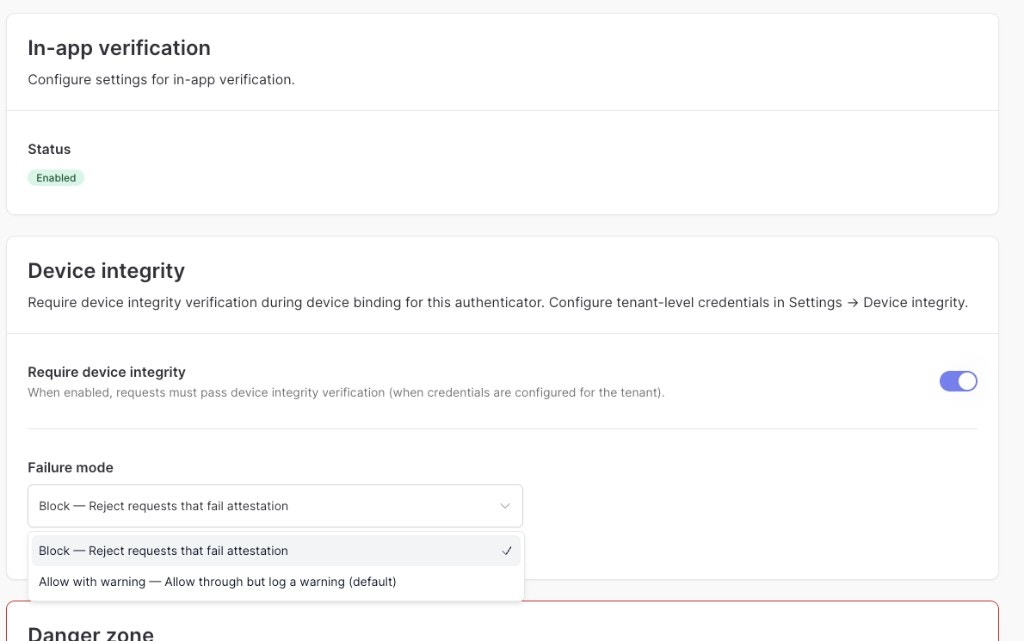
Controls how the server handles attestation results during credential enrollment.
* **Block** - Enrollment is rejected if attestation fails or is not provided. When [validating the challenge](/sdks/server/challenges#validate-challenge) on your backend, the `state` will be `BLOCK` - your backend should handle this by denying access or preventing the user from proceeding.
* **Review required** - Enrollment is allowed but the credential is flagged for review if attestation fails. When [validating the challenge](/sdks/server/challenges#validate-challenge) on your backend, the `state` will be `REVIEW_REQUIRED` - your backend should handle this appropriately, for example by restricting access to certain features or flagging the user for manual review.
 When enabled, accepts attestations from development builds. This should be enabled during development and testing, and disabled in production.
* **iOS**: Accepts attestations from apps signed with a development provisioning profile (App Attest sandbox environment).
* **Android**: Not applicable - Play Integrity requires distribution via the Google Play Store (including internal testing tracks). For local development builds not distributed via Play, set `performAttestation` to `false` in your SDK calls.
When enabled, accepts attestations from development builds. This should be enabled during development and testing, and disabled in production.
* **iOS**: Accepts attestations from apps signed with a development provisioning profile (App Attest sandbox environment).
* **Android**: Not applicable - Play Integrity requires distribution via the Google Play Store (including internal testing tracks). For local development builds not distributed via Play, set `performAttestation` to `false` in your SDK calls.
 ### Platform-specific configuration
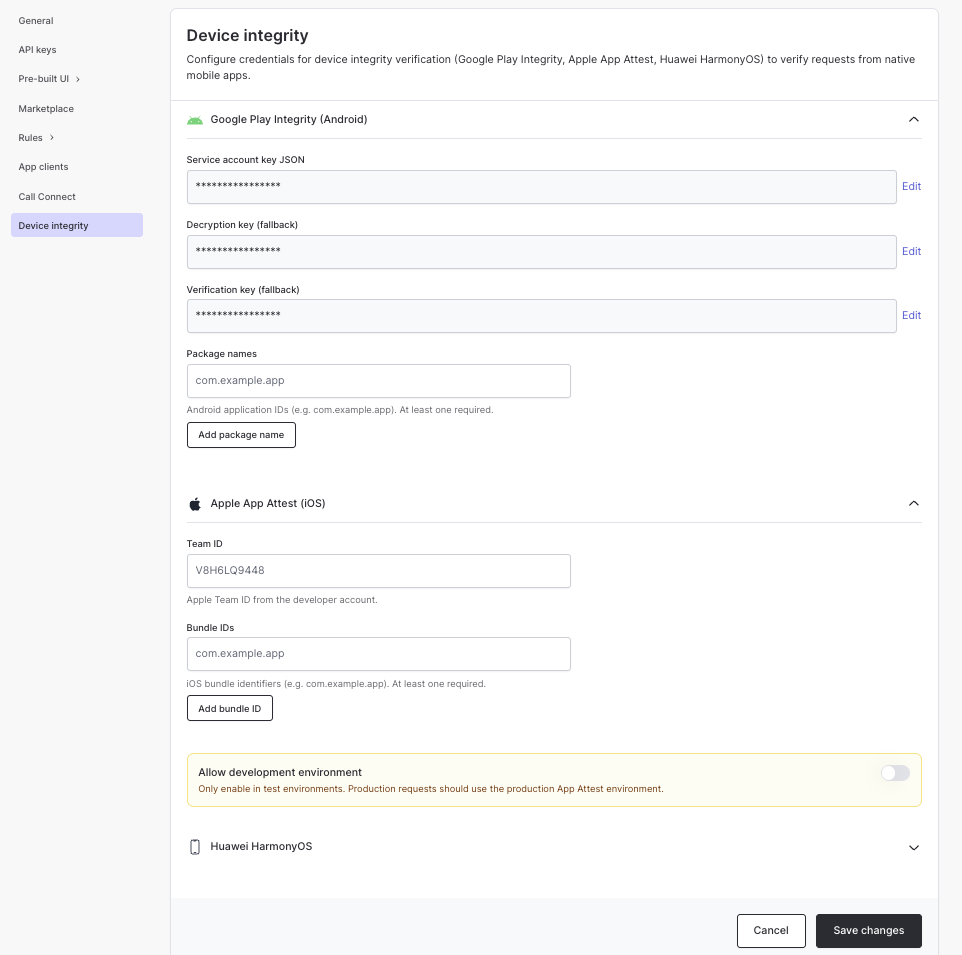
Your Apple Developer Team ID. Found in the [Apple Developer Portal](https://developer.apple.com/account) under Membership details.
The bundle identifiers of apps which are permitted to enroll credentials. Must match the bundle ID of your app as configured in Xcode.
A Google Cloud service account key with access to the Play Integrity API. This is used by Authsignal to verify integrity tokens server-side via the [Google Play Integrity API](https://developer.android.com/google/play/integrity/setup).
To create a service account key, follow Google's guide on [setting up Play Integrity](https://developer.android.com/google/play/integrity/setup)
Play Integrity requires your app to be distributed through the **Google Play Store**. This
includes internal testing tracks - your app does not need to be publicly available.
## SDK integration
To enable attestation, pass `performAttestation: true` when adding a credential. The `token` parameter is a short-lived token obtained by [tracking an action](/sdks/server/actions#track-action) from your backend.
On the client side, call `addCredential` with `performAttestation: true`. The example below uses the `push` namespace. If you're implementing QR code or in-app verification, replace `push` with `qr` or `inapp`.
```swift iOS theme={null}
await authsignal.push.addCredential(token: "eyJhbGciOiJ...", performAttestation: true)
```
```kotlin Android theme={null}
authsignal.push.addCredential(token = "eyJhbGciOiJ...", performAttestation = true)
```
```ts React Native theme={null}
await authsignal.push.addCredential({ token: "eyJhbGciOiJ...", performAttestation: true });
```
The SDK handles all platform-specific attestation generation internally. No additional configuration is required in the mobile app.
On your backend, you can [validate the challenge](/sdks/server/challenges#validate-challenge) to check the outcome of the attestation.
For more details on the `addCredential` method, refer to the SDK documentation for [in-app verification](/sdks/client/mobile/in-app-verification#adding-a-credential) or [push verification](/sdks/client/mobile/push-verification#adding-a-credential).
## Handling client errors
If attestation fails (e.g. unsupported device, emulator, or network issue), `addCredential` will return an error.
You can safely ignore this error on the client side - the action will remain in a
non-`CHALLENGE_SUCCEEDED` state, and your backend will handle it when calling [validate
challenge](/sdks/server/challenges#validate-challenge).
## Server-side validation
Authsignal verifies the attestation server-side during credential enrollment. However, it is up to **your backend** to decide what to do with the result.
After a user completes app verification, call [validate challenge](#server-side-validation) from your backend using the enrollment token. The response includes a `state` field that reflects the outcome of the attestation.
Your backend should use this state to make business logic decisions - for example, provisioning services, issuing vouchers, or granting access to sensitive features.
```ts Node.js theme={null}
const response = await authsignal.validateChallenge({
action: "addCredential",
token: "eyJhbGciOiJIUzI....",
});
switch (response.state) {
case "CHALLENGE_SUCCEEDED":
// Attestation check passed
// Safe to provision services, issue vouchers, grant access, etc.
break;
case "BLOCK":
// Attestation failed and enforcement mode is set to Block
// Do not provision - the request may not be from a legitimate device
break;
case "REVIEW_REQUIRED":
// Attestation failed but enforcement mode allows enrollment
// The credential was enrolled but you may want to flag for manual review
// or restrict access to certain features until reviewed
break;
default:
// Handle unexpected states
break;
}
```
```go Go theme={null}
response, err := client.ValidateChallenge(
ValidateChallengeRequest{
Action: "addCredential",
Token: "eyJhbGciOiJ...",
},
)
if response.State == "CHALLENGE_SUCCEEDED" {
// Attestation check passed
// Safe to provision services, issue vouchers, grant access, etc.
} else if response.State == "BLOCK" {
// Do not provision - the request may not be from a legitimate device
} else if response.State == "REVIEW_REQUIRED" {
// Credential enrolled but flagged - consider restricting access
}
```
```ruby Ruby theme={null}
response = Authsignal.validate_challenge(action: "addCredential", token: "eyJhbGciOiJIUzI....")
case response[:state]
when "CHALLENGE_SUCCEEDED"
# Attestation check passed
# Safe to provision services, issue vouchers, grant access, etc.
when "BLOCK"
# Do not provision - the request may not be from a legitimate device
when "REVIEW_REQUIRED"
# Credential enrolled but flagged - consider restricting access
end
```
```python Python theme={null}
response = authsignal.validate_challenge(action="addCredential", token="eyJhbGciOiJIUzI....")
if response["state"] == "CHALLENGE_SUCCEEDED":
# Attestation check passed
# Safe to provision services, issue vouchers, grant access, etc.
elif response["state"] == "BLOCK":
# Do not provision - the request may not be from a legitimate device
elif response["state"] == "REVIEW_REQUIRED":
# Credential enrolled but flagged - consider restricting access
```
### Attestation result
On your server, after calling [validate challenge](/sdks/server/challenges#validate-challenge), you can retrieve the full attestation result by calling [getAction](/api-reference/server-api/get-action) before allowing the user to continue.
The following fields are returned in the `output.device.attestationResult` object of the [getAction](/api-reference/server-api/get-action) response. The fields present depend on the platform and what verdicts are enabled.
#### Fraud risk metric
You can optionally configure a DeviceCheck-enabled key to fetch a fraud risk metric from Apple after attestation.
To enable this, add your DeviceCheck Key ID and private key in the [Authsignal Portal](https://portal.authsignal.com/organisations/tenants/device_integrity) under the iOS (App Attest) configuration. Create the key in the [Apple Developer portal](https://developer.apple.com/account/resources/authkeys/list) under Keys with the DeviceCheck service enabled.
### Platform-specific configuration
Your Apple Developer Team ID. Found in the [Apple Developer Portal](https://developer.apple.com/account) under Membership details.
The bundle identifiers of apps which are permitted to enroll credentials. Must match the bundle ID of your app as configured in Xcode.
A Google Cloud service account key with access to the Play Integrity API. This is used by Authsignal to verify integrity tokens server-side via the [Google Play Integrity API](https://developer.android.com/google/play/integrity/setup).
To create a service account key, follow Google's guide on [setting up Play Integrity](https://developer.android.com/google/play/integrity/setup)
Play Integrity requires your app to be distributed through the **Google Play Store**. This
includes internal testing tracks - your app does not need to be publicly available.
## SDK integration
To enable attestation, pass `performAttestation: true` when adding a credential. The `token` parameter is a short-lived token obtained by [tracking an action](/sdks/server/actions#track-action) from your backend.
On the client side, call `addCredential` with `performAttestation: true`. The example below uses the `push` namespace. If you're implementing QR code or in-app verification, replace `push` with `qr` or `inapp`.
```swift iOS theme={null}
await authsignal.push.addCredential(token: "eyJhbGciOiJ...", performAttestation: true)
```
```kotlin Android theme={null}
authsignal.push.addCredential(token = "eyJhbGciOiJ...", performAttestation = true)
```
```ts React Native theme={null}
await authsignal.push.addCredential({ token: "eyJhbGciOiJ...", performAttestation: true });
```
The SDK handles all platform-specific attestation generation internally. No additional configuration is required in the mobile app.
On your backend, you can [validate the challenge](/sdks/server/challenges#validate-challenge) to check the outcome of the attestation.
For more details on the `addCredential` method, refer to the SDK documentation for [in-app verification](/sdks/client/mobile/in-app-verification#adding-a-credential) or [push verification](/sdks/client/mobile/push-verification#adding-a-credential).
## Handling client errors
If attestation fails (e.g. unsupported device, emulator, or network issue), `addCredential` will return an error.
You can safely ignore this error on the client side - the action will remain in a
non-`CHALLENGE_SUCCEEDED` state, and your backend will handle it when calling [validate
challenge](/sdks/server/challenges#validate-challenge).
## Server-side validation
Authsignal verifies the attestation server-side during credential enrollment. However, it is up to **your backend** to decide what to do with the result.
After a user completes app verification, call [validate challenge](#server-side-validation) from your backend using the enrollment token. The response includes a `state` field that reflects the outcome of the attestation.
Your backend should use this state to make business logic decisions - for example, provisioning services, issuing vouchers, or granting access to sensitive features.
```ts Node.js theme={null}
const response = await authsignal.validateChallenge({
action: "addCredential",
token: "eyJhbGciOiJIUzI....",
});
switch (response.state) {
case "CHALLENGE_SUCCEEDED":
// Attestation check passed
// Safe to provision services, issue vouchers, grant access, etc.
break;
case "BLOCK":
// Attestation failed and enforcement mode is set to Block
// Do not provision - the request may not be from a legitimate device
break;
case "REVIEW_REQUIRED":
// Attestation failed but enforcement mode allows enrollment
// The credential was enrolled but you may want to flag for manual review
// or restrict access to certain features until reviewed
break;
default:
// Handle unexpected states
break;
}
```
```go Go theme={null}
response, err := client.ValidateChallenge(
ValidateChallengeRequest{
Action: "addCredential",
Token: "eyJhbGciOiJ...",
},
)
if response.State == "CHALLENGE_SUCCEEDED" {
// Attestation check passed
// Safe to provision services, issue vouchers, grant access, etc.
} else if response.State == "BLOCK" {
// Do not provision - the request may not be from a legitimate device
} else if response.State == "REVIEW_REQUIRED" {
// Credential enrolled but flagged - consider restricting access
}
```
```ruby Ruby theme={null}
response = Authsignal.validate_challenge(action: "addCredential", token: "eyJhbGciOiJIUzI....")
case response[:state]
when "CHALLENGE_SUCCEEDED"
# Attestation check passed
# Safe to provision services, issue vouchers, grant access, etc.
when "BLOCK"
# Do not provision - the request may not be from a legitimate device
when "REVIEW_REQUIRED"
# Credential enrolled but flagged - consider restricting access
end
```
```python Python theme={null}
response = authsignal.validate_challenge(action="addCredential", token="eyJhbGciOiJIUzI....")
if response["state"] == "CHALLENGE_SUCCEEDED":
# Attestation check passed
# Safe to provision services, issue vouchers, grant access, etc.
elif response["state"] == "BLOCK":
# Do not provision - the request may not be from a legitimate device
elif response["state"] == "REVIEW_REQUIRED":
# Credential enrolled but flagged - consider restricting access
```
### Attestation result
On your server, after calling [validate challenge](/sdks/server/challenges#validate-challenge), you can retrieve the full attestation result by calling [getAction](/api-reference/server-api/get-action) before allowing the user to continue.
The following fields are returned in the `output.device.attestationResult` object of the [getAction](/api-reference/server-api/get-action) response. The fields present depend on the platform and what verdicts are enabled.
#### Fraud risk metric
You can optionally configure a DeviceCheck-enabled key to fetch a fraud risk metric from Apple after attestation.
To enable this, add your DeviceCheck Key ID and private key in the [Authsignal Portal](https://portal.authsignal.com/organisations/tenants/device_integrity) under the iOS (App Attest) configuration. Create the key in the [Apple Developer portal](https://developer.apple.com/account/resources/authkeys/list) under Keys with the DeviceCheck service enabled.
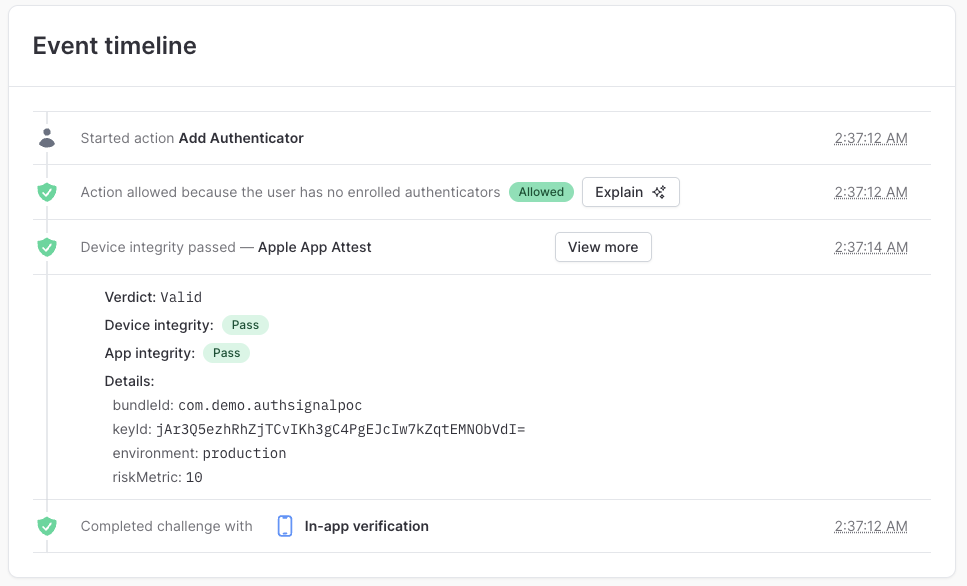
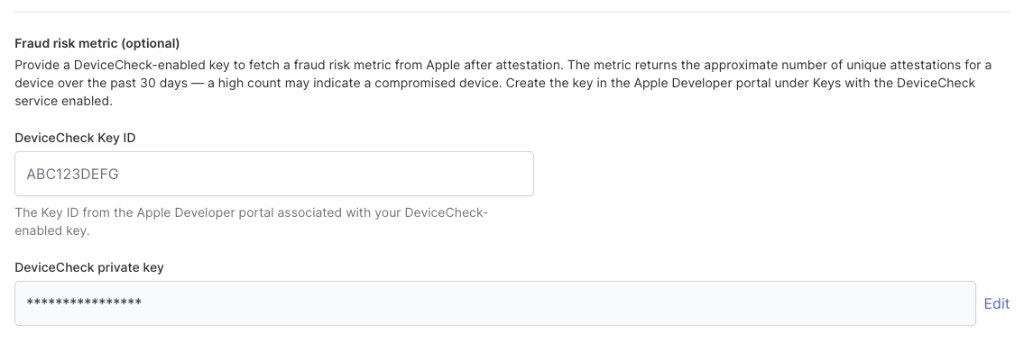 When a device passes attestation, the risk metric is included in the action's event timeline, which you can view in the Authsignal Portal.
 #### Response
```json getAction response: output.device.attestationResult theme={null}
{
"attestationResult": {
"verdict": "VALID",
"provider": "APP_ATTEST",
"deviceIntegrity": true,
"appIntegrity": true,
"riskMetric": 10,
"keyId": "abc123...",
"bundleId": "com.example.myapp"
}
}
```
| Field | Description |
| ----------------- | -------------------------------------------------------------------------------------------------------------------------------- |
| `verdict` | Overall attestation verdict: `VALID`, `FAILED_INTEGRITY`, `FAILED_APP_IDENTITY`, `FAILED_DEVICE`, or `ERROR`. |
| `provider` | Always `APP_ATTEST` for iOS. |
| `deviceIntegrity` | Whether the device passed integrity checks. |
| `appIntegrity` | Whether the app matches the expected bundle ID. |
| `riskMetric` | Approximate count of unique attestations for this device over the past 30 days. Only present if a DeviceCheck key is configured. |
| `keyId` | The App Attest key identifier. |
| `bundleId` | The matched bundle identifier. |
| `error` | An error message if attestation verification failed. Only present when `verdict` is `ERROR`. |
#### Enabling verdict responses
To receive detailed integrity verdicts, enable the responses you want in the [Google Play Console](https://play.google.com/console) under **App integrity > Integrity API settings > Change responses**.
#### Response
```json getAction response: output.device.attestationResult theme={null}
{
"attestationResult": {
"verdict": "VALID",
"provider": "APP_ATTEST",
"deviceIntegrity": true,
"appIntegrity": true,
"riskMetric": 10,
"keyId": "abc123...",
"bundleId": "com.example.myapp"
}
}
```
| Field | Description |
| ----------------- | -------------------------------------------------------------------------------------------------------------------------------- |
| `verdict` | Overall attestation verdict: `VALID`, `FAILED_INTEGRITY`, `FAILED_APP_IDENTITY`, `FAILED_DEVICE`, or `ERROR`. |
| `provider` | Always `APP_ATTEST` for iOS. |
| `deviceIntegrity` | Whether the device passed integrity checks. |
| `appIntegrity` | Whether the app matches the expected bundle ID. |
| `riskMetric` | Approximate count of unique attestations for this device over the past 30 days. Only present if a DeviceCheck key is configured. |
| `keyId` | The App Attest key identifier. |
| `bundleId` | The matched bundle identifier. |
| `error` | An error message if attestation verification failed. Only present when `verdict` is `ERROR`. |
#### Enabling verdict responses
To receive detailed integrity verdicts, enable the responses you want in the [Google Play Console](https://play.google.com/console) under **App integrity > Integrity API settings > Change responses**.
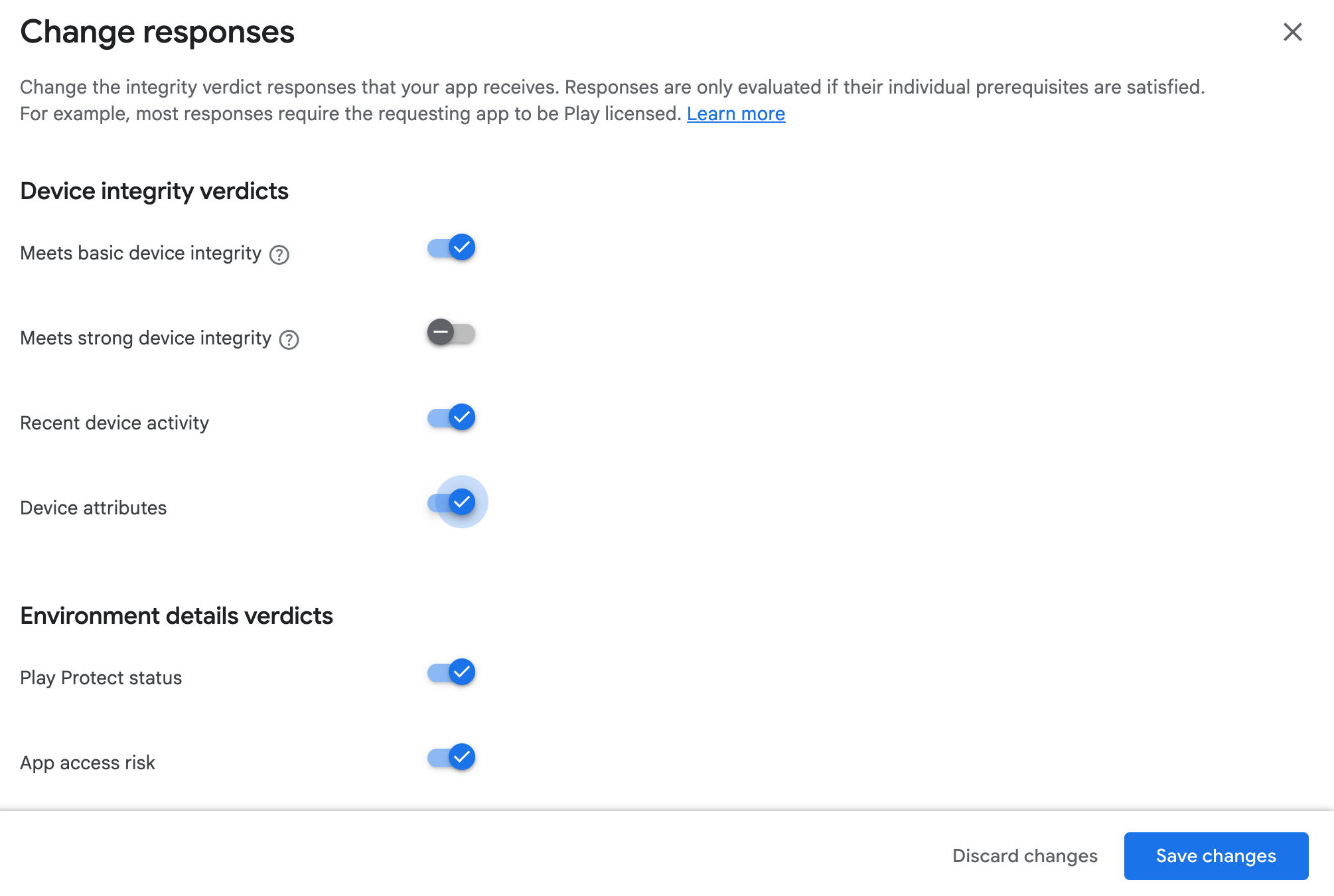 Authsignal flattens the [Play Integrity API](https://developer.android.com/google/play/integrity/verdicts) response into a single `attestationResult` object. Fields like `deviceRecognitionVerdict` and `playProtectVerdict` are only present when the corresponding verdict is enabled in the Google Play Console.
#### Response
```json getAction response: output.device.attestationResult theme={null}
{
"attestationResult": {
"verdict": "VALID",
"provider": "PLAY_INTEGRITY",
"deviceIntegrity": true,
"appIntegrity": true,
"deviceRecognitionVerdict": [
"MEETS_BASIC_INTEGRITY",
"MEETS_DEVICE_INTEGRITY"
],
"appRecognitionVerdict": "PLAY_RECOGNIZED",
"appLicensingVerdict": "LICENSED",
"deviceActivityLevel": "LEVEL_1",
"playProtectVerdict": "NO_ISSUES",
"appAccessRiskVerdict": [
"KNOWN_INSTALLED",
"UNKNOWN_INSTALLED"
],
"sdkVersion": 34,
"requestPackageName": "com.example.myapp",
"versionCode": "11"
}
}
```
| Field | Values |
| -------------------------- | -------------------------------------------------------------------------------------------------------------------------- |
| `verdict` | `VALID`, `FAILED_INTEGRITY`, `FAILED_APP_IDENTITY`, `FAILED_DEVICE`, `ERROR` |
| `provider` | `PLAY_INTEGRITY` |
| `deviceIntegrity` | `true`, `false` |
| `appIntegrity` | `true`, `false` |
| `deviceRecognitionVerdict` | `MEETS_BASIC_INTEGRITY`, `MEETS_DEVICE_INTEGRITY`, `MEETS_STRONG_INTEGRITY` |
| `appRecognitionVerdict` | `PLAY_RECOGNIZED`, `UNRECOGNIZED_VERSION`, `UNEVALUATED` |
| `appLicensingVerdict` | `LICENSED`, `UNLICENSED`, `UNEVALUATED` |
| `deviceActivityLevel` | `LEVEL_1` to `LEVEL_4` |
| `playProtectVerdict` | `NO_ISSUES`, `MEDIUM_RISK`, `HIGH_RISK`, `POSSIBLE_RISK` |
| `appAccessRiskVerdict` | `KNOWN_INSTALLED`, `KNOWN_CAPTURING`, `KNOWN_CONTROLLING`, `UNKNOWN_INSTALLED`, `UNKNOWN_CAPTURING`, `UNKNOWN_CONTROLLING` |
| `sdkVersion` | e.g. `34` |
| `requestPackageName` | e.g. `com.example.myapp` |
| `versionCode` | e.g. `11` |
| `error` | Error message string |
For full details on each verdict, see Google's [Play Integrity verdicts documentation](https://developer.android.com/google/play/integrity/verdicts).
## Next steps
* **[In-app verification](/authentication-methods/app-verification/in-app)** - Set up in-app verification for your mobile app
* **[Push verification](/authentication-methods/app-verification/push)** - Set up push verification for your mobile app
* **[Enrollment lifecycle](/authentication-methods/app-verification/enrollment-lifecycle)** - Learn when to enroll and un-enroll users
* **[Adaptive MFA](/actions-rules/rules/adaptive-mfa)** - Set up rules to trigger authentication based on risk
Authsignal flattens the [Play Integrity API](https://developer.android.com/google/play/integrity/verdicts) response into a single `attestationResult` object. Fields like `deviceRecognitionVerdict` and `playProtectVerdict` are only present when the corresponding verdict is enabled in the Google Play Console.
#### Response
```json getAction response: output.device.attestationResult theme={null}
{
"attestationResult": {
"verdict": "VALID",
"provider": "PLAY_INTEGRITY",
"deviceIntegrity": true,
"appIntegrity": true,
"deviceRecognitionVerdict": [
"MEETS_BASIC_INTEGRITY",
"MEETS_DEVICE_INTEGRITY"
],
"appRecognitionVerdict": "PLAY_RECOGNIZED",
"appLicensingVerdict": "LICENSED",
"deviceActivityLevel": "LEVEL_1",
"playProtectVerdict": "NO_ISSUES",
"appAccessRiskVerdict": [
"KNOWN_INSTALLED",
"UNKNOWN_INSTALLED"
],
"sdkVersion": 34,
"requestPackageName": "com.example.myapp",
"versionCode": "11"
}
}
```
| Field | Values |
| -------------------------- | -------------------------------------------------------------------------------------------------------------------------- |
| `verdict` | `VALID`, `FAILED_INTEGRITY`, `FAILED_APP_IDENTITY`, `FAILED_DEVICE`, `ERROR` |
| `provider` | `PLAY_INTEGRITY` |
| `deviceIntegrity` | `true`, `false` |
| `appIntegrity` | `true`, `false` |
| `deviceRecognitionVerdict` | `MEETS_BASIC_INTEGRITY`, `MEETS_DEVICE_INTEGRITY`, `MEETS_STRONG_INTEGRITY` |
| `appRecognitionVerdict` | `PLAY_RECOGNIZED`, `UNRECOGNIZED_VERSION`, `UNEVALUATED` |
| `appLicensingVerdict` | `LICENSED`, `UNLICENSED`, `UNEVALUATED` |
| `deviceActivityLevel` | `LEVEL_1` to `LEVEL_4` |
| `playProtectVerdict` | `NO_ISSUES`, `MEDIUM_RISK`, `HIGH_RISK`, `POSSIBLE_RISK` |
| `appAccessRiskVerdict` | `KNOWN_INSTALLED`, `KNOWN_CAPTURING`, `KNOWN_CONTROLLING`, `UNKNOWN_INSTALLED`, `UNKNOWN_CAPTURING`, `UNKNOWN_CONTROLLING` |
| `sdkVersion` | e.g. `34` |
| `requestPackageName` | e.g. `com.example.myapp` |
| `versionCode` | e.g. `11` |
| `error` | Error message string |
For full details on each verdict, see Google's [Play Integrity verdicts documentation](https://developer.android.com/google/play/integrity/verdicts).
## Next steps
* **[In-app verification](/authentication-methods/app-verification/in-app)** - Set up in-app verification for your mobile app
* **[Push verification](/authentication-methods/app-verification/push)** - Set up push verification for your mobile app
* **[Enrollment lifecycle](/authentication-methods/app-verification/enrollment-lifecycle)** - Learn when to enroll and un-enroll users
* **[Adaptive MFA](/actions-rules/rules/adaptive-mfa)** - Set up rules to trigger authentication based on risk