> ## Documentation Index
> Fetch the complete documentation index at: https://docs.authsignal.com/llms.txt
> Use this file to discover all available pages before exploring further.
# Session management
> Learn how to use Authsignal SDKs to issue, validate, refresh and revoke access tokens.
Authsignal's session APIs can be used to manage an authenticated session for a user.
## Configuration
### Enabling the JWKS URL
To use Authsignal session APIs, you must first enable a JWKS URL in the Authsignal Portal under Settings -> API keys.
 Once enabled, a link to the JWKS URL for your tenant will be displayed.
 ### Creating app clients
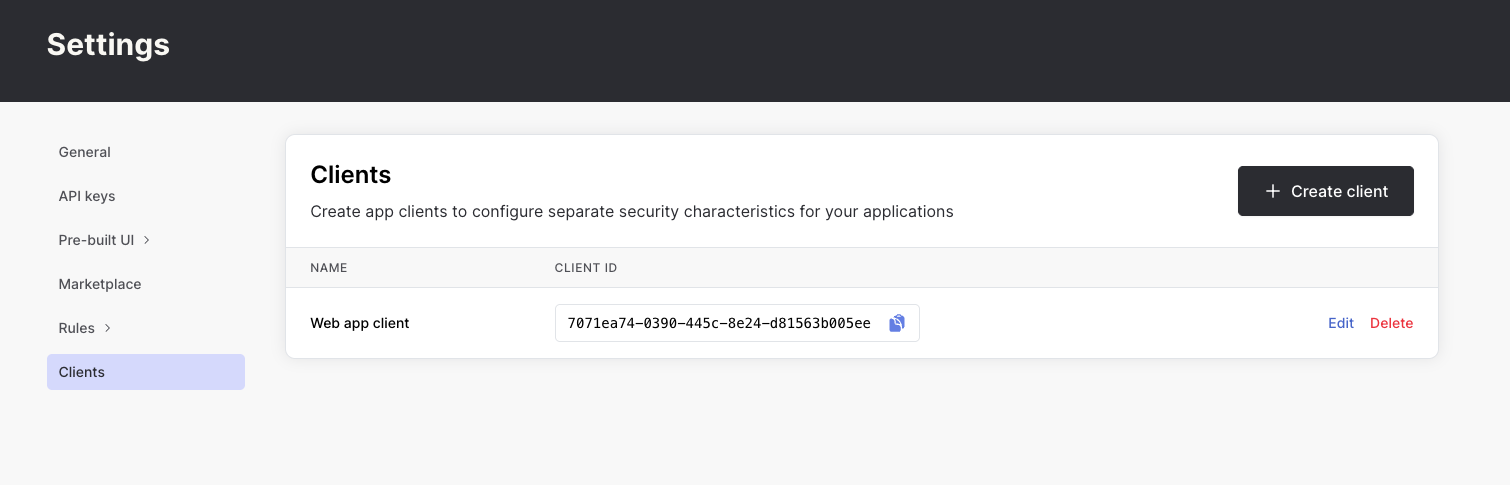
Next, create an app client in the Authsignal Portal under Settings -> App clients.
### Creating app clients
Next, create an app client in the Authsignal Portal under Settings -> App clients.
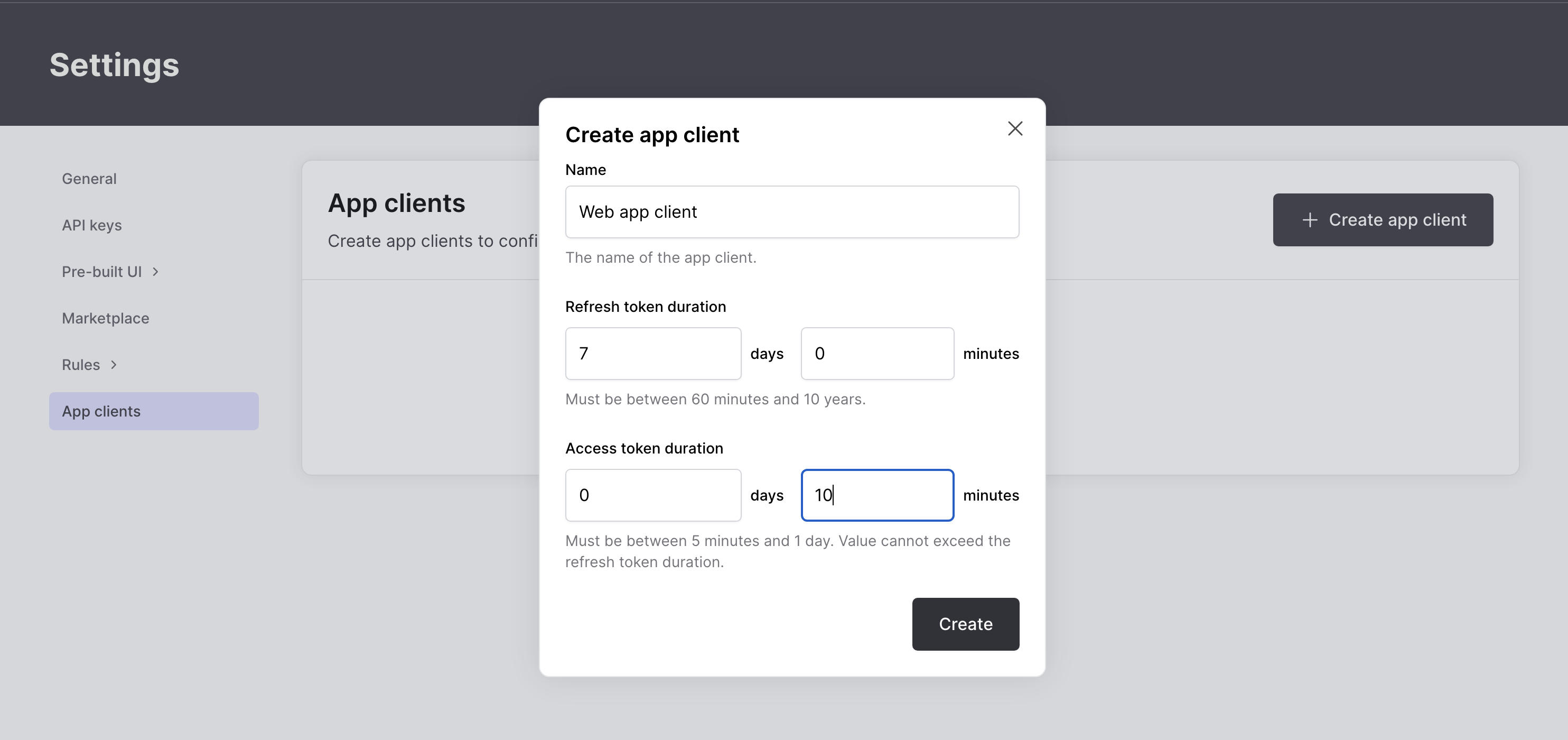 For each client you create, you can configure a separate access token and refresh token duration. The **client ID** will be set as the access token's `aud` claim.
 ## Creating sessions
In order to create an authenticated session, you must first obtain an Authsignal client token either by using a [Client SDK](/sdks/client) or the [pre-built UI](/implementation-options/prebuilt-ui/overview).
### OTP auth (email, SMS, TOTP)
For an OTP authentication method such as [Email OTP](/authentication-methods/email-otp) you can follow the integration steps below to create a session.
**1. Backend - Track action**
In your app's backend, use an [Authsignal Server SDK](/sdks/server) to track an action and obtain an initial client token.
```ts Node.js theme={null}
const request = {
userId: "dc58c6dc-a1fd-4a4f-8e2f-846636dd4833",
action: "signIn",
attributes: {
email: "jane.smith@authsignal.com",
},
};
const response = await authsignal.track(request);
const token = response.token;
```
```csharp C# theme={null}
var request = new TrackRequest(
UserId: "dc58c6dc-a1fd-4a4f-8e2f-846636dd4833",
Action: "signIn",
Attributes: new TrackAttributes(
Email: "jane.smith@authsignal.com",
)
);
var response = await authsignal.Track(request);
var token = response.token;
```
```java Java theme={null}
TrackRequest request = new TrackRequest();
request.userId = "dc58c6dc-a1fd-4a4f-8e2f-846636dd4833";
request.action = "signIn";
request.attributes = new TrackAttributes();
request.attributes.email = "jane@authsignal.co";
TrackResponse response = authsignal.track(request).get();
String token = response.token;
```
```ruby Ruby theme={null}
response = Authsignal.track({
user_id: "dc58c6dc-a1fd-4a4f-8e2f-846636dd4833",
action: "signIn",
attributes: {
email: "jane.smith@authsignal.com",
}
})
token = response.token
```
```python Python theme={null}
response = authsignal.track(
user_id="dc58c6dc-a1fd-4a4f-8e2f-846636dd4833",
action="signIn",
attributes={
"email": "jane.smith@authsignal.com",
}
)
token = response.token
```
```php PHP theme={null}
$response = Authsignal::track([
'userId' => "dc58c6dc-a1fd-4a4f-8e2f-846636dd4833",
'action' => "signIn",
'attributes' => [
'email' => "jane.smith@authsignal.com",
]
]);
$token = response.token
```
```go Go theme={null}
response, err := client.Track(
TrackRequest{
UserId: "dc58c6dc-a1fd-4a4f-8e2f-846636dd4833",
Action: "signIn",
Attributes: &TrackAttributes{
Email: "jane.smith@authsignal.com",
},
},
)
token := response.token
```
**2. Frontend - Use a Client SDK**
In your web or mobile app, call `setToken` with the client token obtained in step 1, then use the relevant SDK methods to progress the user through a challenge and obtain a new client token.
```ts Web theme={null}
// Set token from the track response
authsignal.setToken("eyJhbGciOiJ...");
// Send the user an email OTP code
// You can call this multiple times via a 'resend' button
await authsignal.email.challenge();
// Verify the inputted code matches the original code
const response = await authsignal.email.verify({ code: "123456" });
// Obtain a new token
const token = response.token;
```
```swift iOS theme={null}
// Set token from the track response
authsignal.setToken("eyJhbGciOiJ...")
// Send the user an email OTP code
// You can call this multiple times via a 'resend' button
await authsignal.email.challenge()
// Verify the inputted code matches the original code
let response = await authsignal.email.verify(code: "123456")
// Obtain a new token
let token = response.token
```
```kotlin Android theme={null}
// Set token from the track response
authsignal.setToken("eyJhbGciOiJ...")
// Send the user an email OTP code
// You can call this multiple times via a 'resend' button
authsignal.email.challenge()
// Verify the inputted code matches the original code
val response = authsignal.email.verify(code = "123456")
// Obtain a new token
val token = response.token
```
```ts React Native theme={null}
// Set token from the track response
await authsignal.setToken("eyJhbGciOiJ...");
// Send the user an email OTP code
// You can call this multiple times via a 'resend' button
await authsignal.email.challenge();
// Verify the inputted code matches the original code
const response = await authsignal.email.verify({ code: "123456" });
// Obtain a new token
const token = response.token;
```
```dart Flutter theme={null}
// Set token from the track response
await authsignal.setToken("eyJhbGciOiJ...");
// Send the user an email OTP code
// You can call this multiple times via a 'resend' button
await authsignal.email.challenge();
// Verify the inputted code matches the original code
final response = await authsignal.email.verify(code: "123456");
// Obtain a new token
final token = response.token;
```
**3. Backend - Create session**
Pass the client token obtained in step 2 to your backend and exchange it for an access token and refresh token.
```ts Node.js theme={null}
const request = {
token: "eyJhbGciOiJ...",
clientId: "46e10ac5-cb9c-458f-ad86-0f698f67b365",
};
const response = await authsignal.createSession(request);
const accessToken = response.accessToken;
const refreshToken = response.refreshToken;
```
```csharp C# theme={null}
var request = new CreateSessionRequest(
Token: "eyJhbGciOiJ...",
ClientId: "46e10ac5-cb9c-458f-ad86-0f698f67b365"
);
var response = await authsignal.CreateSession(request);
var accessToken = response.AccessToken;
var refreshToken = response.RefreshToken;
```
```java Java theme={null}
CreateSessionRequest request = new CreateSessionRequest();
request.token = "eyJhbGciOiJ...";
request.clientId = "46e10ac5-cb9c-458f-ad86-0f698f67b365";
CreateSessionResponse response = authsignal.createSession(request).get();
String accessToken = response.accessToken;
String refreshToken = response.refreshToken;
```
```ruby Ruby theme={null}
response = Authsignal.create_session(
token: "eyJhbGciOiJ...",
client_id: "46e10ac5-cb9c-458f-ad86-0f698f67b365",
)
access_token = response[:access_token]
refresh_token = response[:refresh_token]
```
```go Go theme={null}
response, err := client.CreateSession(
CreateSessionRequest{
Token: "eyJhbGciOiJ...",
ClientId: "46e10ac5-cb9c-458f-ad86-0f698f67b365",
},
)
accessToken := response.AccessToken
refreshToken := response.RefreshToken
```
### Passkeys
When using a device-bound authentication method like **passkeys**, only two steps are required to create a session.
**1. Frontend - Use a Client SDK**
Use our [web SDK](/sdks/client/web/setup) to present a passkey sign-in prompt in the browser, or use one of our [mobile SDKs](/sdks/client/mobile/setup) to present the native passkey UI in an iOS or Android app.
```ts Web theme={null}
const response = await authsignal.passkey.signIn({
action: "signInWithPasskey",
});
if (response.data?.token) {
// Send token to your backend for validation
const token = response.data.token;
} else {
console.error("Passkey sign-in failed:", response.error);
}
```
```ts React Native theme={null}
const response = await authsignal.passkey.signIn({
action: "signInWithPasskey",
});
if (response.data?.token) {
// Send token to your backend for validation
const token = response.data.token;
} else {
Alert.alert("Error", "Passkey sign-in failed");
}
```
```dart Flutter theme={null}
final response = await authsignal.passkey.signIn(action: "signInWithPasskey");
if (response.data?.token != null) {
// Send token to your backend for validation
final token = response.data.token;
} else {
print("Passkey sign-in failed: ${response.error}");
}
```
```swift Swift theme={null}
let response = await authsignal.passkey.signIn(action: "signInWithPasskey")
if let token = response.data?.token {
// Send token to your backend for validation
} else {
print("Passkey sign-in failed: \(response.error ?? "Unknown error")")
}
```
```kotlin Kotlin theme={null}
val response = authsignal.passkey.signIn(action = "signInWithPasskey")
if (response.data?.token != null) {
// Send token to your backend for validation
val token = response.data.token
} else {
Log.e("Passkey", "Sign-in failed: ${response.error}")
}
```
**2. Backend - Create session**
Pass the token obtained in step 1 to your backend and exchange it for an access token and refresh token.
```ts Node.js theme={null}
const request = {
token: "eyJhbGciOiJ...",
clientId: "46e10ac5-cb9c-458f-ad86-0f698f67b365",
};
const response = await authsignal.createSession(request);
const accessToken = response.accessToken;
const refreshToken = response.refreshToken;
```
```csharp C# theme={null}
var request = new CreateSessionRequest(
Token: "eyJhbGciOiJ...",
ClientId: "46e10ac5-cb9c-458f-ad86-0f698f67b365"
);
var response = await authsignal.CreateSession(request);
var accessToken = response.AccessToken;
var refreshToken = response.RefreshToken;
```
```java Java theme={null}
CreateSessionRequest request = new CreateSessionRequest();
request.token = "eyJhbGciOiJ...";
request.clientId = "46e10ac5-cb9c-458f-ad86-0f698f67b365";
CreateSessionResponse response = authsignal.createSession(request).get();
String accessToken = response.accessToken;
String refreshToken = response.refreshToken;
```
```ruby Ruby theme={null}
response = Authsignal.create_session(
token: "eyJhbGciOiJ...",
client_id: "46e10ac5-cb9c-458f-ad86-0f698f67b365",
)
access_token = response[:access_token]
refresh_token = response[:refresh_token]
```
```go Go theme={null}
response, err := client.CreateSession(
CreateSessionRequest{
Token: "eyJhbGciOiJ...",
ClientId: "46e10ac5-cb9c-458f-ad86-0f698f67b365",
},
)
accessToken := response.AccessToken
refreshToken := response.RefreshToken
```
## Validating sessions
### Using the JWKS URL
Access tokens are signed using an RS256 algorithm. A JWKS endpoint for your tenant's keys is available at the following location:
```
${env:AUTHSIGNAL_URL}/client/public/${env:AUTHSIGNAL_TENANT}/.well-known/jwks
```
* The `AUTHSIGNAL_URL` value is the URL for your [tenant's region](/sdks/server/overview#initialization).
* The `AUTHSIGNAL_TENANT` value is your tenant ID.
### Using the SDK
You can also use the [Authsignal Server SDK](/sdks/server/overview) to validate an access token.
```ts Node.js theme={null}
const request = {
accessToken: "eyJhbGciOiJ...",
clientIds: ["46e10ac5-cb9c-458f-ad86-0f698f67b365"],
};
const response = await authsignal.validateSession(request);
const userId = response.user.userId;
const email = response.user.email;
```
```csharp C# theme={null}
var request = new ValidateSessionRequest(
AccessToken: "eyJhbGciOiJ...",
ClientIds: ["46e10ac5-cb9c-458f-ad86-0f698f67b365"]
);
var response = await authsignal.ValidateSession(request);
var userId = response.User.UserId;
var email = response.User.Email;
```
```java Java theme={null}
ValidateSessionRequest request = new ValidateSessionRequest();
request.accessToken = "eyJhbGciOiJ...";
request.clientIds = clientIds = new String[] { "46e10ac5-cb9c-458f-ad86-0f698f67b365" };
ValidateSessionResponse response = authsignal.validateSession(request).get();
String userId = response.user.userId;
String email = response.user.email;
```
```ruby Ruby theme={null}
response = Authsignal.validate_session(
access_token: "eyJhbGciOiJ...",
client_ids: ["46e10ac5-cb9c-458f-ad86-0f698f67b365"],
)
user_id = response[:user][:user_id]
email = response[:user][:email]
```
```go Go theme={null}
response, err := client.ValidateSession(
ValidateSessionRequest{
AccessToken: "eyJhbGciOiJ...",
ClientIds: []string{"46e10ac5-cb9c-458f-ad86-0f698f67b365"}
},
)
userId := response.User.UserId
email := response.User.Email
```
In addition to verifying the access token's signature, the Authsignal SDK's `validateSession`
method will also check that the token has not been revoked.
## Refreshing sessions
A refresh token can be exchanged for a new access token and refresh token.
```ts Node.js theme={null}
const request = {
refreshToken: "3f72a26e6834b4da...",
};
const response = await authsignal.refreshSession(request);
const accessToken = response.accessToken;
const refreshToken = response.refreshToken;
```
```csharp C# theme={null}
var request = new RefreshSessionRequest(
RefreshToken: "3f72a26e6834b4da...",
);
var response = await authsignal.RefreshSession(request);
var accessToken = response.AccessToken;
var refreshToken = response.RefreshToken;
```
```java Java theme={null}
RefreshSessionRequest request = new RefreshSessionRequest();
request.refreshToken = "3f72a26e6834b4da...";
RefreshSessionResponse response = authsignal.refreshSession(request).get();
String accessToken = response.accessToken;
String refreshToken = response.refreshToken;
```
```ruby Ruby theme={null}
response = Authsignal.refresh_session(
refresh_token: "3f72a26e6834b4da...",
)
access_token = response[:access_token]
refresh_token = response[:refresh_token]
```
```go Go theme={null}
response, err := client.RefreshSession(
RefreshSessionRequest{
RefreshToken: "3f72a26e6834b4da...",
},
)
accessToken := response.AccessToken
refreshToken := response.RefreshToken
```
Refresh tokens are single-use and should be replaced with the new refresh token returned in the response.
## Revoking sessions
An individual access token can be revoked so that the `validateSession` method will no longer accept it.
```ts Node.js theme={null}
const request = {
accessToken: "eyJhbGciOiJ...",
};
await authsignal.revokeSession(request);
```
```csharp C# theme={null}
var request = new RevokeSessionRequest(
AccessToken: "eyJhbGciOiJ..."
);
await authsignal.RevokeSession(request);
```
```java Java theme={null}
RevokeSessionRequest request = new RevokeSessionRequest();
request.accessToken = "eyJhbGciOiJ...";
authsignal.revokeSession(request).get();
```
```ruby Ruby theme={null}
response = Authsignal.revoke_session(
access_token: "eyJhbGciOiJ...",
)
```
```go Go theme={null}
err := client.RevokeSession(
RevokeSessionRequest{
AccessToken: "eyJhbGciOiJ...",
},
)
```
In addition, you can revoke all currently active tokens for a user.
```ts Node.js theme={null}
const request = {
userId: "dc58c6dc-a1fd-4a4f-8e2f-846636dd4833",
};
await authsignal.revokeUserSessions(request);
```
```csharp C# theme={null}
var request = new RevokeUserSessionsRequest(
UserId: "dc58c6dc-a1fd-4a4f-8e2f-846636dd4833"
);
await authsignal.RevokeUserSessions(request);
```
```java Java theme={null}
RevokeUserSessionsRequest request = new RevokeUserSessionsRequest();
request.userId = "dc58c6dc-a1fd-4a4f-8e2f-846636dd4833";
authsignal.revokeUserSessions(request).get();
```
```ruby Ruby theme={null}
response = Authsignal.revoke_user_sessions(
user_id: "dc58c6dc-a1fd-4a4f-8e2f-846636dd4833",
)
```
```go Go theme={null}
err := client.RevokeUserSessions(
RevokeSessionRequest{
UserId: "dc58c6dc-a1fd-4a4f-8e2f-846636dd4833",
},
)
```
## Next steps
* [Server SDK session methods](/sdks/server/sessions)
## Creating sessions
In order to create an authenticated session, you must first obtain an Authsignal client token either by using a [Client SDK](/sdks/client) or the [pre-built UI](/implementation-options/prebuilt-ui/overview).
### OTP auth (email, SMS, TOTP)
For an OTP authentication method such as [Email OTP](/authentication-methods/email-otp) you can follow the integration steps below to create a session.
**1. Backend - Track action**
In your app's backend, use an [Authsignal Server SDK](/sdks/server) to track an action and obtain an initial client token.
```ts Node.js theme={null}
const request = {
userId: "dc58c6dc-a1fd-4a4f-8e2f-846636dd4833",
action: "signIn",
attributes: {
email: "jane.smith@authsignal.com",
},
};
const response = await authsignal.track(request);
const token = response.token;
```
```csharp C# theme={null}
var request = new TrackRequest(
UserId: "dc58c6dc-a1fd-4a4f-8e2f-846636dd4833",
Action: "signIn",
Attributes: new TrackAttributes(
Email: "jane.smith@authsignal.com",
)
);
var response = await authsignal.Track(request);
var token = response.token;
```
```java Java theme={null}
TrackRequest request = new TrackRequest();
request.userId = "dc58c6dc-a1fd-4a4f-8e2f-846636dd4833";
request.action = "signIn";
request.attributes = new TrackAttributes();
request.attributes.email = "jane@authsignal.co";
TrackResponse response = authsignal.track(request).get();
String token = response.token;
```
```ruby Ruby theme={null}
response = Authsignal.track({
user_id: "dc58c6dc-a1fd-4a4f-8e2f-846636dd4833",
action: "signIn",
attributes: {
email: "jane.smith@authsignal.com",
}
})
token = response.token
```
```python Python theme={null}
response = authsignal.track(
user_id="dc58c6dc-a1fd-4a4f-8e2f-846636dd4833",
action="signIn",
attributes={
"email": "jane.smith@authsignal.com",
}
)
token = response.token
```
```php PHP theme={null}
$response = Authsignal::track([
'userId' => "dc58c6dc-a1fd-4a4f-8e2f-846636dd4833",
'action' => "signIn",
'attributes' => [
'email' => "jane.smith@authsignal.com",
]
]);
$token = response.token
```
```go Go theme={null}
response, err := client.Track(
TrackRequest{
UserId: "dc58c6dc-a1fd-4a4f-8e2f-846636dd4833",
Action: "signIn",
Attributes: &TrackAttributes{
Email: "jane.smith@authsignal.com",
},
},
)
token := response.token
```
**2. Frontend - Use a Client SDK**
In your web or mobile app, call `setToken` with the client token obtained in step 1, then use the relevant SDK methods to progress the user through a challenge and obtain a new client token.
```ts Web theme={null}
// Set token from the track response
authsignal.setToken("eyJhbGciOiJ...");
// Send the user an email OTP code
// You can call this multiple times via a 'resend' button
await authsignal.email.challenge();
// Verify the inputted code matches the original code
const response = await authsignal.email.verify({ code: "123456" });
// Obtain a new token
const token = response.token;
```
```swift iOS theme={null}
// Set token from the track response
authsignal.setToken("eyJhbGciOiJ...")
// Send the user an email OTP code
// You can call this multiple times via a 'resend' button
await authsignal.email.challenge()
// Verify the inputted code matches the original code
let response = await authsignal.email.verify(code: "123456")
// Obtain a new token
let token = response.token
```
```kotlin Android theme={null}
// Set token from the track response
authsignal.setToken("eyJhbGciOiJ...")
// Send the user an email OTP code
// You can call this multiple times via a 'resend' button
authsignal.email.challenge()
// Verify the inputted code matches the original code
val response = authsignal.email.verify(code = "123456")
// Obtain a new token
val token = response.token
```
```ts React Native theme={null}
// Set token from the track response
await authsignal.setToken("eyJhbGciOiJ...");
// Send the user an email OTP code
// You can call this multiple times via a 'resend' button
await authsignal.email.challenge();
// Verify the inputted code matches the original code
const response = await authsignal.email.verify({ code: "123456" });
// Obtain a new token
const token = response.token;
```
```dart Flutter theme={null}
// Set token from the track response
await authsignal.setToken("eyJhbGciOiJ...");
// Send the user an email OTP code
// You can call this multiple times via a 'resend' button
await authsignal.email.challenge();
// Verify the inputted code matches the original code
final response = await authsignal.email.verify(code: "123456");
// Obtain a new token
final token = response.token;
```
**3. Backend - Create session**
Pass the client token obtained in step 2 to your backend and exchange it for an access token and refresh token.
```ts Node.js theme={null}
const request = {
token: "eyJhbGciOiJ...",
clientId: "46e10ac5-cb9c-458f-ad86-0f698f67b365",
};
const response = await authsignal.createSession(request);
const accessToken = response.accessToken;
const refreshToken = response.refreshToken;
```
```csharp C# theme={null}
var request = new CreateSessionRequest(
Token: "eyJhbGciOiJ...",
ClientId: "46e10ac5-cb9c-458f-ad86-0f698f67b365"
);
var response = await authsignal.CreateSession(request);
var accessToken = response.AccessToken;
var refreshToken = response.RefreshToken;
```
```java Java theme={null}
CreateSessionRequest request = new CreateSessionRequest();
request.token = "eyJhbGciOiJ...";
request.clientId = "46e10ac5-cb9c-458f-ad86-0f698f67b365";
CreateSessionResponse response = authsignal.createSession(request).get();
String accessToken = response.accessToken;
String refreshToken = response.refreshToken;
```
```ruby Ruby theme={null}
response = Authsignal.create_session(
token: "eyJhbGciOiJ...",
client_id: "46e10ac5-cb9c-458f-ad86-0f698f67b365",
)
access_token = response[:access_token]
refresh_token = response[:refresh_token]
```
```go Go theme={null}
response, err := client.CreateSession(
CreateSessionRequest{
Token: "eyJhbGciOiJ...",
ClientId: "46e10ac5-cb9c-458f-ad86-0f698f67b365",
},
)
accessToken := response.AccessToken
refreshToken := response.RefreshToken
```
### Passkeys
When using a device-bound authentication method like **passkeys**, only two steps are required to create a session.
**1. Frontend - Use a Client SDK**
Use our [web SDK](/sdks/client/web/setup) to present a passkey sign-in prompt in the browser, or use one of our [mobile SDKs](/sdks/client/mobile/setup) to present the native passkey UI in an iOS or Android app.
```ts Web theme={null}
const response = await authsignal.passkey.signIn({
action: "signInWithPasskey",
});
if (response.data?.token) {
// Send token to your backend for validation
const token = response.data.token;
} else {
console.error("Passkey sign-in failed:", response.error);
}
```
```ts React Native theme={null}
const response = await authsignal.passkey.signIn({
action: "signInWithPasskey",
});
if (response.data?.token) {
// Send token to your backend for validation
const token = response.data.token;
} else {
Alert.alert("Error", "Passkey sign-in failed");
}
```
```dart Flutter theme={null}
final response = await authsignal.passkey.signIn(action: "signInWithPasskey");
if (response.data?.token != null) {
// Send token to your backend for validation
final token = response.data.token;
} else {
print("Passkey sign-in failed: ${response.error}");
}
```
```swift Swift theme={null}
let response = await authsignal.passkey.signIn(action: "signInWithPasskey")
if let token = response.data?.token {
// Send token to your backend for validation
} else {
print("Passkey sign-in failed: \(response.error ?? "Unknown error")")
}
```
```kotlin Kotlin theme={null}
val response = authsignal.passkey.signIn(action = "signInWithPasskey")
if (response.data?.token != null) {
// Send token to your backend for validation
val token = response.data.token
} else {
Log.e("Passkey", "Sign-in failed: ${response.error}")
}
```
**2. Backend - Create session**
Pass the token obtained in step 1 to your backend and exchange it for an access token and refresh token.
```ts Node.js theme={null}
const request = {
token: "eyJhbGciOiJ...",
clientId: "46e10ac5-cb9c-458f-ad86-0f698f67b365",
};
const response = await authsignal.createSession(request);
const accessToken = response.accessToken;
const refreshToken = response.refreshToken;
```
```csharp C# theme={null}
var request = new CreateSessionRequest(
Token: "eyJhbGciOiJ...",
ClientId: "46e10ac5-cb9c-458f-ad86-0f698f67b365"
);
var response = await authsignal.CreateSession(request);
var accessToken = response.AccessToken;
var refreshToken = response.RefreshToken;
```
```java Java theme={null}
CreateSessionRequest request = new CreateSessionRequest();
request.token = "eyJhbGciOiJ...";
request.clientId = "46e10ac5-cb9c-458f-ad86-0f698f67b365";
CreateSessionResponse response = authsignal.createSession(request).get();
String accessToken = response.accessToken;
String refreshToken = response.refreshToken;
```
```ruby Ruby theme={null}
response = Authsignal.create_session(
token: "eyJhbGciOiJ...",
client_id: "46e10ac5-cb9c-458f-ad86-0f698f67b365",
)
access_token = response[:access_token]
refresh_token = response[:refresh_token]
```
```go Go theme={null}
response, err := client.CreateSession(
CreateSessionRequest{
Token: "eyJhbGciOiJ...",
ClientId: "46e10ac5-cb9c-458f-ad86-0f698f67b365",
},
)
accessToken := response.AccessToken
refreshToken := response.RefreshToken
```
## Validating sessions
### Using the JWKS URL
Access tokens are signed using an RS256 algorithm. A JWKS endpoint for your tenant's keys is available at the following location:
```
${env:AUTHSIGNAL_URL}/client/public/${env:AUTHSIGNAL_TENANT}/.well-known/jwks
```
* The `AUTHSIGNAL_URL` value is the URL for your [tenant's region](/sdks/server/overview#initialization).
* The `AUTHSIGNAL_TENANT` value is your tenant ID.
### Using the SDK
You can also use the [Authsignal Server SDK](/sdks/server/overview) to validate an access token.
```ts Node.js theme={null}
const request = {
accessToken: "eyJhbGciOiJ...",
clientIds: ["46e10ac5-cb9c-458f-ad86-0f698f67b365"],
};
const response = await authsignal.validateSession(request);
const userId = response.user.userId;
const email = response.user.email;
```
```csharp C# theme={null}
var request = new ValidateSessionRequest(
AccessToken: "eyJhbGciOiJ...",
ClientIds: ["46e10ac5-cb9c-458f-ad86-0f698f67b365"]
);
var response = await authsignal.ValidateSession(request);
var userId = response.User.UserId;
var email = response.User.Email;
```
```java Java theme={null}
ValidateSessionRequest request = new ValidateSessionRequest();
request.accessToken = "eyJhbGciOiJ...";
request.clientIds = clientIds = new String[] { "46e10ac5-cb9c-458f-ad86-0f698f67b365" };
ValidateSessionResponse response = authsignal.validateSession(request).get();
String userId = response.user.userId;
String email = response.user.email;
```
```ruby Ruby theme={null}
response = Authsignal.validate_session(
access_token: "eyJhbGciOiJ...",
client_ids: ["46e10ac5-cb9c-458f-ad86-0f698f67b365"],
)
user_id = response[:user][:user_id]
email = response[:user][:email]
```
```go Go theme={null}
response, err := client.ValidateSession(
ValidateSessionRequest{
AccessToken: "eyJhbGciOiJ...",
ClientIds: []string{"46e10ac5-cb9c-458f-ad86-0f698f67b365"}
},
)
userId := response.User.UserId
email := response.User.Email
```
In addition to verifying the access token's signature, the Authsignal SDK's `validateSession`
method will also check that the token has not been revoked.
## Refreshing sessions
A refresh token can be exchanged for a new access token and refresh token.
```ts Node.js theme={null}
const request = {
refreshToken: "3f72a26e6834b4da...",
};
const response = await authsignal.refreshSession(request);
const accessToken = response.accessToken;
const refreshToken = response.refreshToken;
```
```csharp C# theme={null}
var request = new RefreshSessionRequest(
RefreshToken: "3f72a26e6834b4da...",
);
var response = await authsignal.RefreshSession(request);
var accessToken = response.AccessToken;
var refreshToken = response.RefreshToken;
```
```java Java theme={null}
RefreshSessionRequest request = new RefreshSessionRequest();
request.refreshToken = "3f72a26e6834b4da...";
RefreshSessionResponse response = authsignal.refreshSession(request).get();
String accessToken = response.accessToken;
String refreshToken = response.refreshToken;
```
```ruby Ruby theme={null}
response = Authsignal.refresh_session(
refresh_token: "3f72a26e6834b4da...",
)
access_token = response[:access_token]
refresh_token = response[:refresh_token]
```
```go Go theme={null}
response, err := client.RefreshSession(
RefreshSessionRequest{
RefreshToken: "3f72a26e6834b4da...",
},
)
accessToken := response.AccessToken
refreshToken := response.RefreshToken
```
Refresh tokens are single-use and should be replaced with the new refresh token returned in the response.
## Revoking sessions
An individual access token can be revoked so that the `validateSession` method will no longer accept it.
```ts Node.js theme={null}
const request = {
accessToken: "eyJhbGciOiJ...",
};
await authsignal.revokeSession(request);
```
```csharp C# theme={null}
var request = new RevokeSessionRequest(
AccessToken: "eyJhbGciOiJ..."
);
await authsignal.RevokeSession(request);
```
```java Java theme={null}
RevokeSessionRequest request = new RevokeSessionRequest();
request.accessToken = "eyJhbGciOiJ...";
authsignal.revokeSession(request).get();
```
```ruby Ruby theme={null}
response = Authsignal.revoke_session(
access_token: "eyJhbGciOiJ...",
)
```
```go Go theme={null}
err := client.RevokeSession(
RevokeSessionRequest{
AccessToken: "eyJhbGciOiJ...",
},
)
```
In addition, you can revoke all currently active tokens for a user.
```ts Node.js theme={null}
const request = {
userId: "dc58c6dc-a1fd-4a4f-8e2f-846636dd4833",
};
await authsignal.revokeUserSessions(request);
```
```csharp C# theme={null}
var request = new RevokeUserSessionsRequest(
UserId: "dc58c6dc-a1fd-4a4f-8e2f-846636dd4833"
);
await authsignal.RevokeUserSessions(request);
```
```java Java theme={null}
RevokeUserSessionsRequest request = new RevokeUserSessionsRequest();
request.userId = "dc58c6dc-a1fd-4a4f-8e2f-846636dd4833";
authsignal.revokeUserSessions(request).get();
```
```ruby Ruby theme={null}
response = Authsignal.revoke_user_sessions(
user_id: "dc58c6dc-a1fd-4a4f-8e2f-846636dd4833",
)
```
```go Go theme={null}
err := client.RevokeUserSessions(
RevokeSessionRequest{
UserId: "dc58c6dc-a1fd-4a4f-8e2f-846636dd4833",
},
)
```
## Next steps
* [Server SDK session methods](/sdks/server/sessions)