> ## Documentation Index
> Fetch the complete documentation index at: https://docs.authsignal.com/llms.txt
> Use this file to discover all available pages before exploring further.
# Authenticator binding
> Ensure a strong binding between authenticators when using the pre-built UI or Client SDKs.
In order to add new authentication methods, users must first prove their identity by authenticating with any existing methods on their account.
## Using the pre-built UI
### Requiring a challenge with an existing method
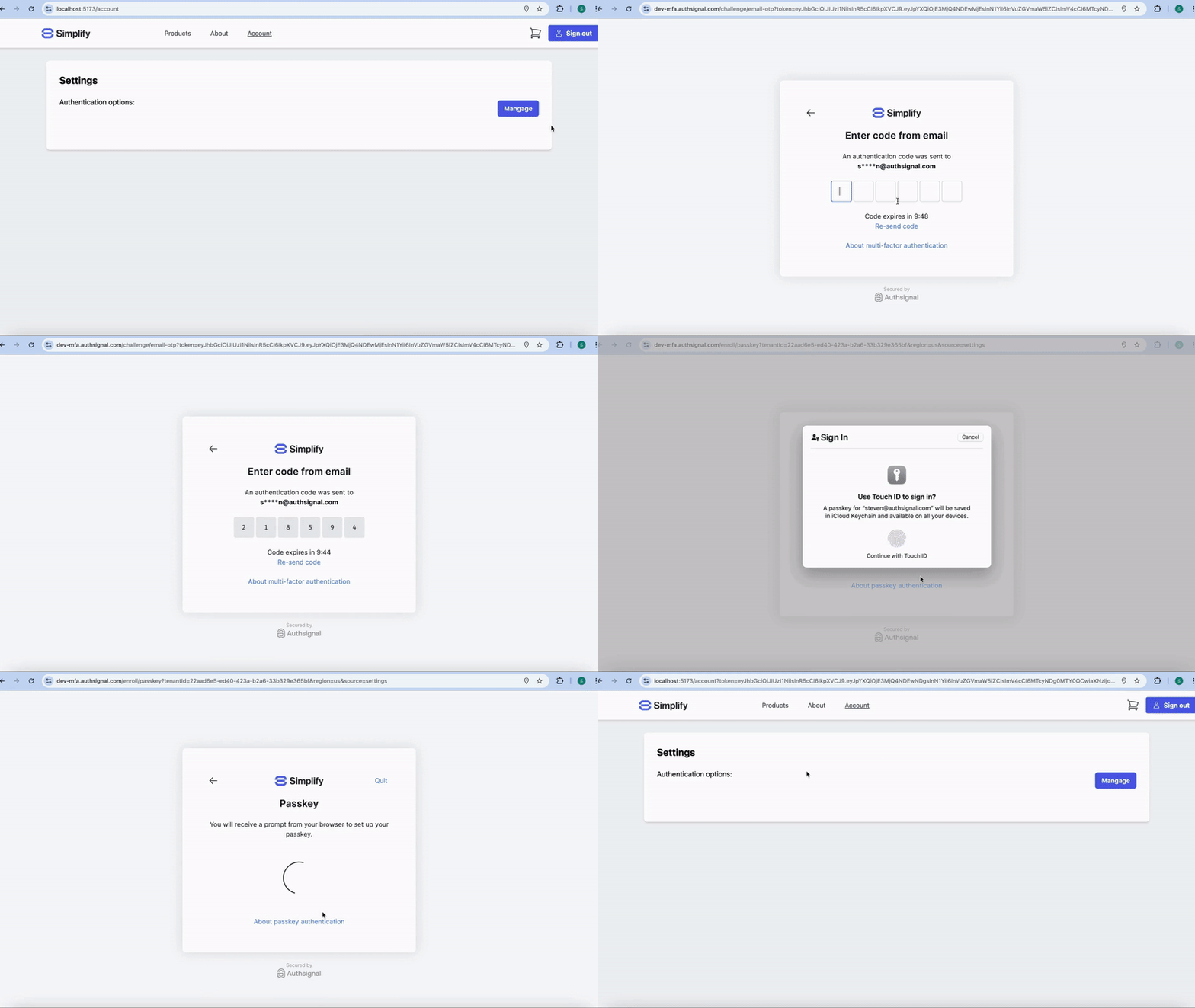
When using the pre-built UI, strong binding between authenticators is handled automatically.
This is because the pre-built UI requires the user to complete a challenge with an existing authentication method in order to add a new method within a limited time window (10 minutes by default).
 ### Skipping the prerequisite challenge
It is possible to skip this prerequisite challenge step when launching the pre-built UI if you have already strongly authenticated the user outside of Authsignal.
This can be achieved by passing **additional scopes** when tracking an action on your server to generate a short-lived pre-built UI URL.
```ts Node.js {7} theme={null}
const request = {
userId: "dc58c6dc-a1fd-4a4f-8e2f-846636dd4833",
action: "enroll",
attributes: {
redirectUrl: "https://yourapp.com/callback",
redirectToSettings: true,
scope: "add:authenticators update:authenticators remove:authenticators",
},
};
const response = await authsignal.track(request);
const url = response.url;
```
```csharp C# {7} theme={null}
var request = new TrackRequest(
UserId: "dc58c6dc-a1fd-4a4f-8e2f-846636dd4833",
Action: "enroll",
Attributes: new TrackAttributes(
RedirectUrl: "https://yourapp.com/callback",
RedirectToSettings: true,
Scope: "add:authenticators update:authenticators remove:authenticators"
)
);
var response = await authsignal.Track(request);
var url = response.Url;
```
```java Java {7} theme={null}
TrackRequest request = new TrackRequest();
request.userId = "dc58c6dc-a1fd-4a4f-8e2f-846636dd4833";
request.action = "enroll";
request.attributes = new TrackAttributes();
request.attributes.redirectUrl = https://yourapp.com/callback";
request.attributes.redirectToSettings = true;
request.attributes.scope = "add:authenticators update:authenticators remove:authenticators";
TrackResponse response = authsignal.track(request).get();
String url = response.url;
```
```ruby Ruby {7} theme={null}
response = Authsignal.track({
user_id: "dc58c6dc-a1fd-4a4f-8e2f-846636dd4833"
action: "enroll",
attributes: {
redirect_url: "https://yourapp.com/callback",
redirect_to_settings: true,
scope: "add:authenticators update:authenticators remove:authenticators"
}
})
url = response[:url]
```
```python Python {7} theme={null}
response = authsignal.track(
user_id="dc58c6dc-a1fd-4a4f-8e2f-846636dd4833",
action="enroll",
attributes={
"redirectUrl": "https://yourapp.com/callback",
"redirect_to_settings": true,
"scope": "add:authenticators update:authenticators remove:authenticators"
}
)
url = response["url"]
```
```php PHP {7} theme={null}
$response = Authsignal::track([
'userId' => "dc58c6dc-a1fd-4a4f-8e2f-846636dd4833",
'action' => "enroll",
'attributes' => [
'redirectUrl' => "https://yourapp.com/callback",
'redirectToSettings' => true,
'scope' => "add:authenticators update:authenticators remove:authenticators"
]
]);
$url = $response["url"];
```
```go Go {8} theme={null}
response, err := client.Track(
TrackRequest{
UserId: "dc58c6dc-a1fd-4a4f-8e2f-846636dd4833",
Action: "enroll",
Attributes: &TrackAttributes{
RedirectUrl: "https://yourapp.com/callback",
RedirectToSettings: true,
Scope: "add:authenticators update:authenticators remove:authenticators",
},
},
)
url := response.Url
```
With these additional scopes, the pre-built UI will assume that **the user has already been strongly authenticated by another method** and allow them to enroll, update or remove authenticators without first requiring a challenge to be completed.
This bypass should only been used **when the user has been strongly authenticated by at least one of their existing authentication methods**.
## Using Client SDKs
To ensure a strong binding between authenticators, our [Web SDK](/sdks/client/web/setup) and [Mobile SDK](/sdks/client/mobile/setup) support two different ways of adding new authentication methods.
### Presenting a challenge with an existing method
Similar to the pre-built UI, with this option you can present a challenge with an existing method (e.g. passkey) in order to enroll a user in a new method (e.g. authenticator app) within a limited time window (10 minutes by default).
```ts Web theme={null}
const response = await authsignal.passkey.signIn({ action: "signInWithPasskey" });
if (response.data?.isVerified) {
const totpResponse = await authsignal.totp.enroll();
const totpUri = totpResponse.data.uri;
}
```
```swift iOS theme={null}
let response = await authsignal.passkey.signIn(action: "addAuthenticator")
if let isVerified = response.data?.isVerified, isVerified {
let totpResponse = await authsignal.totp.enroll()
let totpUri = totpResponse.data.uri
}
```
```kotlin Android theme={null}
val response = authsignal.passkey.signIn(action = "addAuthenticator")
if (response.data != null && response.data.isVerified) {
val totpResponse = authsignal.totp.enroll()
val totpUri = totpResponse.data.uri
}
```
```ts React Native theme={null}
const response = await authsignal.passkey.signIn({ action: "addAuthenticator" });
if (response.data?.isVerified) {
const totpResponse = await authsignal.totp.enroll();
const totpUri = totpResponse.data.uri;
}
```
```dart Flutter theme={null}
final response = await authsignal.passkey.signIn(action: "addAuthenticator");
if (response.data != null && response.data.isVerified) {
final totpResponse = await authsignal.totp.enroll();
final totpUri = totpResponse.data.uri;
}
```
### Tracking an action to generate a token
You can track an action using a [Server SDK](/sdks/server) to generate a time-limited token (valid for 10 minutes by default).
This token can be used to authorize adding the new authenticator.
If this is not the user's first authenticator, you **must** specify the scope `add:authenticators` when generating the token.
You should only ever generate a token with the `add:authenticators` scope from a context where the user
is **strongly authenticated**.
The example below demonstrates how a user ID is obtained from an authenticated request context and passed into the track request when using AWS Lambda and API Gateway.
```ts Node.js theme={null}
export const handler = async (event) => {
// Get the user from the JWT authorizer
// This ensures that the token is generated for an authenticated user
const userId = event.requestContext.authorizer.jwt.claims.sub as string;
const { token } = await authsignal.track({
userId,
action: "enrollAuthenticator",
attributes: {
scope: "add:authenticators",
},
});
return {
token,
};
};
```
Then pass the token from your backend to the Client SDK.
You can pass the token directly to the relevant method when [creating a passkey](/sdks/client/mobile/passkeys#creating-a-passkey) or [adding a push credential](/sdks/client/mobile/push-verification#adding-a-credential) or else you can use the `setToken` method.
```ts Web theme={null}
await authsignal.setToken("eyJhbGciOiJ...");
const totpResponse = await authsignal.totp.enroll();
const totpUri = totpResponse.data.uri;
```
```swift iOS theme={null}
authsignal.setToken("eyJhbGciOiJ...")
let totpResponse = await authsignal.totp.enroll()
let totpUri = totpResponse.data.uri
```
```kotlin Android theme={null}
authsignal.setToken("eyJhbGciOiJ...")
val totpResponse = authsignal.totp.enroll()
val totpUri = totpResponse.data.uri
```
```ts React Native theme={null}
await authsignal.setToken("eyJhbGciOiJ...");
const totpResponse = await authsignal.totp.enroll();
const totpUri = totpResponse.data.uri;
```
```dart Flutter theme={null}
await authsignal.setToken("eyJhbGciOiJ...");
final totpResponse = await authsignal.totp.enroll();
final totpUri = totpResponse.data.uri;
```
### Skipping the prerequisite challenge
It is possible to skip this prerequisite challenge step when launching the pre-built UI if you have already strongly authenticated the user outside of Authsignal.
This can be achieved by passing **additional scopes** when tracking an action on your server to generate a short-lived pre-built UI URL.
```ts Node.js {7} theme={null}
const request = {
userId: "dc58c6dc-a1fd-4a4f-8e2f-846636dd4833",
action: "enroll",
attributes: {
redirectUrl: "https://yourapp.com/callback",
redirectToSettings: true,
scope: "add:authenticators update:authenticators remove:authenticators",
},
};
const response = await authsignal.track(request);
const url = response.url;
```
```csharp C# {7} theme={null}
var request = new TrackRequest(
UserId: "dc58c6dc-a1fd-4a4f-8e2f-846636dd4833",
Action: "enroll",
Attributes: new TrackAttributes(
RedirectUrl: "https://yourapp.com/callback",
RedirectToSettings: true,
Scope: "add:authenticators update:authenticators remove:authenticators"
)
);
var response = await authsignal.Track(request);
var url = response.Url;
```
```java Java {7} theme={null}
TrackRequest request = new TrackRequest();
request.userId = "dc58c6dc-a1fd-4a4f-8e2f-846636dd4833";
request.action = "enroll";
request.attributes = new TrackAttributes();
request.attributes.redirectUrl = https://yourapp.com/callback";
request.attributes.redirectToSettings = true;
request.attributes.scope = "add:authenticators update:authenticators remove:authenticators";
TrackResponse response = authsignal.track(request).get();
String url = response.url;
```
```ruby Ruby {7} theme={null}
response = Authsignal.track({
user_id: "dc58c6dc-a1fd-4a4f-8e2f-846636dd4833"
action: "enroll",
attributes: {
redirect_url: "https://yourapp.com/callback",
redirect_to_settings: true,
scope: "add:authenticators update:authenticators remove:authenticators"
}
})
url = response[:url]
```
```python Python {7} theme={null}
response = authsignal.track(
user_id="dc58c6dc-a1fd-4a4f-8e2f-846636dd4833",
action="enroll",
attributes={
"redirectUrl": "https://yourapp.com/callback",
"redirect_to_settings": true,
"scope": "add:authenticators update:authenticators remove:authenticators"
}
)
url = response["url"]
```
```php PHP {7} theme={null}
$response = Authsignal::track([
'userId' => "dc58c6dc-a1fd-4a4f-8e2f-846636dd4833",
'action' => "enroll",
'attributes' => [
'redirectUrl' => "https://yourapp.com/callback",
'redirectToSettings' => true,
'scope' => "add:authenticators update:authenticators remove:authenticators"
]
]);
$url = $response["url"];
```
```go Go {8} theme={null}
response, err := client.Track(
TrackRequest{
UserId: "dc58c6dc-a1fd-4a4f-8e2f-846636dd4833",
Action: "enroll",
Attributes: &TrackAttributes{
RedirectUrl: "https://yourapp.com/callback",
RedirectToSettings: true,
Scope: "add:authenticators update:authenticators remove:authenticators",
},
},
)
url := response.Url
```
With these additional scopes, the pre-built UI will assume that **the user has already been strongly authenticated by another method** and allow them to enroll, update or remove authenticators without first requiring a challenge to be completed.
This bypass should only been used **when the user has been strongly authenticated by at least one of their existing authentication methods**.
## Using Client SDKs
To ensure a strong binding between authenticators, our [Web SDK](/sdks/client/web/setup) and [Mobile SDK](/sdks/client/mobile/setup) support two different ways of adding new authentication methods.
### Presenting a challenge with an existing method
Similar to the pre-built UI, with this option you can present a challenge with an existing method (e.g. passkey) in order to enroll a user in a new method (e.g. authenticator app) within a limited time window (10 minutes by default).
```ts Web theme={null}
const response = await authsignal.passkey.signIn({ action: "signInWithPasskey" });
if (response.data?.isVerified) {
const totpResponse = await authsignal.totp.enroll();
const totpUri = totpResponse.data.uri;
}
```
```swift iOS theme={null}
let response = await authsignal.passkey.signIn(action: "addAuthenticator")
if let isVerified = response.data?.isVerified, isVerified {
let totpResponse = await authsignal.totp.enroll()
let totpUri = totpResponse.data.uri
}
```
```kotlin Android theme={null}
val response = authsignal.passkey.signIn(action = "addAuthenticator")
if (response.data != null && response.data.isVerified) {
val totpResponse = authsignal.totp.enroll()
val totpUri = totpResponse.data.uri
}
```
```ts React Native theme={null}
const response = await authsignal.passkey.signIn({ action: "addAuthenticator" });
if (response.data?.isVerified) {
const totpResponse = await authsignal.totp.enroll();
const totpUri = totpResponse.data.uri;
}
```
```dart Flutter theme={null}
final response = await authsignal.passkey.signIn(action: "addAuthenticator");
if (response.data != null && response.data.isVerified) {
final totpResponse = await authsignal.totp.enroll();
final totpUri = totpResponse.data.uri;
}
```
### Tracking an action to generate a token
You can track an action using a [Server SDK](/sdks/server) to generate a time-limited token (valid for 10 minutes by default).
This token can be used to authorize adding the new authenticator.
If this is not the user's first authenticator, you **must** specify the scope `add:authenticators` when generating the token.
You should only ever generate a token with the `add:authenticators` scope from a context where the user
is **strongly authenticated**.
The example below demonstrates how a user ID is obtained from an authenticated request context and passed into the track request when using AWS Lambda and API Gateway.
```ts Node.js theme={null}
export const handler = async (event) => {
// Get the user from the JWT authorizer
// This ensures that the token is generated for an authenticated user
const userId = event.requestContext.authorizer.jwt.claims.sub as string;
const { token } = await authsignal.track({
userId,
action: "enrollAuthenticator",
attributes: {
scope: "add:authenticators",
},
});
return {
token,
};
};
```
Then pass the token from your backend to the Client SDK.
You can pass the token directly to the relevant method when [creating a passkey](/sdks/client/mobile/passkeys#creating-a-passkey) or [adding a push credential](/sdks/client/mobile/push-verification#adding-a-credential) or else you can use the `setToken` method.
```ts Web theme={null}
await authsignal.setToken("eyJhbGciOiJ...");
const totpResponse = await authsignal.totp.enroll();
const totpUri = totpResponse.data.uri;
```
```swift iOS theme={null}
authsignal.setToken("eyJhbGciOiJ...")
let totpResponse = await authsignal.totp.enroll()
let totpUri = totpResponse.data.uri
```
```kotlin Android theme={null}
authsignal.setToken("eyJhbGciOiJ...")
val totpResponse = authsignal.totp.enroll()
val totpUri = totpResponse.data.uri
```
```ts React Native theme={null}
await authsignal.setToken("eyJhbGciOiJ...");
const totpResponse = await authsignal.totp.enroll();
const totpUri = totpResponse.data.uri;
```
```dart Flutter theme={null}
await authsignal.setToken("eyJhbGciOiJ...");
final totpResponse = await authsignal.totp.enroll();
final totpUri = totpResponse.data.uri;
```