> ## Documentation Index
> Fetch the complete documentation index at: https://docs.authsignal.com/llms.txt
> Use this file to discover all available pages before exploring further.
# Adaptive MFA
> Learn how to use rules to create adaptive, risk-based authentication that challenges users only when necessary.
Adaptive MFA uses rules to intelligently determine when to challenge users based on risk factors and context. Instead of challenging every user every time, you can create policies that balance security with user experience.
For a recorded walk-through and Postman companion steps, see the [Adaptive MFA video walk-through](/knowledge-base/video-walkthroughs/adaptive-mfa).
## How adaptive MFA works
Rules evaluate contextual information about each action to determine the appropriate response:
```mermaid theme={null}
sequenceDiagram
participant F as Your frontend
participant B as Your backend
participant A as Authsignal
B->>A: Track action with context
Note over A: Rules engine evaluates:
• Device information
• Location data
• User behavior
• Custom data
A->>B: Decision: ALLOW, CHALLENGE, or BLOCK
alt Challenge Required
B->>F: Pre-built UI URL
Note left of F: Present challenge
F->>B: Check result
B->>A: Validate challenge
A->>B: Challenge result
else Allow
Note over B: Proceed without challenge
else Block
Note over B: Deny access
end
```
## Common adaptive MFA scenarios
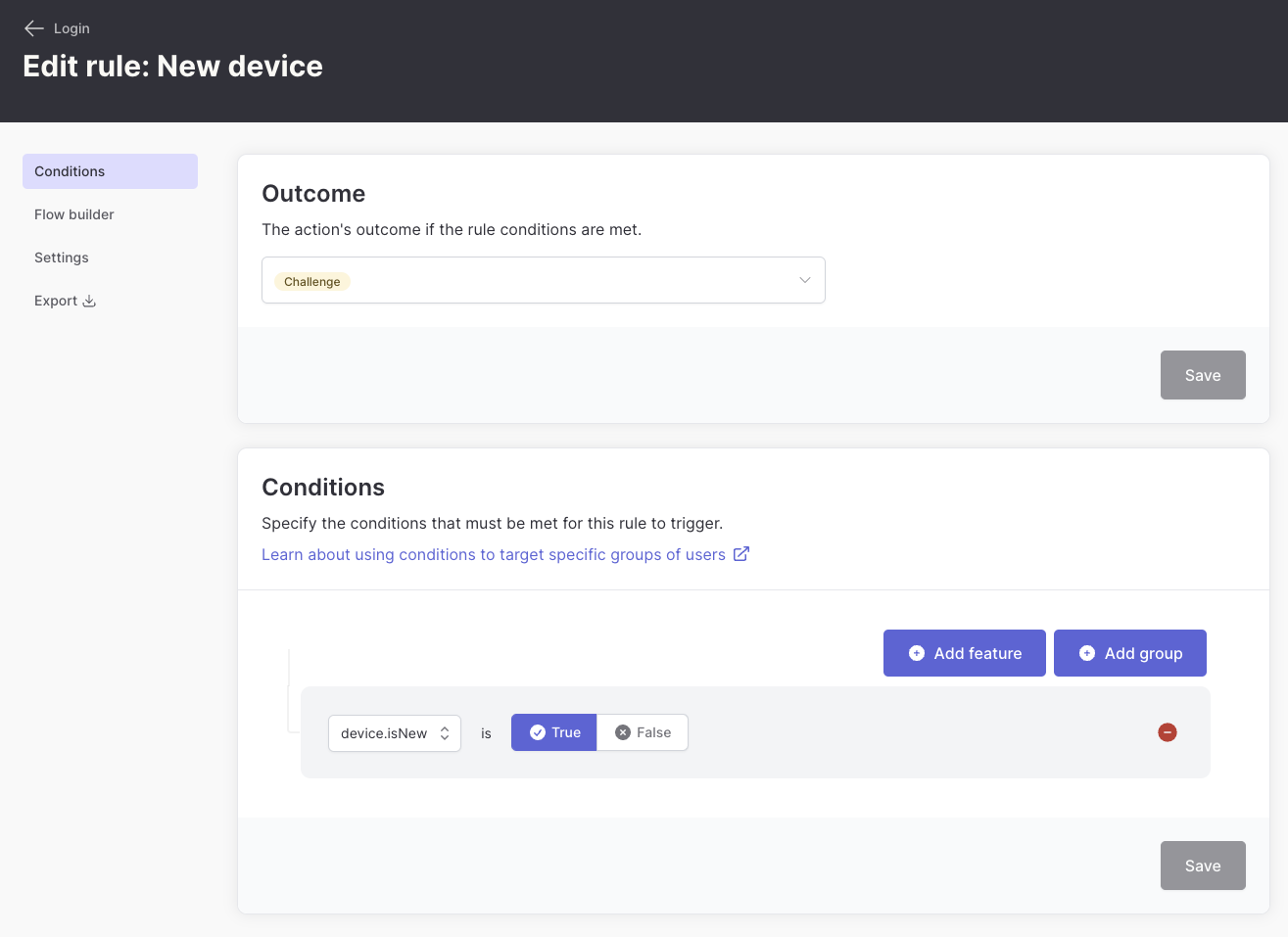
### New device detection
Challenge users only when they're signing in from an unrecognized device:
 **Implementation:**
```javascript theme={null}
const result = await authsignal.track({
userId: "0272c312-e181-4cad-a494-43647b503a0a",
action: "signIn",
attributes: {
deviceId: "555c17e1-3837-4f13-81bb-131e5597e168", // Required for device tracking
userAgent: req.headers['user-agent'],
ipAddress: "203.0.113.42"
}
});
```
### Location-based policies
Apply different authentication requirements based on user location:
* **Known locations**: Allow without challenge
* **New countries**: Require MFA
* **High-risk regions**: Block or require strong authentication
**Implementation:**
```javascript theme={null}
const result = await authsignal.track({
userId: "0272c312-e181-4cad-a494-43647b503a0a",
action: "signIn",
attributes: {
deviceId: "555c17e1-3837-4f13-81bb-131e5597e168", // Required for device tracking
userAgent: req.headers['user-agent'],
ipAddress: "203.0.113.42"
}
});
```
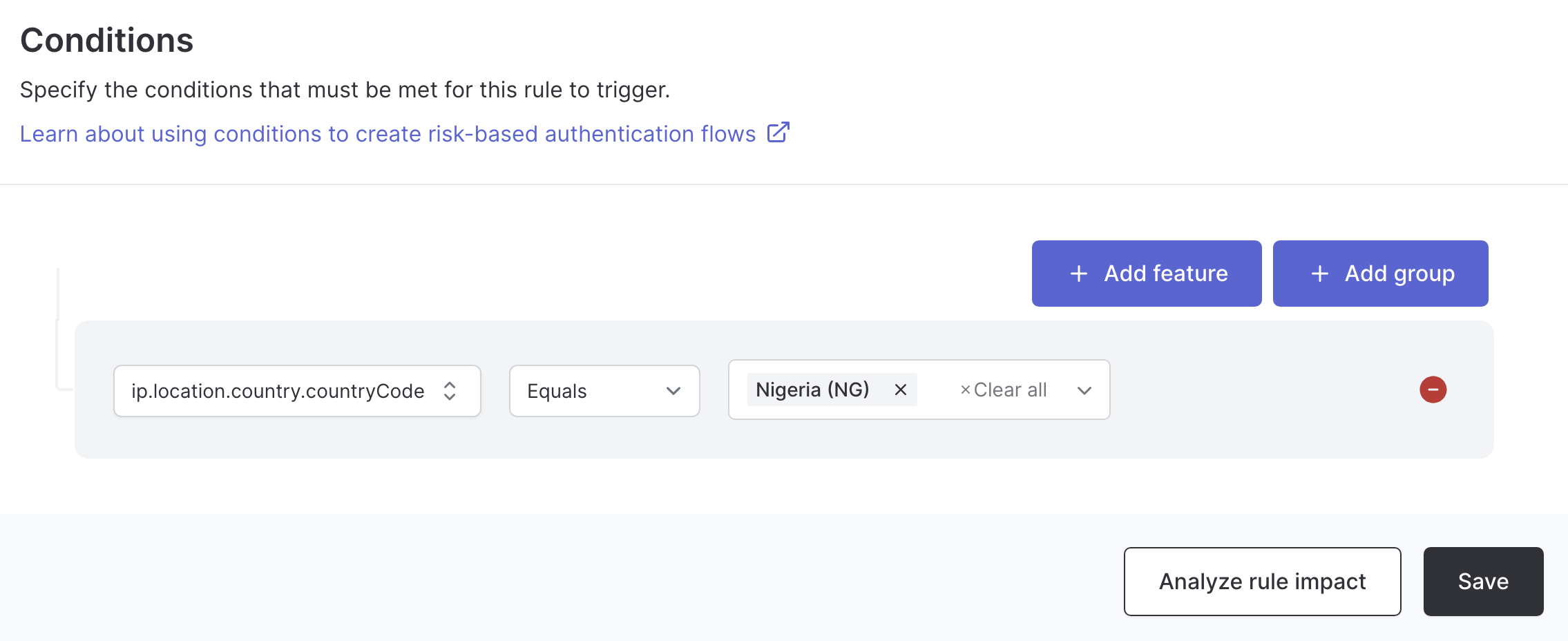
### Location-based policies
Apply different authentication requirements based on user location:
* **Known locations**: Allow without challenge
* **New countries**: Require MFA
* **High-risk regions**: Block or require strong authentication
 **Implementation:**
```javascript theme={null}
const result = await authsignal.track({
userId: "0272c312-e181-4cad-a494-43647b503a0a",
action: "signIn",
attributes: {
ipAddress: "192.168.1.100", // Required for location detection
userAgent: req.headers['user-agent'],
}
});
```
### Risk-based authentication
Create rules that consider multiple risk factors:
* **User behavior**: Login patterns, time of day, frequency
* **Device characteristics**: Known vs unknown devices, device type
* **Network information**: IP reputation, VPN detection
* **Transaction context**: Amount, recipient, frequency
## Business-specific adaptive MFA
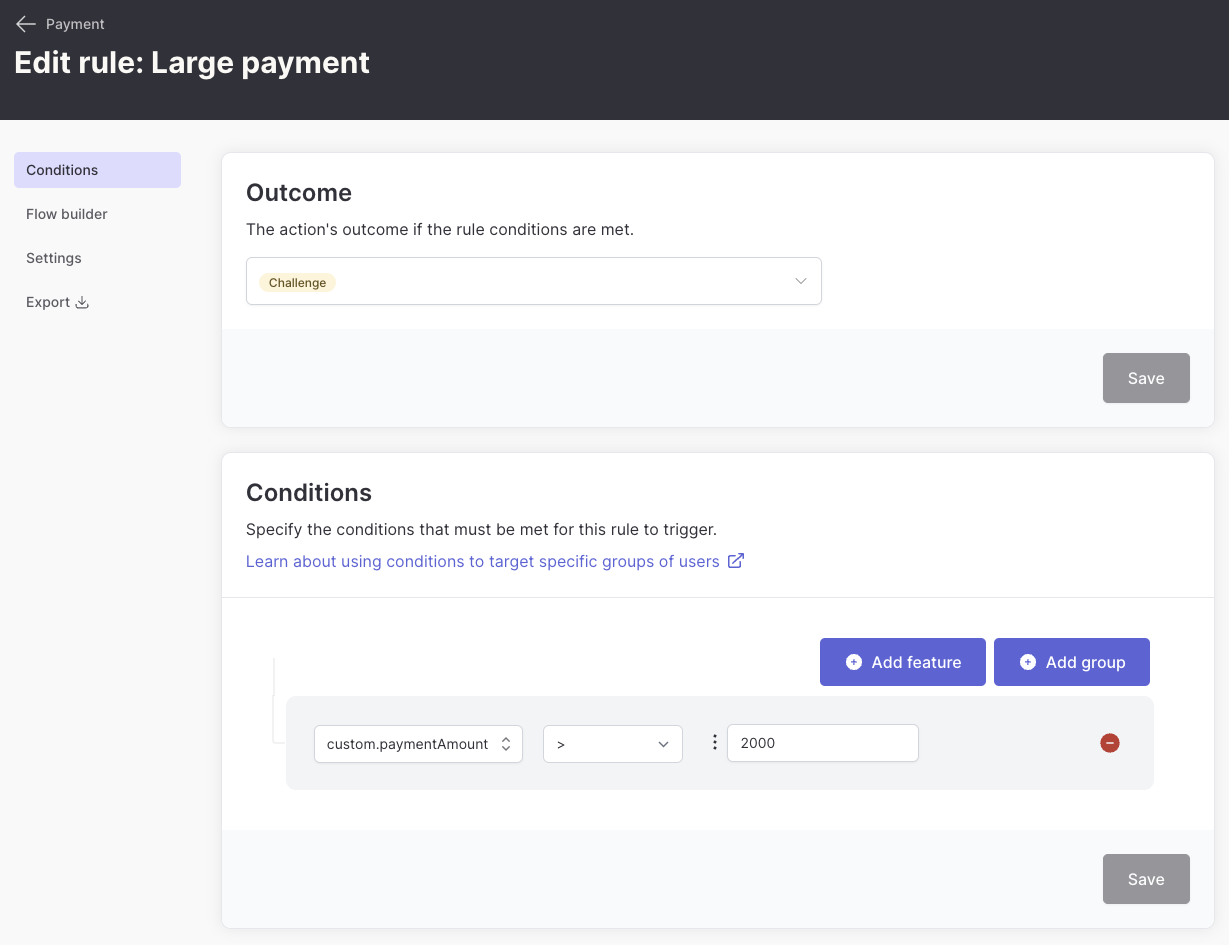
You can create rules based on your application's specific data points. For example, challenge users only for high-value transactions:
**Implementation:**
```javascript theme={null}
const result = await authsignal.track({
userId: "0272c312-e181-4cad-a494-43647b503a0a",
action: "signIn",
attributes: {
ipAddress: "192.168.1.100", // Required for location detection
userAgent: req.headers['user-agent'],
}
});
```
### Risk-based authentication
Create rules that consider multiple risk factors:
* **User behavior**: Login patterns, time of day, frequency
* **Device characteristics**: Known vs unknown devices, device type
* **Network information**: IP reputation, VPN detection
* **Transaction context**: Amount, recipient, frequency
## Business-specific adaptive MFA
You can create rules based on your application's specific data points. For example, challenge users only for high-value transactions:
 **Implementation:**
```javascript theme={null}
const result = await authsignal.track({
userId: "0272c312-e181-4cad-a494-43647b503a0a",
action: "payment",
attributes: {
redirectUrl: "https://yourapp.com/callback",
custom: {
paymentAmount: 1000,
},
},
});
const url = result.url;
```
Learn more about creating and using business-specific data in rules with [custom data points](/actions-rules/rules/custom-data-points)**.**
## Rule examples
### Device and location combination
```
Device is new AND (IP country is not United States OR VPN detected is true)
```
**Implementation:**
```javascript theme={null}
const result = await authsignal.track({
userId: "0272c312-e181-4cad-a494-43647b503a0a",
action: "payment",
attributes: {
redirectUrl: "https://yourapp.com/callback",
custom: {
paymentAmount: 1000,
},
},
});
const url = result.url;
```
Learn more about creating and using business-specific data in rules with [custom data points](/actions-rules/rules/custom-data-points)**.**
## Rule examples
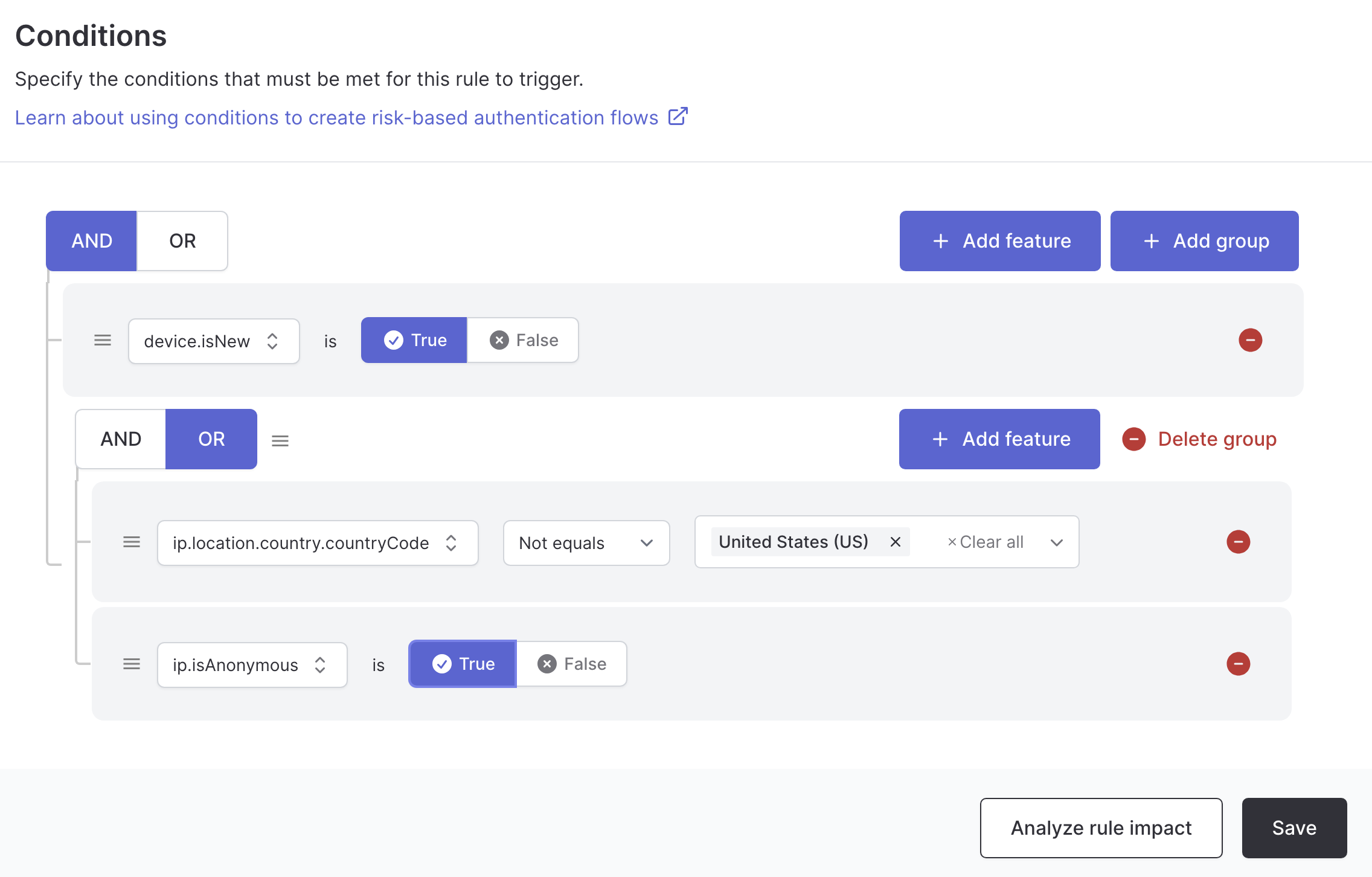
### Device and location combination
```
Device is new AND (IP country is not United States OR VPN detected is true)
```
 **Implementation:**
```javascript theme={null}
const result = await authsignal.track({
userId: "0272c312-e181-4cad-a494-43647b503a0a",
action: "signIn",
attributes: {
deviceId: "555c17e1-3837-4f13-81bb-131e5597e168", // Required for device tracking
ipAddress: "198.51.100.25", // Required for location and VPN detection
userAgent: req.headers['user-agent']
}
});
```
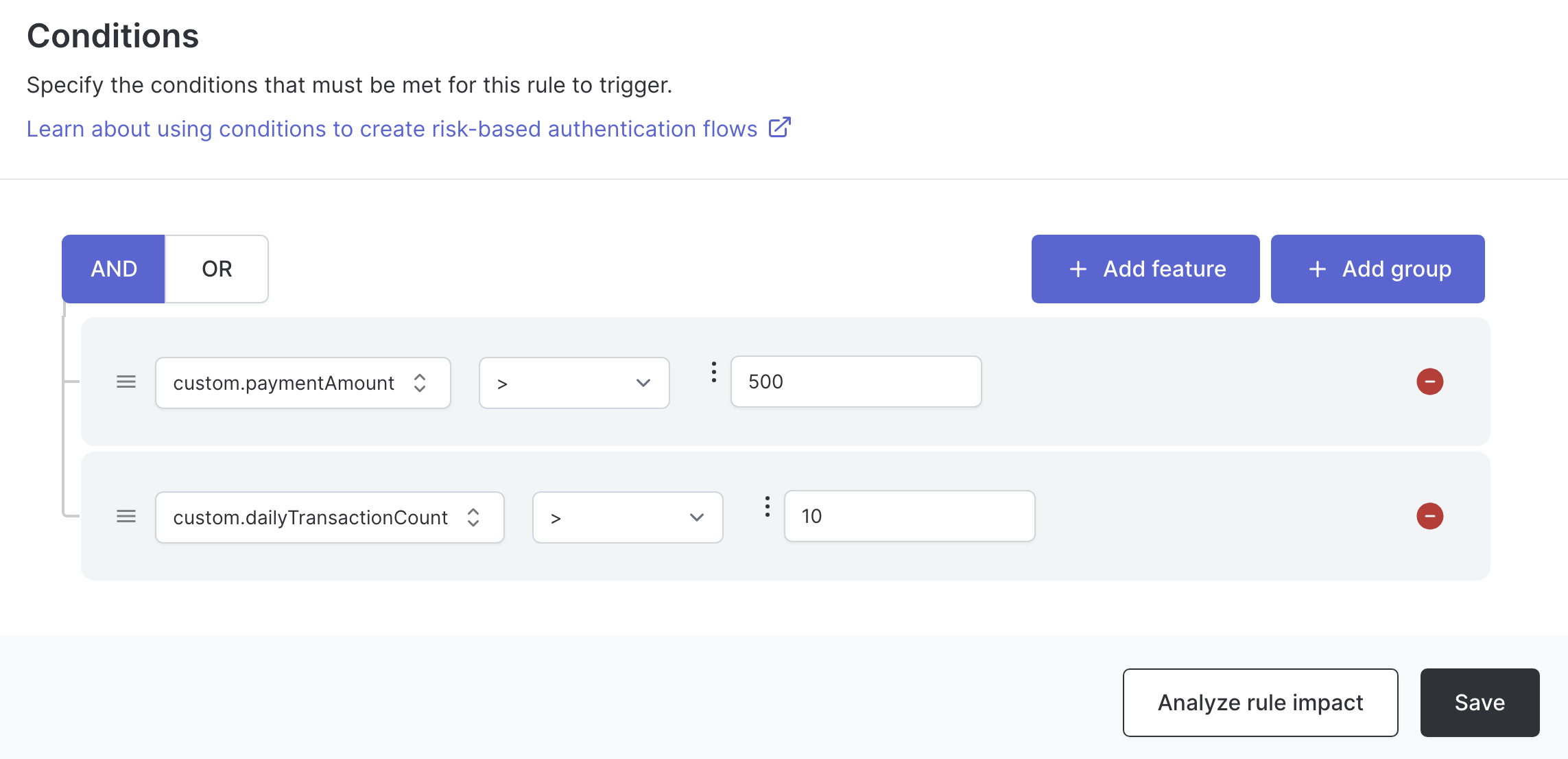
### Transaction pattern analysis using custom data points
```
Payment amount is greater than 500 AND
(daily transaction count is greater than 10)
```
**Implementation:**
```javascript theme={null}
const result = await authsignal.track({
userId: "0272c312-e181-4cad-a494-43647b503a0a",
action: "signIn",
attributes: {
deviceId: "555c17e1-3837-4f13-81bb-131e5597e168", // Required for device tracking
ipAddress: "198.51.100.25", // Required for location and VPN detection
userAgent: req.headers['user-agent']
}
});
```
### Transaction pattern analysis using custom data points
```
Payment amount is greater than 500 AND
(daily transaction count is greater than 10)
```
 **Implementation:**
```javascript theme={null}
const result = await authsignal.track({
userId: "0272c312-e181-4cad-a494-43647b503a0a",
action: "payment",
attributes: {
custom: {
paymentAmount: transactionAmount,
dailyTransactionCount: userDailyCount
},
deviceId: "555c17e1-3837-4f13-81bb-131e5597e168",
ipAddress: "203.0.113.89"
}
});
```
**Implementation:**
```javascript theme={null}
const result = await authsignal.track({
userId: "0272c312-e181-4cad-a494-43647b503a0a",
action: "payment",
attributes: {
custom: {
paymentAmount: transactionAmount,
dailyTransactionCount: userDailyCount
},
deviceId: "555c17e1-3837-4f13-81bb-131e5597e168",
ipAddress: "203.0.113.89"
}
});
```